Surfaces
Open sheets with no inside: how to make one (an open curve swept along a path, a loft through paths), and what to do with it: split a solid along a curved cut, thicken it into a shell, sew several into a closed solid, push the pieces apart. Typical workflows, the limits, and the errors.
What a surface is
A Surface is a sheet, as thin as paper and with no thickness at all: faces with an edge left open, so it has no inside. A solid is closed all round and has an inside that can be printed; a surface does not. It is a tool, never a part. You use it in one of four ways:
| You want | Use |
|---|---|
| to cut a solid along a curve instead of a plane | body.split(surface) |
| a thin curved shell, a panel, a gutter | surface.thicken(2.mm) |
| a closed solid whose sides you made one by one | sew([sides…]) |
| the space between surfaces, solids and planes, filled | enclosed([…], at: point) |
| the pieces of a cut apart, an exploded view (the pieces drawn a little apart, to show how they fit) | pieces.push(from: surface, by: 3.mm) |
If a flat cut will do, cut with a plane: body.split(plane) is simpler (see the guide on planes). If the shape is a closed solid you can sweep, loft, extrude or revolve, make it that way (see the guide on sweeps): surfaces are for what those cannot do.
Making one
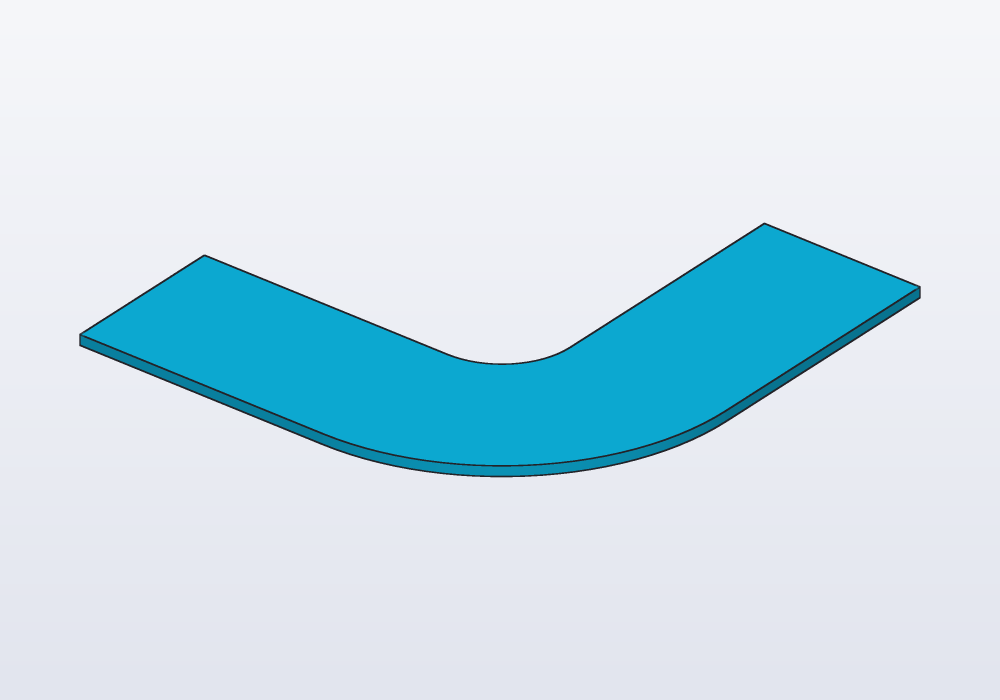
Sweep an open curve. A Path is a curve; a sweep moves a shape along a route. A Path swept along another path gives a surface, the same way a profile swept gives a solid: the curve is drawn on XY around the origin and placed across the route, its +Y towards world +Z, its x to the right seen from further along the route looking back (a route along +X takes x to +Y, one along +Y takes x to -X). up:, guide:, twist: and frenet: work as for a profile.
// a ribbon 16 mm wide along a bent route, made 1 mm thick

immutable route = path([vec(0, 0, 0), vec(40, 0, 0),
    vec(40, 40, 0)], bend: 15.mm);

@part("Sky Pop")
Solid strap() => path([vec(-8.mm, 0), vec(8.mm, 0)])
    .sweep(route)
    .thicken(1.mm);
Loft through paths. A loft stretches a skin across several curves or outlines placed one after the other. loft([path1, path2, …]) through paths instead of profiles gives the smooth sheet through them, in order; ruled: true joins them with flat strips. Every element must be a path: a profile among them is an error. Two closed paths give a tube open at both ends.
The curve can come from anywhere a path comes from: path, spline, helix, a sketch's s.path, a solid's edges body.path(…), two views path(top, front) (all in the guide on sweeps).
Splitting a solid along a surface
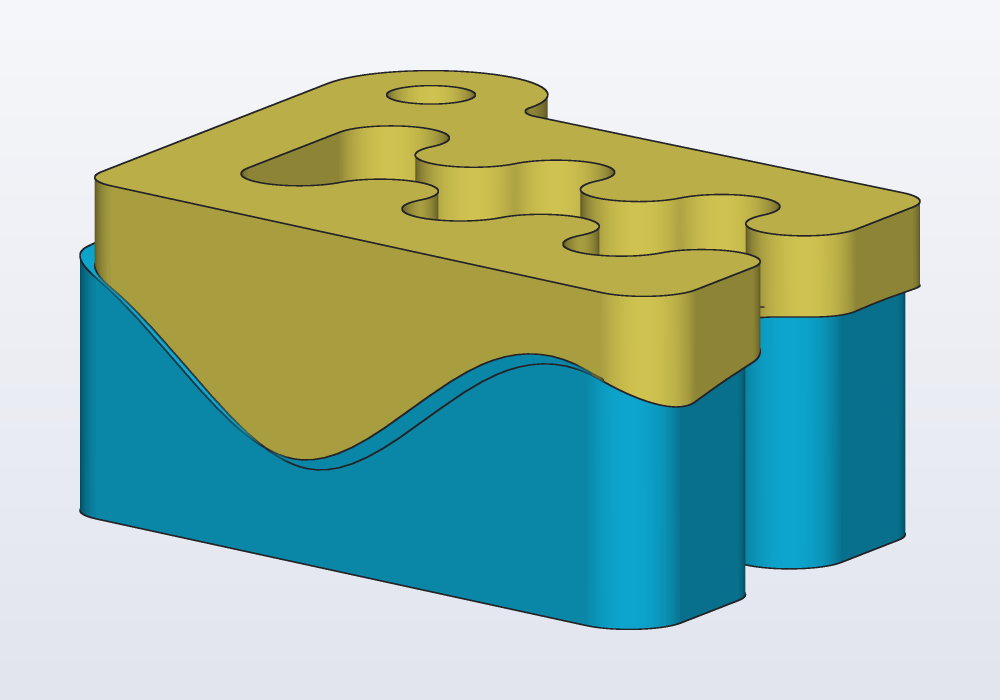
body.split(surface) gives the pieces the surface cuts the solid into, sorted as split(plane) sorts them (along X, then Y, then Z), so .bottom, .top, .largest, [0] pick one, and @parts makes a part of each. The surface must reach across the solid, past its edges on every side. push(from: surface, by:) moves each piece away from the surface, across it where it is nearest: an exploded view, or two halves laid apart to print.
A wavy cut through Carlo: a curve drawn across X, swept along Y at mid-height:
import std;

// the wave runs along -Y, so the curve's x lands on +X;
// it reaches past Carlo on every side
Surface wave() => spline([vec(-12, 0), vec(0, 3),
        vec(12, -3), vec(24, 3), vec(36, 0)])
    .sweep(path([vec(0, 20, 7.5), vec(0, -15, 7.5)]));

@parts(varied: true)
Solid[] halves() => carlo()
    .split(wave())
    .push(from: wave(), by: 4.mm);
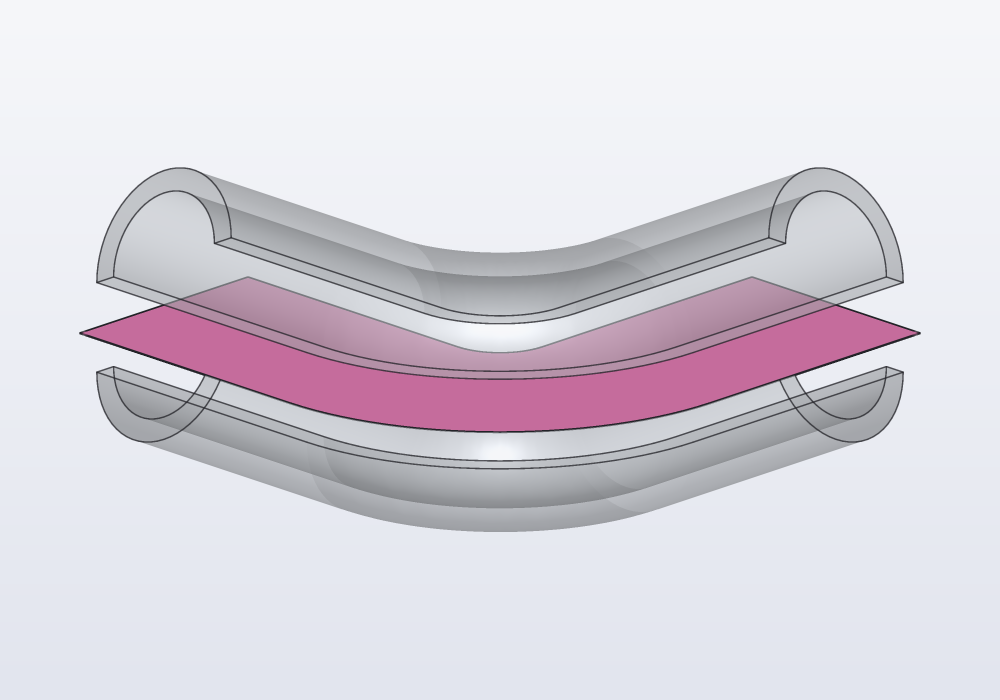
A bent tube cut lengthwise is the same idea with the route reused: a straight line across the tube's profile, as wide as the tube, swept along the tube's own path, runs through its middle all the way. The two halves print flat, each on its cut face:
// a bent tube cut lengthwise into two halves

immutable route = path([vec(0, 0, 0), vec(40, 0, 0),
    vec(40, 40, 0)], bend: 15.mm);

Solid tube() => (circle(d: 16.mm) - circle(d: 12.mm))
    .sweep(route);

// a line across the profile, wider than the tube,
// swept along the same route: it runs through the middle
Surface ribbon() => path([vec(-10, 0), vec(10, 0)])
    .sweep(route);

// (grey and see-through here, so that the ribbon shows)
@parts("Gray Pop", alpha: 0.35)
Solid[] halves() => tube()
    .split(ribbon())
    .push(from: ribbon(), by: 4.mm);

// the ribbon itself, shown between the halves: a sheet has
// no thickness to draw, so a hair-thin solid made from it
@part("Pink Pop", export: false)
Solid sheet() => ribbon().thicken(0.05.mm);
Thickening
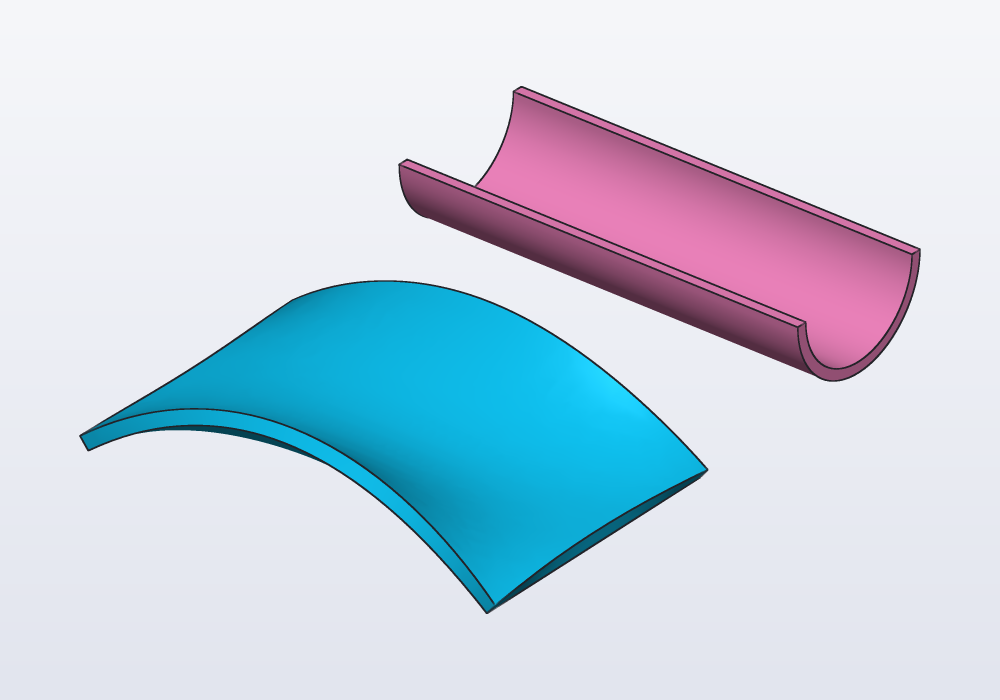
surface.thicken(t) makes a solid t thick from the sheet, on the side its normals point (a face's normal is the direction it looks towards, straight out of it); a negative t goes the other side. Which side that is depends on the direction of the curves, so check it: look at the picture, or at the solid's bbox, and change the sign if it went the wrong way.
// two sheets made solid: a saddle lofted through three
// curves, and a half circle swept along a line

Path edge(Length y, Length rise) => spline([
    vec(0, y, 0), vec(30, y, rise), vec(60, y, 0)]);

@part("Sky Pop")
Solid saddle() => loft([edge(0.mm, 12.mm),
        edge(20.mm, 2.mm), edge(40.mm, 12.mm)])
    .thicken(2.mm);

// the lower half of a circle, drawn in a sketch
// (an arc goes counter-clockwise, start to end)
Path halfCircle()
{
    auto s = sketch();
    auto c = s.point(0, 0, fixed: true);
    s.arc(c, s.point(-10, 0, fixed: true),
        s.point(10, 0, fixed: true));
    return s.path;
}

@part("Pink Pop")
Solid gutter() => halfCircle()
    .sweep(path([vec(0, 0, 0), vec(60, 0, 0)]))
    .thicken(1.5.mm)
    .move(y: 70.mm, z: 12.mm);
A thickened sheet is an ordinary solid: fillet it, cut holes in it, add it to other parts.
Sewing
sew([…]) joins surfaces that close round a space into one solid, as the panels of a ball sewn together. Flat ends can be given as profiles placed where they go (rect(…), circle(…).move(z: …)). The pieces must meet edge to edge all round; where they leave a gap the error says how many edges stay open.
Often the same solid is easier to make by splitting: a box cut by its top surface. Both are below, with the same volume:
// one wavy-topped block made twice: sewn from its six
// sides, and cut from a box by the top surface

Path wave(Length y) => spline([vec(0, y, 10),
    vec(20, y, 16), vec(40, y, 8), vec(60, y, 12)]);

Path floor(Length y) =>
    path([vec(0, y, 0), vec(60, y, 0)]);

Path post(Length x, Length y, Length h) =>
    path([vec(x, y, 0), vec(x, y, h)]);

Surface top() => loft([wave(0.mm), wave(40.mm)]);

@part("Sky Pop")
Solid sewn() => sew([
    top(),
    loft([floor(0.mm), wave(0.mm)]),
    loft([floor(40.mm), wave(40.mm)]),
    loft([post(0.mm, 0.mm, 10.mm),
        post(0.mm, 40.mm, 10.mm)]),
    loft([post(60.mm, 0.mm, 12.mm),
        post(60.mm, 40.mm, 12.mm)]),
    rect(vec(0, 0), w: 60.mm, h: 40.mm)]);

@part("Pink Pop")
Solid cut() => box(60.mm, 40.mm, 20.mm)
    .move(x: 30.mm, y: 20.mm)
    .split(top())
    .bottom
    .move(x: 80.mm);
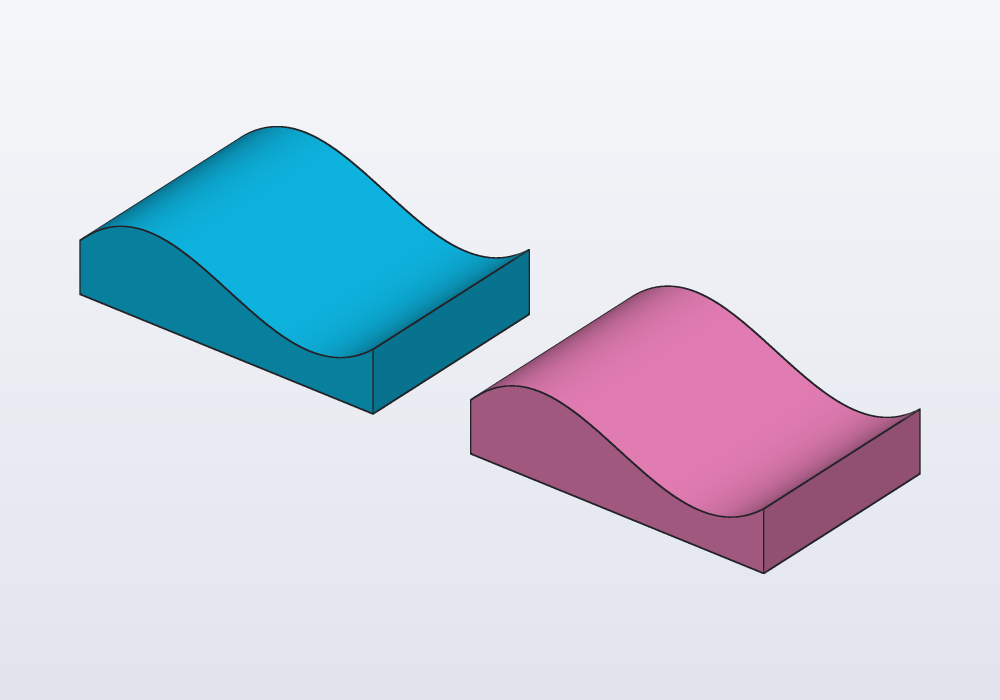
Sew when you have every side anyway (they were lofted between curves you were given); split when one surface is the only special thing about the shape.
The space between
enclosed([…]) fills the space that surfaces, solids and planes close off between them, as water poured into a mould fills what the walls leave. Each region walled in on every side becomes a solid. Give at: a point to take the one holding it, or a list of points to take several, joined; without at: you get all of them, sorted as pieces, to pick from. Planes count as walls as large as needed.
Below, a tube is cut by the floor plane and by a wavy sheet. The part between them is one volume, and its wavy top is the sheet's shape:
// a tube between a floor and a wavy sheet: the space
// they close off, filled; the lowest piece beside it

immutable tube = cylinder(d: 30.mm, h: 40.mm);

immutable wave = spline([vec(-25.mm, 0.mm),
        vec(-10.mm, 4.mm), vec(5.mm, -4.mm),
        vec(25.mm, 3.mm)])
    .sweep(path([vec(0.mm, -25.mm, 25.mm),
        vec(0.mm, 25.mm, 25.mm)]));

immutable floor = plane(origin: vec(0.mm, 0.mm, 8.mm),
    normal: Z);

@part("Sky Pop")
Solid middle() => enclosed([tube, wave, floor],
    at: vec(0.mm, 0.mm, 15.mm));

@part("Pink Pop")
Solid bottom() => enclosed([tube, wave, floor],
        at: vec(0.mm, 0.mm, 4.mm))
    .move(x: 40.mm);
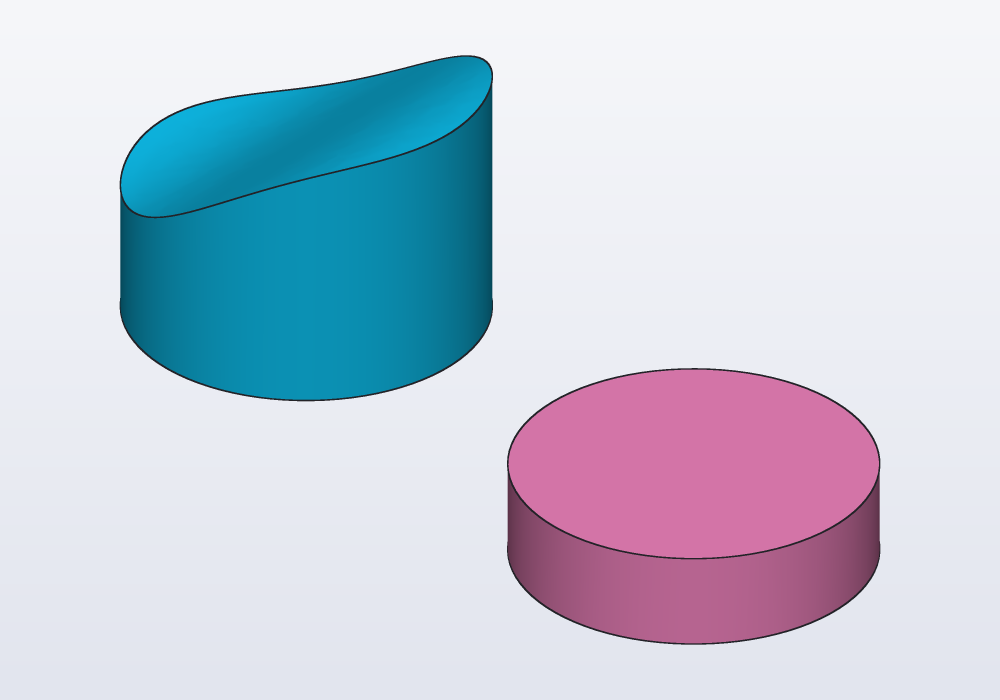
The shapes must cross one another: a sheet that stops short of the tube's wall leaves the space open on that side, and nothing is closed off there. Make the sheets generously larger than what they cut, as for a split.
Filling a loop
fill(rim) makes a smooth face that closes a loop: a closed path, which may rise and fall. through: gives points it must pass through too, to make it a dome. The result is a surface, so it is thickened, sewn or used to split like the others.
import std;

// a closed rim that rises and falls, filled with a
// smooth face, then made into a dome through a point
Path rim()
{
    Vec3[] pts;
    foreach (i; 0 .. 24)
    {
        immutable t = i * 360.deg / 24;
        pts ~= vec(20.mm * cos(t), 14.mm * sin(t),
            4.mm * sin(2 * t));
    }
    return spline(pts, closed: true);
}

@part("Sky Pop")
Solid cap() => fill(rim()).thicken(1.mm);

@part("Pink Pop")
Solid dome() => fill(rim(), through: [vec(0.mm, 0.mm, 10.mm)])
    .thicken(1.mm)
    .move(x: 50.mm);
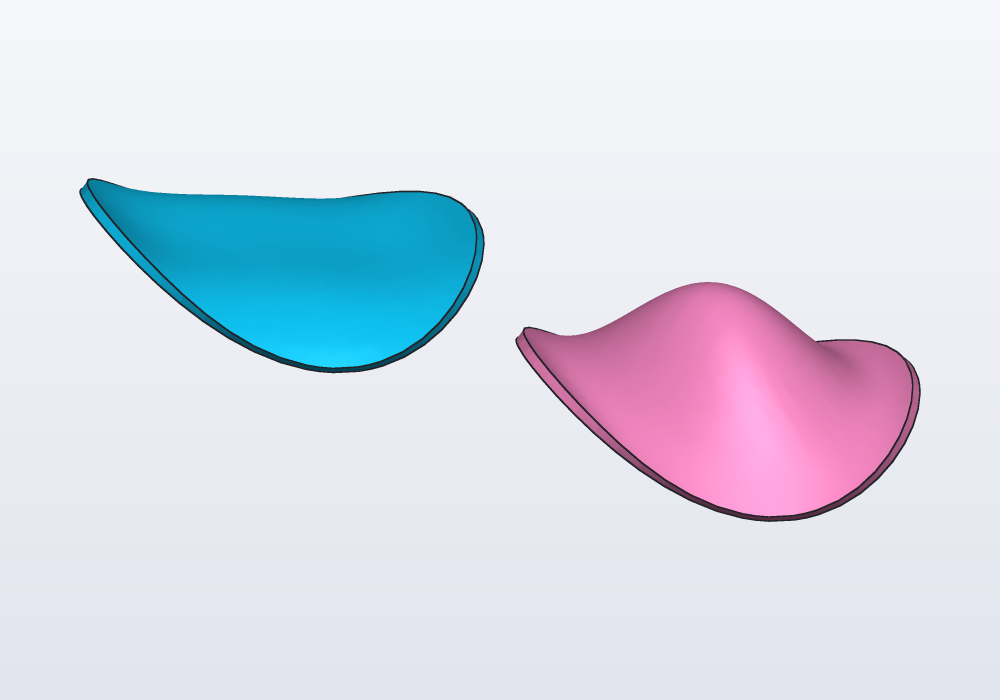
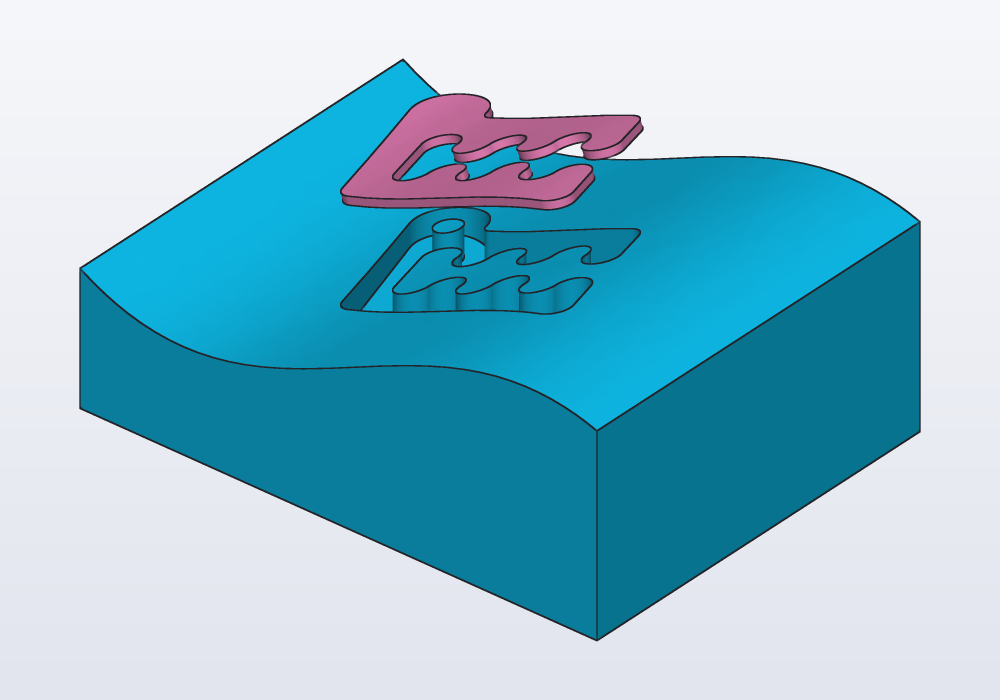
On a solid, body.fill(edges, tangent: faces) closes a loop of its own edges: the rim of an opening, of an irregular cavity. Where the rim lies on one of the faces given as tangent:, the new face carries on smoothly from it; elsewhere it only meets it. Thickened, it makes a lid that follows the opening exactly.
import std;

// a block with a wavy top, and an opening shaped like
// Carlo cut down into it
immutable wave = spline([vec(-25.mm, 0.mm), vec(-10.mm, 3.mm),
        vec(5.mm, -3.mm), vec(25.mm, 2.mm)])
    .sweep(path([vec(0.mm, -20.mm, 12.mm),
        vec(0.mm, 20.mm, 12.mm)]));

immutable block = box(40.mm, 30.mm, 20.mm).split(wave)[0];

immutable pocket = carlo().projection.scale(0.5)
    .centered.extrude(30.mm).move(z: 6.mm);

immutable body = block - pocket;

@part("Sky Pop")
Solid part() => body;

// the opening closed by a face that carries on the
// wave, lifted to show it
@part("Pink Pop")
Solid cap() => body
    .fill(edges.between(faces.from(pocket), faces.farthest(Z)),
        tangent: faces.farthest(Z))
    .thicken(0.6.mm)
    .move(z: 8.mm);
Workflows
- A curved cut, to split a part in two along a curve (a lid that follows a wave, two halves that interlock): draw the curve, sweep it along a straight route longer than the part,
split, take the pieces as@parts. - A part cut lengthwise (a tube, a handle, a duct, to print in halves): sweep a line across the profile along the part's own route,
split,pushapart. - A shell from a sheet (a curved panel, a cover, a gutter, a visor): loft through curves or sweep a curve, then
thicken. - A solid from given edges (a part whose outlines on four sides are known): loft each side between its edges, close the ends with profiles,
sew.
The parameters
| Call | Parameter | What it does | Default |
|---|---|---|---|
curve.sweep(path, …) |
as a profile's sweep | the curve across the route | as little roll as it can |
loft(paths) |
ruled: |
flat strips between the paths | false, smooth |
body.split(surface) |
the surface | the pieces, sorted along X, Y, Z | — |
pieces.push(from: surface, by:) |
by: |
how far each piece moves away from the surface | — |
surface.thicken(t) |
t |
the thickness; negative: the other side | — |
sew(list) |
surfaces and flat profiles | joined into one closed solid | — |
enclosed(list, at:) |
at: |
a point (or a list): the volume holding it (several: joined) | none: every volume |
fill(rim, through:) |
through: |
points the face passes through too | none |
body.fill(edges, tangent:) |
tangent: |
faces the new face carries on from smoothly | none: it only meets them |
Limits
- A surface is not a part: a
@partreturning one is an error. Thicken it, sew it, or split a solid with it. - Surfaces do not combine with
+ - &, and paths and profiles do not mix in one loft. - A split needs a surface that reaches across the solid on every side: make it generously larger than the part. One that misses the solid, or ends inside it, is an error (it must reach across it, from one side out to the other).
- A surface lofted through closed paths whose sharp corners meet smooth curves (a square to a circle) is thickened from its paths: each offset in its own plane, outwards for a positive thickness, so the wall is that thick across the paths' planes, a little thinner where it leans.
- Only one surface per split: to cut with two, split, then split the pieces.
- In the window, Split… cuts with a plane only: a surface split is written in the code.
Common errors
| Message | What to do |
|---|---|
| return value of 'x' must be a Solid, but this is a Surface, which has no inside: thicken it, sew surfaces into a solid, or split a solid with it | a part cannot be a sheet |
| cannot combine a Surface with '+': split a solid with it (s.split(surface)), or thicken it into a solid first | use split or thicken, not + - & |
| sew failed: the surfaces do not close: 4 edges are open on one side | a side is missing, or two sides do not meet exactly: build neighbouring sides from the same paths |
| enclosed failed: the shapes close off no volume: they must wall in a region on all sides | a sheet stops short, or a side is missing: make the sheets larger than what they cut, or add a plane |
| no volume the shapes close off holds (x, y, z) mm | the point is outside every region: list them with enclosed([…]) and look at where they are |
| thicken by 0 leaves no solid | give a thickness |
| could not thicken the surface cleanly where its sharp edges meet smooth ones… | a sheet other than a loft through closed paths, with sharp and smooth edges meeting: round its corners, or build the solid and shell it |
| a surface through paths takes paths only, not Profile | loft profiles (a solid) or paths (a surface), not both |
| loft needs an array of at least 2 profiles | a loft goes through two paths at least |
In the application
Surfaces are made and used in the code; there is no menu entry for them. Inspect (Ctrl+I, Cmd+I on a Mac; or Ctrl+click a line of code) shows in orange what a line makes, so click the line that makes the surface to see where it lies before splitting with it. The right-click menu's Split… cuts a part with a plane (the XY, XZ, YZ planes or the clicked face's): for a curved cut, write split(surface) in the code.