Gears
Spur gears and racks from the gears library: module, number of teeth and pressure angle, placing two gears so that they mesh, checking the mesh in the model, and printing gears that turn (backlash, the module for a printer, hubs, bores and set screws).
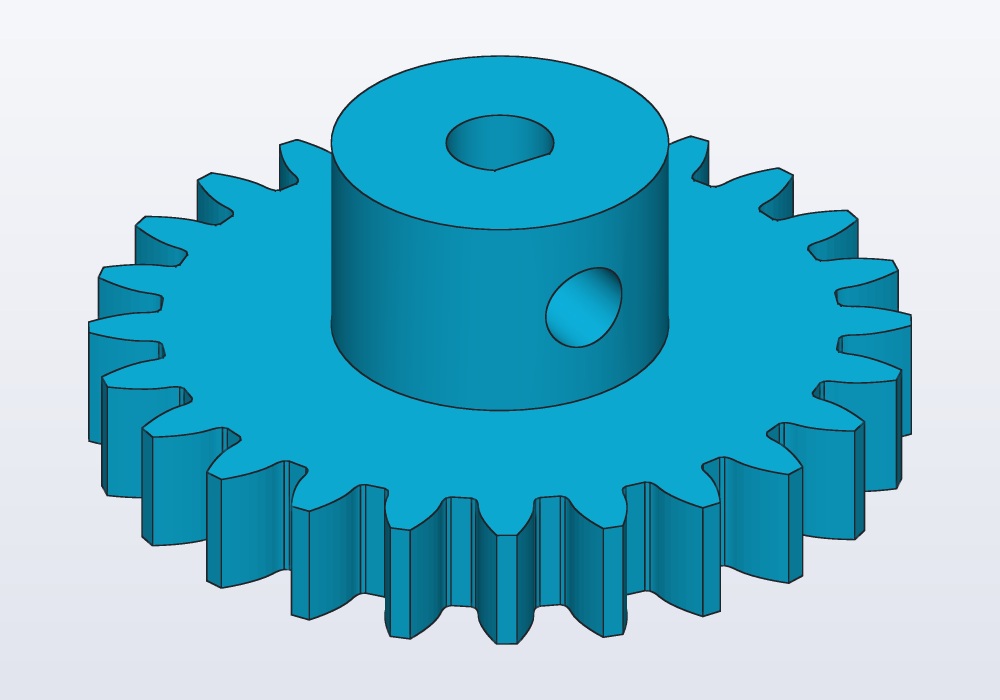
Module, teeth, pressure angle
A spur gear is a wheel with straight teeth round its edge, parallel to its axis. Two of them, meshing on parallel shafts, change a speed or a force: the small one turns faster, the large one with more force. A rack is a straight bar of teeth: with a gear on it, a rotation becomes a straight movement (a knob that moves a slide). The gears library makes both; it has no helical, bevel, worm or internal (ring) gears.
The teeth have involute flanks: the curve traced by the end of a string unwound from a circle. With it, two teeth roll on each other instead of rubbing, and the gears turn evenly.
Three numbers describe a spur gear:
- The module
mis the size of the teeth: the pitch diameter divided by the number of teeth. A module 2 gear of 20 teeth is 40 mm across at its pitch circle. Two gears mesh only when they have the same module. - The number of teeth sets the diameter (for a given module) and the ratio: a 30-tooth gear driving a 12-tooth one makes it turn 30 / 12 = 2.5 times faster, the other way.
- The pressure angle is how steep the flanks (the sides) of the teeth are. 20° is the standard and the default; 14.5° is found on old machinery, 25° gives stronger, more pointed teeth. Two gears mesh only when they have the same pressure angle too.
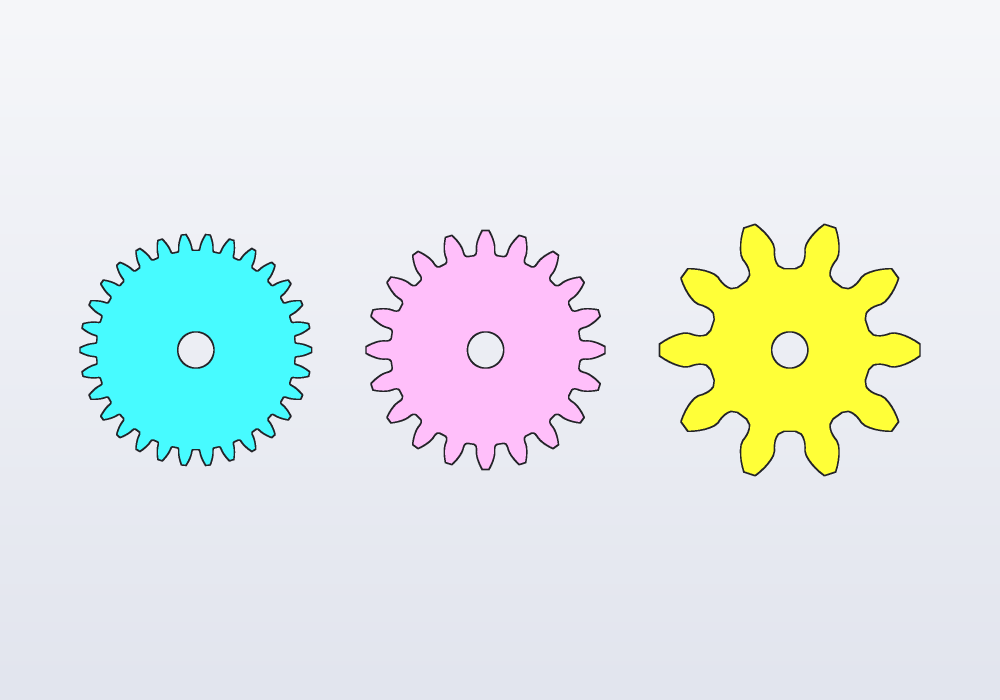
The same pitch diameter, 30 mm, with modules 1, 1.5 and 3: more, smaller teeth, or fewer, larger ones.
// one pitch diameter, 30 mm: modules 1, 1.5 and 3

import std;

@part("Sky Pop")
Solid fine() => spurGear(1.mm, 30, 5.mm, bore: 5.mm);

@part("Pink Pop")
Solid medium() => spurGear(1.5.mm, 20, 5.mm, bore: 5.mm)
    .move(x: 40.mm);

@part("gold")
Solid coarse() => spurGear(3.mm, 10, 5.mm, bore: 5.mm)
    .move(x: 82.mm);
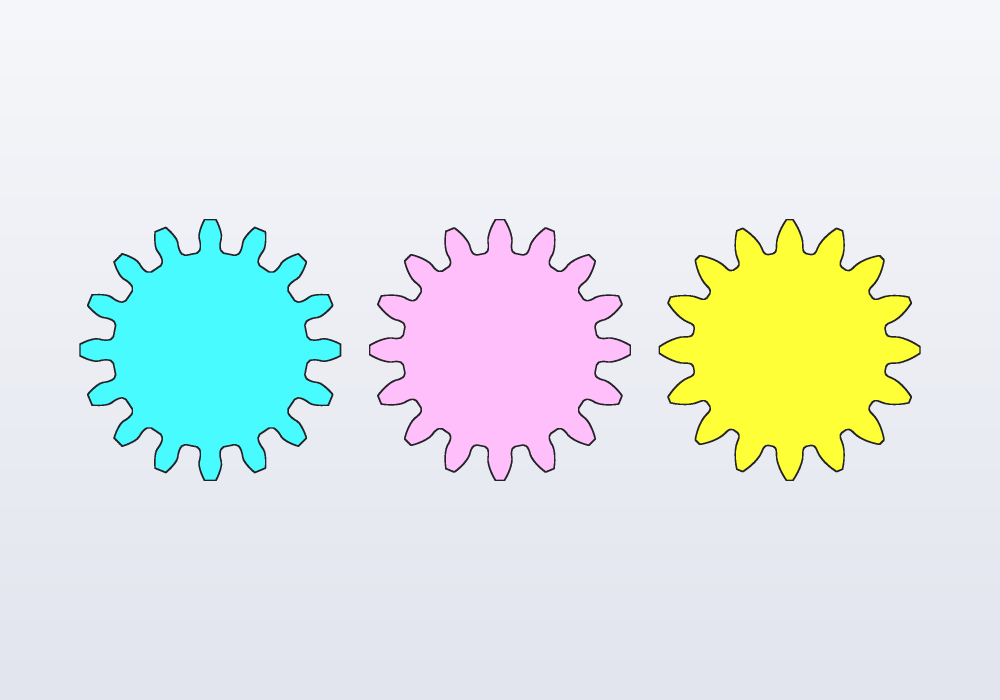
The pressure angle changes the flanks: at 14.5° they are nearly straight, at 25° the teeth are wider at the base and narrower at the tip.
// 16 teeth of module 3 at 14.5°, 20° and 25°

import std;

@part("Sky Pop")
Solid old() => spurGear(3.mm, 16, 5.mm, pressure: 14.5.deg);

@part("Pink Pop")
Solid standard() => spurGear(3.mm, 16, 5.mm)
    .move(x: 60.mm);

@part("gold")
Solid strong() => spurGear(3.mm, 16, 5.mm, pressure: 25.deg)
    .move(x: 120.mm);
The sizes of a gear of z teeth follow from the module:
| Function | Gives | Formula |
|---|---|---|
pitchDiameter(m, z) |
the pitch circle: the circle on which two gears roll on each other | m · z |
outsideDiameter(m, z) |
over the tips: the room the gear needs | m · (z + 2) |
rootDiameter(m, z) |
at the bottom of the gaps: keep bores and windows inside it | m · (z − 2.5) |
centerDistance(m, z1, z2) |
how far apart the centres of two meshing gears are | m · (z1 + z2) / 2 |
involute(rb, r) is the angle of the involute of a base circle of radius rb at radius r, used to draw the teeth; you rarely need it.
The library
The gears library (import std;) gives:
| Function | What it makes |
|---|---|
spurGear(m, teeth, thickness, bore:, pressure:, backlash:) |
a spur gear standing on z = 0, centred on the origin, a tooth on +X |
gearProfile(m, teeth, pressure:, backlash:, steps:) |
its outline, a profile (a flat outline) on XY, the same way round |
rack(m, teeth, thickness, base:, pressure:, backlash:) |
a straight rack along +X from x = 0, teeth up, its pitch line on y = 0 |
Their parameters:
| Parameter | What it does | Default |
|---|---|---|
m |
the module: the size of the teeth | — |
teeth |
how many; at least 6 for a gear, 1 for a rack | — |
thickness |
how thick the gear or rack is, along Z | — |
bore: |
a round hole through the centre, that diameter; 0.mm none |
0.mm |
pressure: |
the pressure angle | 20.deg |
backlash: |
the play between the teeth: thins each tooth by that much on the pitch circle (a rack's on its pitch line), so printed gears do not bind | 0.1.mm |
steps: |
points on the involute of each flank of the outline, and as many on its root (gearProfile and spurGear) |
6 |
base: |
the height of the rack's solid strip under the teeth' roots | 2 · m |
The rack's teeth are thinned by its own backlash: too: with the gear's, the play is the two added.
A gear carries its axis, tagged gears.axis, and its bore's wall gears.bore; a rack its pitch line, gears.pitch. Turned and moved, the gear takes them along: g.axis("gears.axis") is where it turns now, to place a shaft on, and faces.tagged("gears.bore") the face for a set screw's hole. See Selectors and features.
Meshing two gears
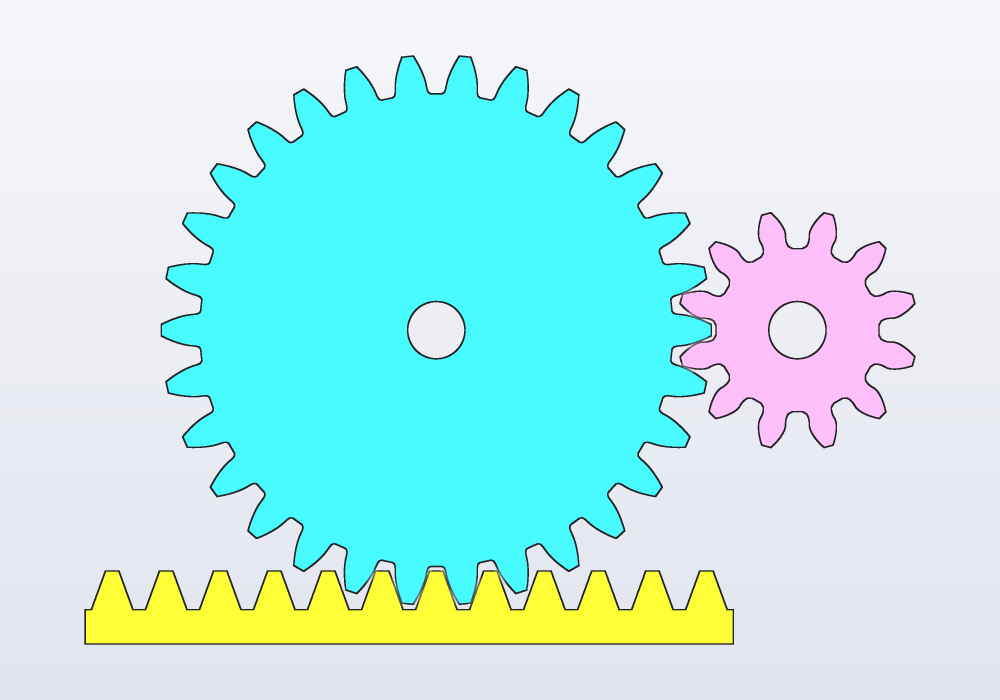
Two gears mesh when the teeth of one go into the gaps of the other. That needs the same module and pressure angle, the centres centerDistance(m, z1, z2) apart, and a tooth of one facing a gap of the other. spurGear has a tooth on +X; put the second gear on +X of the first and turn it by 180.deg - 180.deg / z2, which puts a gap where the first gear's tooth is, whether z2 is odd or even. For a rack, its gaps are centred at x = k · π · m from its start, its teeth halfway between; a gear over it sits with its centre pitchDiameter / 2 above the pitch line.
// a 30-tooth gear driving a 12-tooth pinion, and a rack

import std;

@param("Module", min: 1.mm, max: 3.mm)
immutable m = 1.5.mm;

immutable z1 = 30;
immutable z2 = 12;

@part("Sky Pop")
Solid wheel() => spurGear(m, z1, 6.mm, bore: 5.mm);

// a gap of the pinion faces the wheel's tooth on +X
@part("Pink Pop")
Solid pinion() => spurGear(m, z2, 6.mm, bore: 5.mm)
    .rotate(z: 180.deg - 180.deg / z2)
    .move(x: centerDistance(m, z1, z2));

// pitch line on the pitch circle; a gap of the wheel
// points down (30 teeth), so a rack tooth goes under it
@part("gold")
Solid bar() => rack(m, 12, 6.mm)
    .move(x: -6.5 * PI * m)
    .move(y: -pitchDiameter(m, z1) / 2);

unittest
{
    assert((wheel() & pinion()).volume == 0.mm ^^ 3);
    assert((wheel() & bar()).volume == 0.mm ^^ 3);
}
Checking the mesh
The unittest above is the check: (a & b).volume is the material two parts share, and it must be zero. distance(a, b) says how close they come: about 0.1 mm for two gears with the default backlash, 0 when they touch or overlap. A mesh that looks right on the screen can still collide when the gears turn, so check a few positions through one tooth of turning: the second gear turns the other way, z1 / z2 times as much.
// check a pair through one tooth of turning, not only
// where it was drawn

import std;

immutable m = 1.mm;

@param("Teeth of the wheel", min: 20, max: 60)
immutable z1 = 36;

@param("Teeth of the pinion", min: 8, max: 20)
immutable z2 = 9;

Solid wheelAt(Angle a) => spurGear(m, z1, 4.mm).rotate(z: a);

// the pinion turns the other way, z1 / z2 times faster
Solid pinionAt(Angle a) => spurGear(m, z2, 4.mm)
    .rotate(z: 180.deg - 180.deg / z2 - a * z1 / z2)
    .move(x: centerDistance(m, z1, z2));

@part("Sky Pop")
Solid wheel() => wheelAt(0.deg);

@part("Pink Pop")
Solid pinion() => pinionAt(0.deg);

unittest
{
    foreach (i; 0 .. 6)
    {
        immutable a = 360.deg / z1 * i / 6;
        immutable v = (wheelAt(a) & pinionAt(a)).volume;
        assert(v == 0.mm ^^ 3, "the teeth collide at $(a)");
    }
}
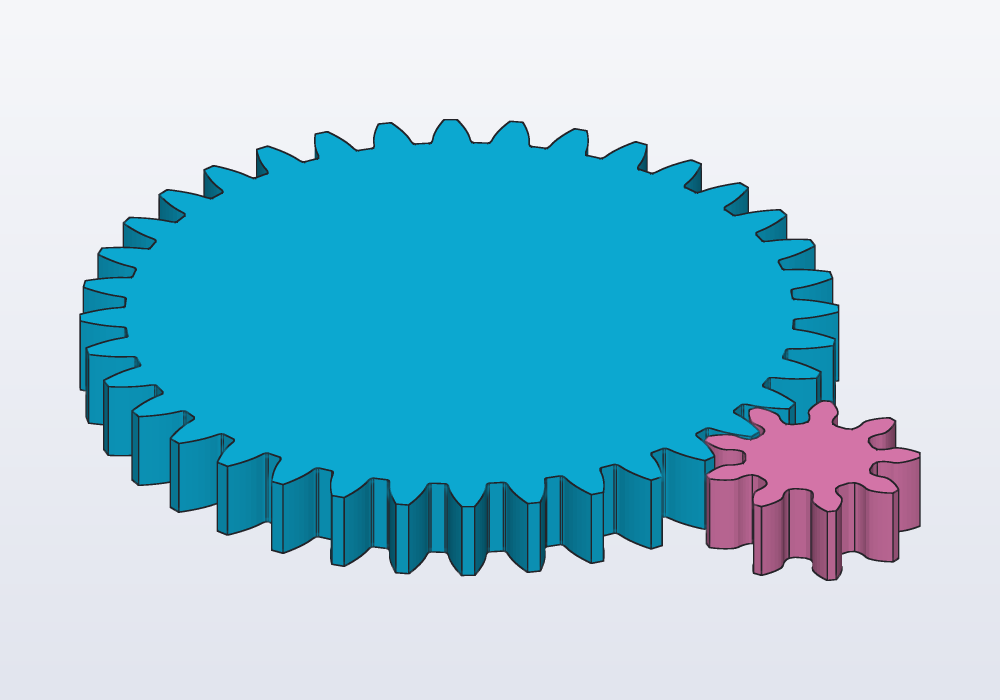
The library cuts the teeth as a rack cuts them: under about 21 teeth (at 20°) the rack's tip takes material from the roots of the flanks, an undercut, where the tips of a large gear pass as they turn. So a pinion of 6 teeth meshes with a wheel of 40, or with a rack, with no backlash at all, though its teeth are thinner at the root, and weaker. This check finds a collision anyway, whatever caused it.
Your own shape: gearProfile
For a gear of your own shape (spokes, windows, a cam on it), start from gearProfile: the outline alone, to cut windows or spokes into before extruding it (pushing the flat outline up into a solid), or to combine with a sketch:
// a big wheel made lighter by six windows

import std;

@part("Sky Pop")
Solid wheel()
{
    auto p = gearProfile(1.5.mm, 60, backlash: 0.15.mm)
        - circle(d: 8.mm);
    foreach (k; 0 .. 6)
    {
        p -= circle(d: 18.mm)
            .move(x: 25.mm)
            .rotate(60.deg * k);
    }
    return p.extrude(5.mm);
}
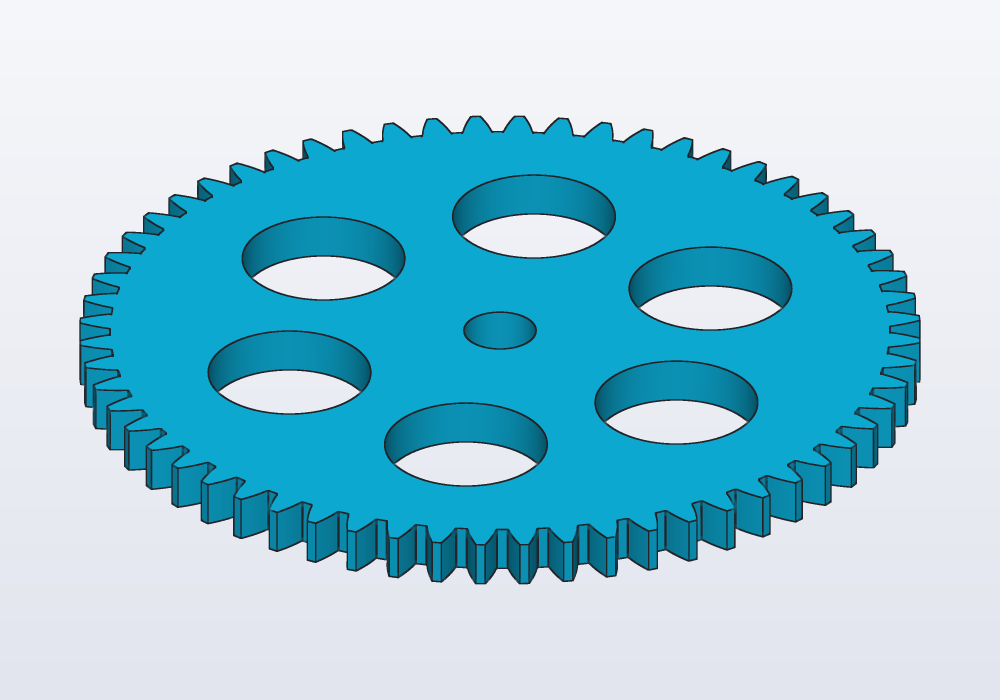
Keep what you cut inside rootDiameter, with a few millimetres of rim under the teeth.
Hubs, bores and set screws
spurGear has a round bore: (the hole for the shaft) only. A hub (a collar that makes the gear longer on its shaft), a shaft with a flat (a D shaft) and a set screw (a screw through the hub that presses on the shaft) are a few lines more, with the hardware library for the screw's hole:
// a gear for a 5 mm motor shaft with a flat (a D shaft),
// held by an M3 set screw in a heat-set insert

import std;

@param("Shaft diameter", min: 3.mm, max: 8.mm)
immutable shaft = 5.mm;

// 0.1 mm over the shaft: printed holes come out small
Profile dBore() => circle(d: shaft + 0.1.mm)
    - rect(center: vec(shaft, 0.mm), w: shaft, h: 2 * shaft)
        .move(x: -0.45.mm);

@part("Sky Pop")
Solid hubGear()
{
    auto g = spurGear(1.5.mm, 24, 6.mm)
        + cylinder(d: 16.mm, h: 10.mm).move(z: 6.mm);
    g -= dBore().extrude(30.mm).move(z: -1.mm);

    // the screw presses on the flat, through the hub's wall
    g -= hole(M3, 8.mm, "insert")
        .rotate(y: 90.deg)
        .move(x: 8.mm, z: 11.mm);
    return g;
}
A round bore on a round shaft slips under load: press-fit it (see the guide on fits), use a D shaft, or a set screw. For screws and inserts, see the guide on holes.
Printing gears
- Module. On an FDM printer (one that lays down melted plastic through a nozzle) with a 0.4 mm nozzle, module 1 is the smallest that prints cleanly; 1.5 to 2 is comfortable, and stronger. Under 1, print in resin.
- Backlash. The default 0.1 mm on each gear suits a well tuned printer. Raise it to 0.15–0.25 mm if the gears bind; a wider play is noisier but never jams. Print two small test gears before a big train.
- Teeth. 12 or more on the smallest gear turn smoothly; fewer mesh, but their undercut roots are weaker (see above). For a large ratio, use two stages rather than one tiny pinion.
- Thickness. About 5 to 10 times the module. Wider teeth carry more, but need the shafts truly parallel.
- Orientation. Print gears flat, the teeth standing: the teeth come out with their exact shape and their layers across the load. The first layer squashes out (elephant's foot) and can make the bottom of the teeth rub: compensate in the slicer, the program that turns the model into the printer's paths.
- Material. PLA is fine for toys and models; PETG or nylon for gears that run for hours. A gear and a pinion of different materials wear less.
- Clearance on the shafts. Shafts the gear turns on want a bore 0.2–0.3 mm larger; shafts that drive it want a tight bore, a flat or a set screw.
Common errors
| Message or symptom | What to do |
|---|---|
| a gear needs at least 6 teeth | more teeth; for a smaller gear, a smaller module |
| the backlash would thin the teeth to nothing: keep it below … | a backlash of tenths of a millimetre, not millimetres; the limit is where the tips come to a point |
| the pressure angle goes from above 0° to 30°… | 20°, the standard, or 14.5° or 25° |
| rack: the backlash goes from 0 to under … | a smaller backlash: the teeth's tops would vanish |
| a rack needs at least 1 tooth | teeth of 1 or more |
| unknown argument 'hub' for spurGear(m, teeth, thickness, bore, pressure, backlash) | the library has no hub: add a cylinder, as above |
| spurGear: the bore must be smaller than the gear's root circle… | a smaller bore: within rootDiameter less a module each side |
the two gears overlap ((a & b).volume is not zero) |
the same module and pressure angle on both; the second turned by 180.deg - 180.deg / z2; centres centerDistance apart |
The messages of the checks point at the line of the library that checks them, not at your call: look for the spurGear or rack call in your model.
In the application
There is no gear menu: gears are written in the code. The cheatsheet (Cheatsheet in the main menu, or F1) lists every function of the gears library with its arguments, and the editor completes them after import std;. Make the module and the numbers of teeth @params to change them from the Parameters panel and see the gears follow; the unittest with (a & b).volume reports a collision in the console when the tests run (F5).