Holes and hardware
Holes for metric screws from M2 to M12, from the hardware library: clearance, tapping, heat-set insert, counterbore and countersink holes with hole(), nut traps, the screws, nuts and washers themselves, teardrop holes that print sideways, and the Hole entry of the 3D view's right-click menu.
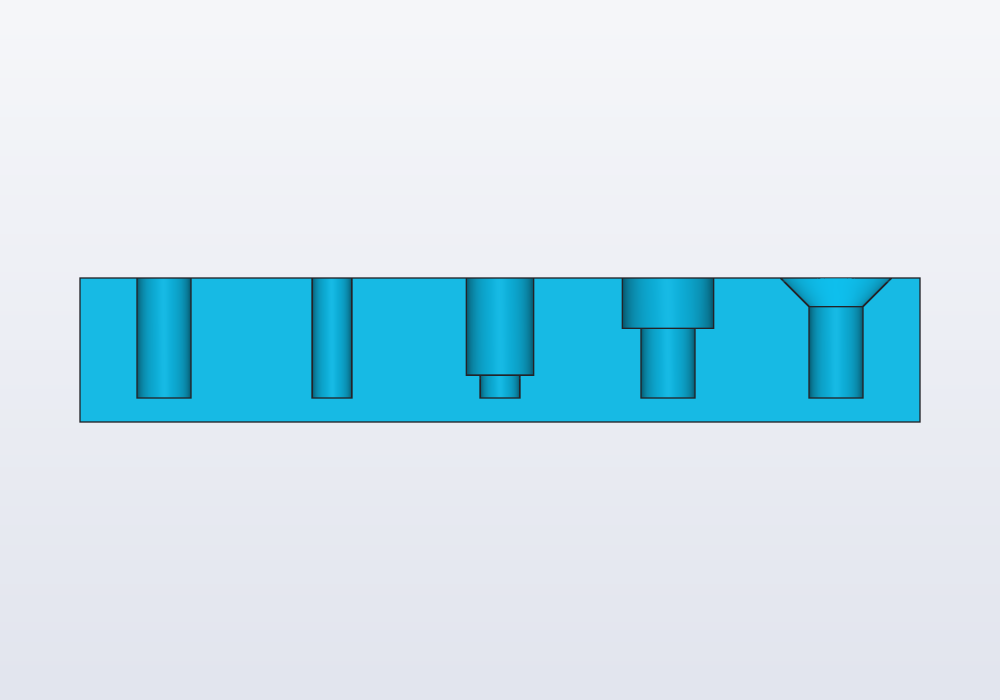
A printed part held by a screw needs a hole on each side of the joint: one the screw passes through, one it grips. The hardware library makes both, sized for each screw.
The library
import std;
M2, M2_5, M3, M4, M5, M6, M8, M10 and M12 are Screw values: the sizes of an ISO 4762 socket head cap screw, its ISO 4032 nut and ISO 7089 washer, and the holes to print for them. Inch sizes and self-tapping screws for plastic are further down. Use them by name in your own geometry: M3.clearance, M3.head, M3.nut.
| Size | clearance |
tap |
insert × insertDepth |
head × headHeight |
nut × nutHeight |
|---|---|---|---|---|---|
| M2 | 2.4 | 1.6 | 3.2 × 4 | 3.8 × 2 | 4 × 1.6 |
| M2.5 | 2.9 | 2.05 | 3.6 × 5 | 4.5 × 2.5 | 5 × 2 |
| M3 | 3.4 | 2.5 | 4.2 × 5.7 | 5.5 × 3 | 5.5 × 2.4 |
| M4 | 4.5 | 3.3 | 5.6 × 8.1 | 7 × 4 | 7 × 3.2 |
| M5 | 5.5 | 4.2 | 6.4 × 9.5 | 8.5 × 5 | 8 × 4.7 |
| M6 | 6.6 | 5 | 8 × 12.7 | 10 × 6 | 10 × 5.2 |
| M8 | 9 | 6.8 | 9.7 × 12.7 | 13 × 8 | 13 × 6.8 |
| M10 | 11 | 8.5 | 12 × 14 | 16 × 10 | 16 × 8.4 |
| M12 | 13.5 | 10.2 | 14.4 × 16 | 18 × 12 | 18 × 10.8 |
All in millimetres; nut is across the flats (the spanner size). The other fields are d (nominal diameter), pitch (coarse), key (the hex key), washer (its outer diameter) and name ("M3"). Insert sizes vary between makers: check the one you bought, and write its hole as cylinder(d: …) if it differs.
hole(): the six kinds
hole(screw, depth, kind) is a tool: a solid shaped like the hole, made to be subtracted from the part. Its top is at z = 0 and it goes down depth, so move it to the face it opens on:
import std;

// an M3 clearance hole through a plate 5 mm thick
@part("Sky Pop")
Solid plate() => box(40.mm, 20.mm, 5.mm)
    - hole(M3, 5.mm).move(x: 10.mm, z: 5.mm);
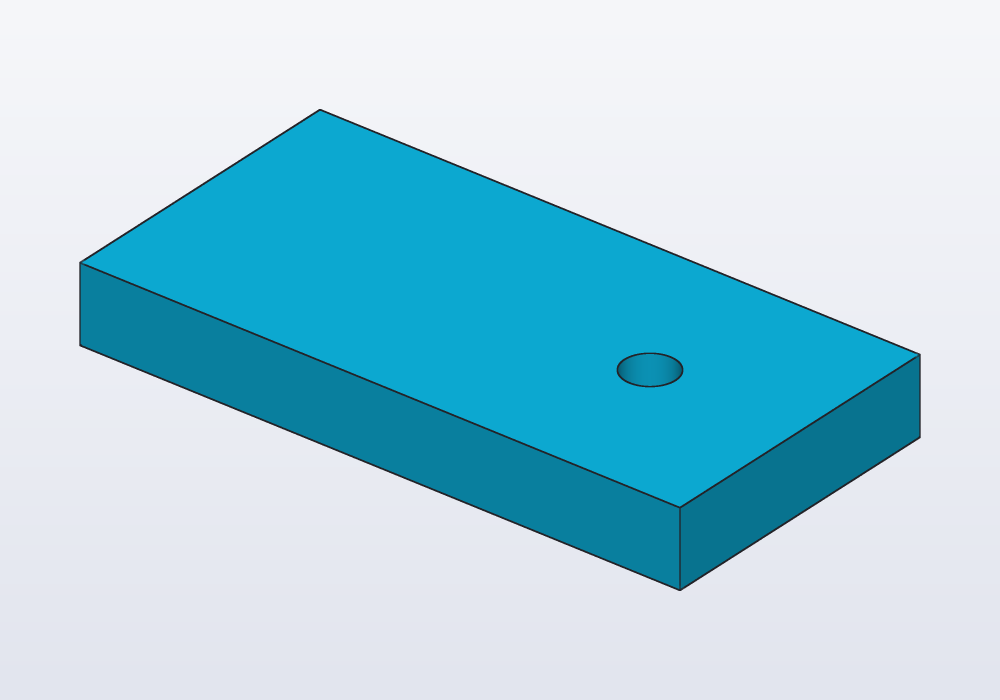
// the five kinds of hole() for an M4, cut in half
// to show them

import std;

immutable kinds = ["clearance", "tap", "insert",
    "counterbore", "countersink"];

@part("Sky Pop")
Solid block()
{
    auto b = box(70.mm, 14.mm, 12.mm);
    foreach (i, kind; kinds)
        b -= hole(M4, 10.mm, kind)
            .move(x: -28.mm + i * 14.mm, z: 12.mm);

    // keep the back half: the front view shows the
    // sections
    return b & box(70.mm, 7.mm, 12.mm).move(y: 3.5.mm);
}
| Kind | What it cuts | Default |
|---|---|---|
"clearance" |
a cylinder the screw passes through freely, clearance wide, depth deep |
yes |
"tap" |
the pilot hole for a thread, tap wide: a self-tapping screw (or an ordinary one) cuts its own thread in it, or a real tap does |
|
"insert" |
the hole of a heat-set insert (a brass sleeve threaded inside, pressed in with a soldering iron), insert wide and insertDepth deep, and below it a tap hole down to depth for the screw's tip |
|
"counterbore" |
a wider step at the top, room for a socket head to sit below the surface (head + 0.6 mm wide, headHeight + 0.2 mm deep), then the clearance hole down to depth |
|
"countersink" |
a cone at the top, for a flat (conical) head to sit flush: a 90° cone from clearance to 2.24 d + 0.3 mm across (an ISO 10642 flat head, 6.72 mm for M3, sits a little below the face), then the clearance hole |
|
"ribs" |
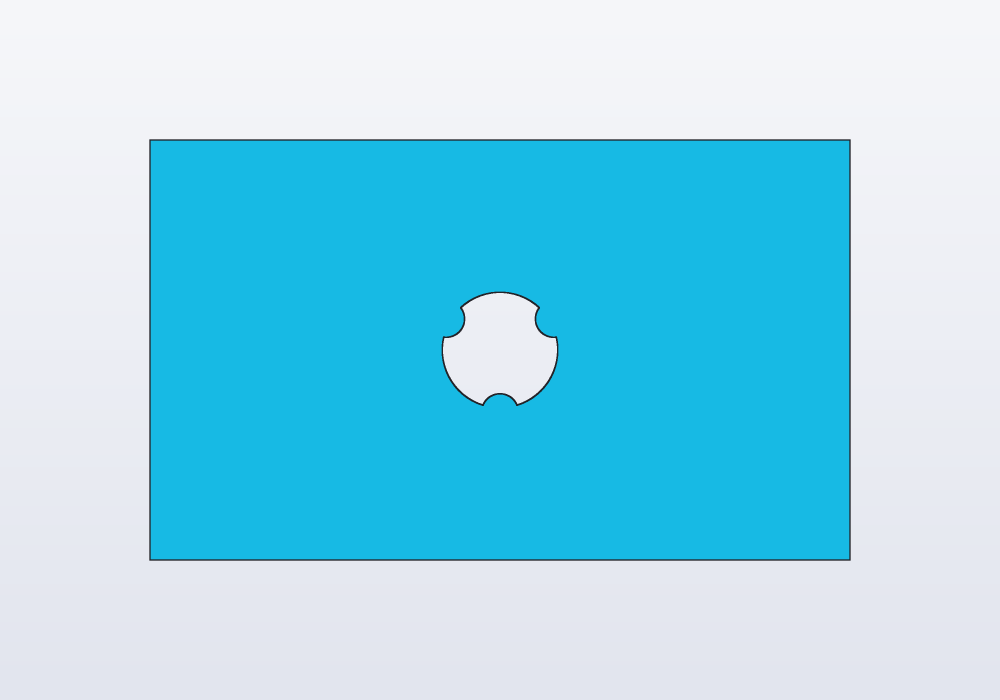
a hole the screw passes freely, with three ribs along it, 120° apart, reaching in to the tap size: the screw cuts its thread in the ribs only (below) |
Any other kind is an error. The depth is always the whole depth from z = 0: a counterbore of depth 10 mm is 10 mm deep, the head's seat included, and nothing of the hole goes deeper. An insert, a counterbore's seat or a countersink's cone deeper than depth is an error that says how deep it is (an M3 insert needs 5.7 mm): a deeper hole, or a thicker part. For a hole all the way through, give the thickness of the wall; hole() already reaches 0.01 mm past the top, so the cut is clean.
What grips the screw decides how strong the joint is and how often it can be undone. A self-tapping screw in a tap hole needs nothing but the screw, and wears the hole after a few dozen times in and out. A heat-set insert takes the most torque (twisting force) and hundreds of times. Under M5 a printed thread comes out too fine to hold; from M6 up, for a screw put in once, a printed thread works: see the guide on threads.
Carlo, the mascot clip, with a wider lower jaw (jaw: 10.mm) and two countersunk M3 holes down through it, to screw it under a shelf with flat-head screws:
// Carlo with a wider lower jaw and two countersunk
// M3 holes down through it, to screw it to a shelf

import std;

immutable height = 15.mm;

@part("Sky Pop")
Solid clip()
{
    auto c = carlo(height: height, jaw: 10.mm);
    foreach (x; [8.mm, 24.mm])
        c -= hole(M3, height, "countersink")
            .move(x: x, y: -13.mm, z: height);
    return c;
}
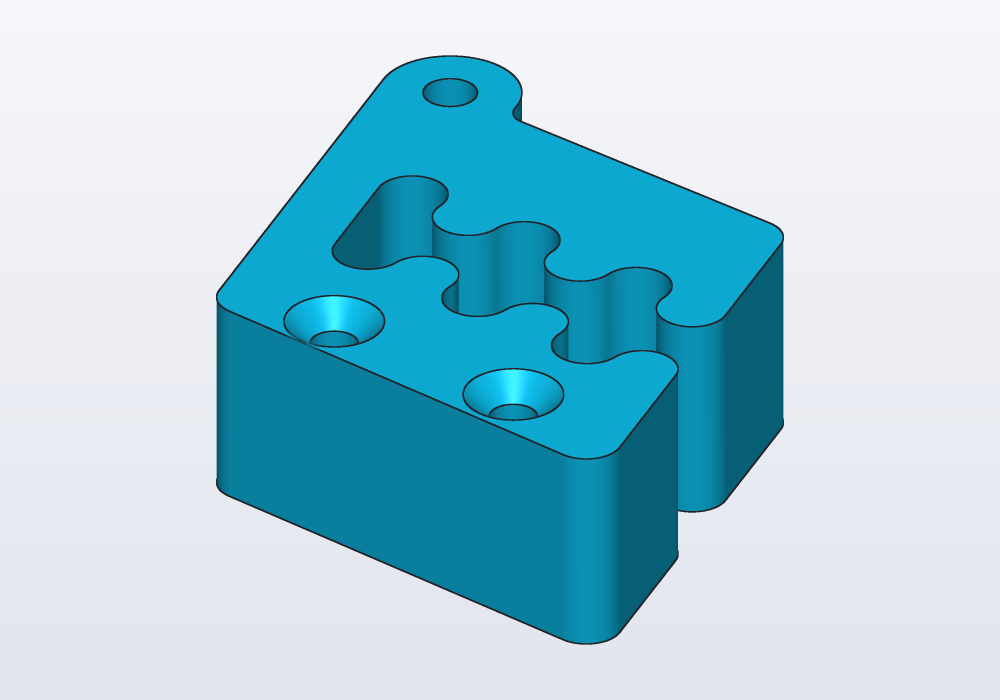
The depth is Carlo's whole height, so the holes go all the way through.
The faces a hole() leaves in the part keep a name, a tag: hardware.bore for its wall, hardware.seat for a counterbore's or countersink's, where the head sits. Rounding or chamfering the holes' rims later finds them by it, wherever the part was turned: .chamfer(edges.between(faces.tagged("hardware.bore"), faces.top), d: 0.4.mm). A hole, screw, nut and washer also carry their axis, hardware.axis. See Selectors and features.
Nut traps
nutTrap(screw, depth, clearance: 0.2.mm) is a nut trap: a hexagonal pocket (a hollow cut into the part) that holds a nut so it cannot turn, its top at z = 0 going down, flats parallel to X, clearance added on each side so a printed hexagon takes the nut. Cut it under the clearance hole, from the face the nut goes in by. To cut it from the bottom face, flip it with .mirror(Z) so it goes up:
// two plates clamped by an M3: the head sunk in the top,
// the nut held in a trap underneath

import std;

immutable plate = 6.mm;

// the trap is cut from the bottom face, so it is flipped
// to go up from z = 0
Solid top() => box(20.mm, 20.mm, plate)
    - hole(M3, plate, "counterbore").move(z: plate);

Solid bottom() => box(20.mm, 20.mm, plate)
    - hole(M3, plate, "clearance").move(z: plate)
    - nutTrap(M3, 3.mm).mirror(Z);

// half of each, to see inside
Solid half(Solid s) => s
    & box(30.mm, 15.mm, 40.mm, center: true)
        .move(y: 7.5.mm);

@part("Sky Pop")
Solid upper() => half(top()).move(z: plate);

@part("Pink Pop")
Solid lower() => half(bottom());

@part("slategray", alpha: 0.6, export: false)
Solid hardware() => half(nut(M3)
    + screw(M3, 10.mm)
        .move(z: 2 * plate - M3.headHeight - 0.2.mm));
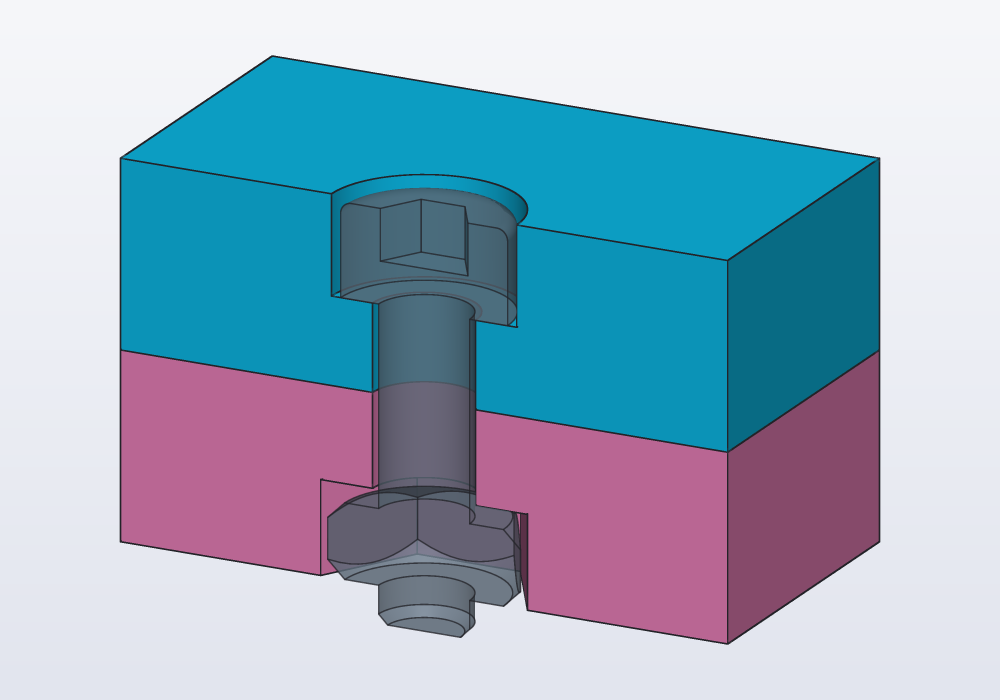
screw(M3, 10.mm) and nut(M3) are the hardware itself, as see-through reference parts: they show at once whether the screw is long enough to go through the nut. screw() has the underside of its head on z = 0 and the shank going down, so it drops into a hole the way hole() is placed; threaded: true models the thread (slower), socket: false leaves out the hex socket. nut(M3, threaded: true) and washer(M3) stand on z = 0.
A grub screw (a set screw) has no head: it goes all the way into its hole, to lock a knob on a shaft or to set a depth that is tuned with a hex key. setScrew(M3, 6.mm) draws one, its socket end on z = 0 and the rest going down like screw(); point: gives its end, "cup" (the common one, a ring that bites into a shaft), "flat", "cone" or "dog" (a short pin, into a hole in the shaft); setKey(M3) is the key it takes, 1.5 mm for an M3.
A nut can also slide in from the side, into a pocket deep in the part: nutTrap for the hexagon, a box the width of the nut across the flats for the channel.
// an M3 nut slid in from the side, 4 mm above the bottom

import std;

immutable slot = M3.nutHeight + 0.4.mm;

@part("Sky Pop")
Solid block() => box(16.mm, 16.mm, 10.mm)
    - hole(M3, 10.mm).move(z: 10.mm)
    - nutTrap(M3, slot).move(z: 4.mm + slot)

    // the channel the nut slides along, out of the
    // +X side
    - box(10.mm, M3.nut + 0.4.mm, slot)
        .move(x: 5.mm, z: 4.mm);
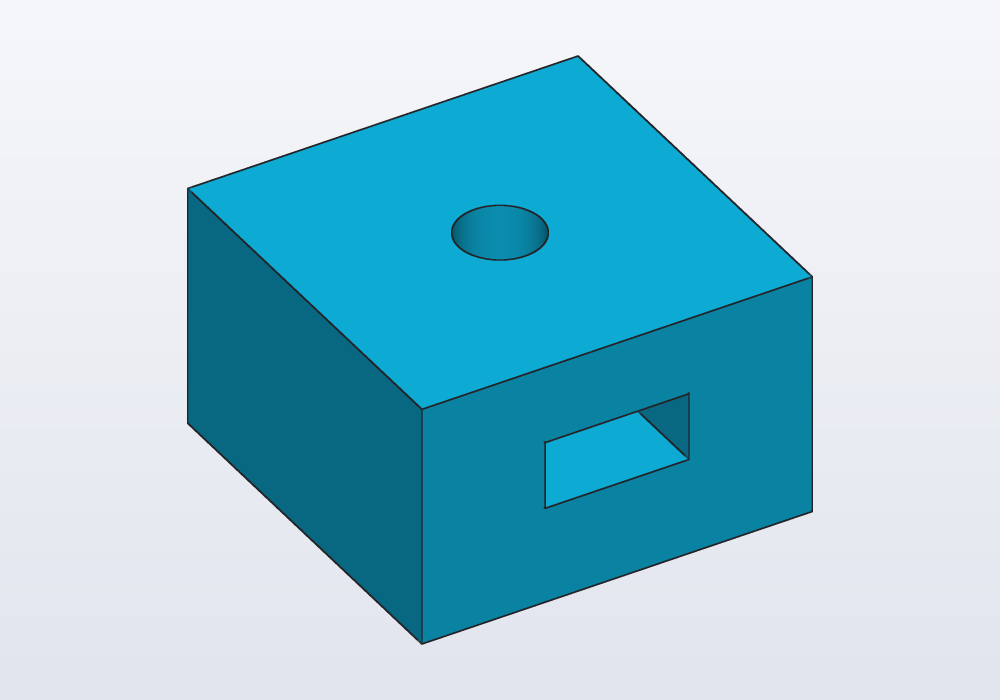
The roof of a trap is a bridge when the part prints: a layer laid across empty space, held only at its ends. A trap closed on every side, with no channel, needs a pause in the print at the layer above its roof, to drop the nut in.
Other heads
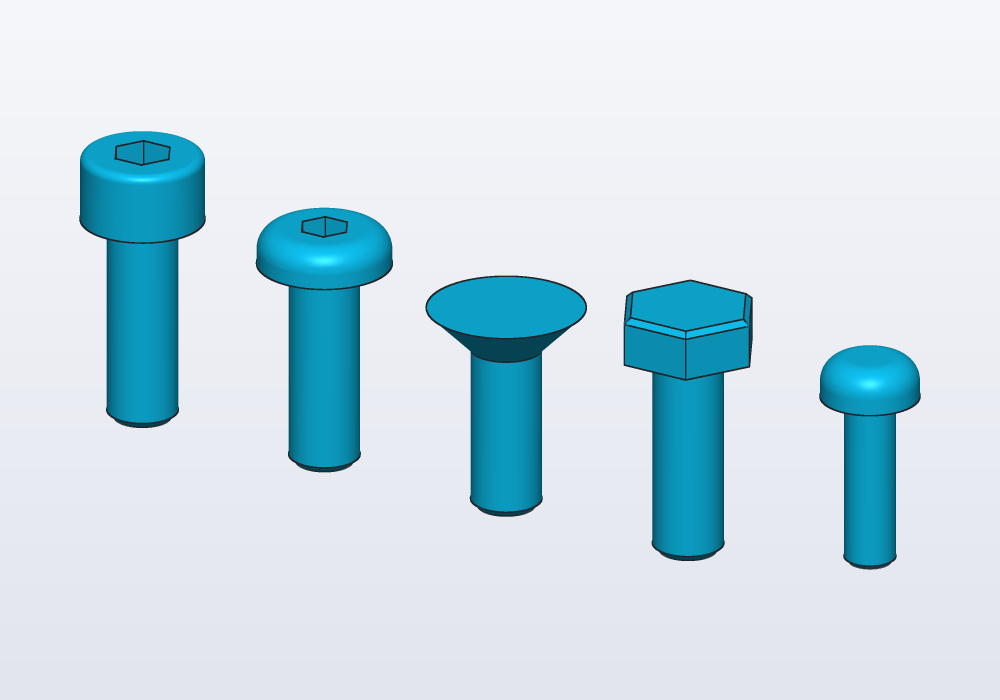
A screw's head can be of five kinds. screw(size, length, head: …) draws it, and hole(size, depth, "counterbore", head: …) makes the recess it sits in, so the head ends level with the face:
head: |
The head | Standard |
|---|---|---|
"socket" |
a cylinder with a hex socket: the default, the strongest | ISO 4762 |
"button" |
low and domed, with a hex socket: neat on show | ISO 7380 |
"flat" |
a 90° cone that sinks into a countersink, flush with the face | ISO 10642 |
"hex" |
a hexagon for a spanner | ISO 4017 |
"pan" |
low and rounded: the self-tapping screws below | ISO 7049 |
headOf(size, head) gives the head's sizes (d, h, key) for geometry of your own.
import std;

// the same M4 screw with four heads, then a
// self-tapping one
@part("Sky Pop")
Solid screws() => screw(M4, 12.mm, head: "socket")
    + screw(M4, 12.mm, head: "button").move(x: 12.mm)
    + screw(M4, 12.mm, head: "flat").move(x: 24.mm)
    + screw(M4, 12.mm, head: "hex").move(x: 36.mm)
    + screw(ST2_9, 10.mm, head: "pan").move(x: 48.mm);
Square nuts
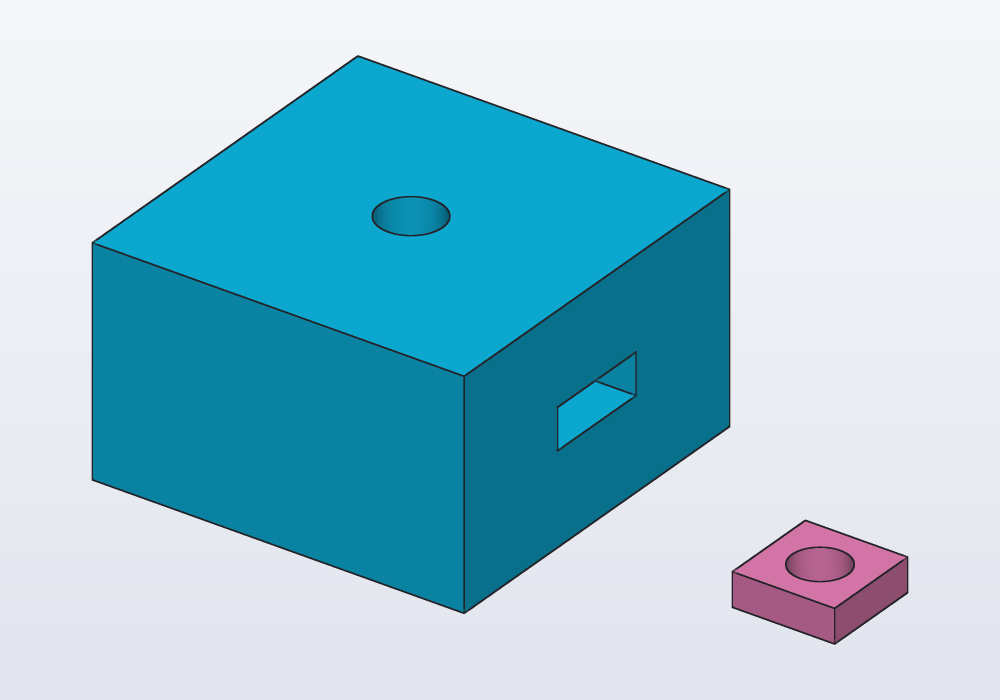
A square nut (DIN 562) is thin and slides into a slot from the side: the slot can open on a wall, so the nut goes in after the part is printed, where a hex nut needs a pocket from above. squareNut(size) is the nut; squareNutSlot(size, reach) is the slot to subtract, centred on the screw's axis with its middle on z = 0, open towards +X for reach millimetres.
import std;

// a block with a slot for an M3 square nut, open
// on the right, and the screw's hole through it
@part("Sky Pop")
Solid block() => box(20.mm, 20.mm, 12.mm)
    - squareNutSlot(M3, 15.mm).move(z: 6.mm)
    - hole(M3, 12.mm).move(z: 12.mm);

// the nut, beside it
@part("Pink Pop")
Solid nut() => squareNut(M3).move(x: 22.mm);
Square nuts go from M2 to M8; squareNutSize(size) and squareNutHeight(size) give their sizes.
Inch screws
UNC4_40, UNC6_32, UNC8_32, UNC10_24 and UNC1_4_20 are the common unified inch sizes, with the same fields as the metric ones: socket head cap screws (ASME B18.3), hex nuts and SAE washers. UNC1_4_20 is the thread of cameras and tripods: a printed camera mount takes a 1/4-20 screw through a clearance hole, or holds its nut in a trap.
| Size | d |
clearance |
tap |
nut across flats |
|---|---|---|---|---|
UNC4_40 |
2.85 | 3.3 | 2.26 | 6.35 |
UNC6_32 |
3.51 | 3.7 | 2.71 | 7.94 |
UNC8_32 |
4.17 | 4.4 | 3.45 | 8.73 |
UNC10_24 |
4.83 | 5.1 | 3.8 | 9.53 |
UNC1_4_20 |
6.35 | 6.8 | 5.11 | 11.11 |
Self-tapping screws for plastic
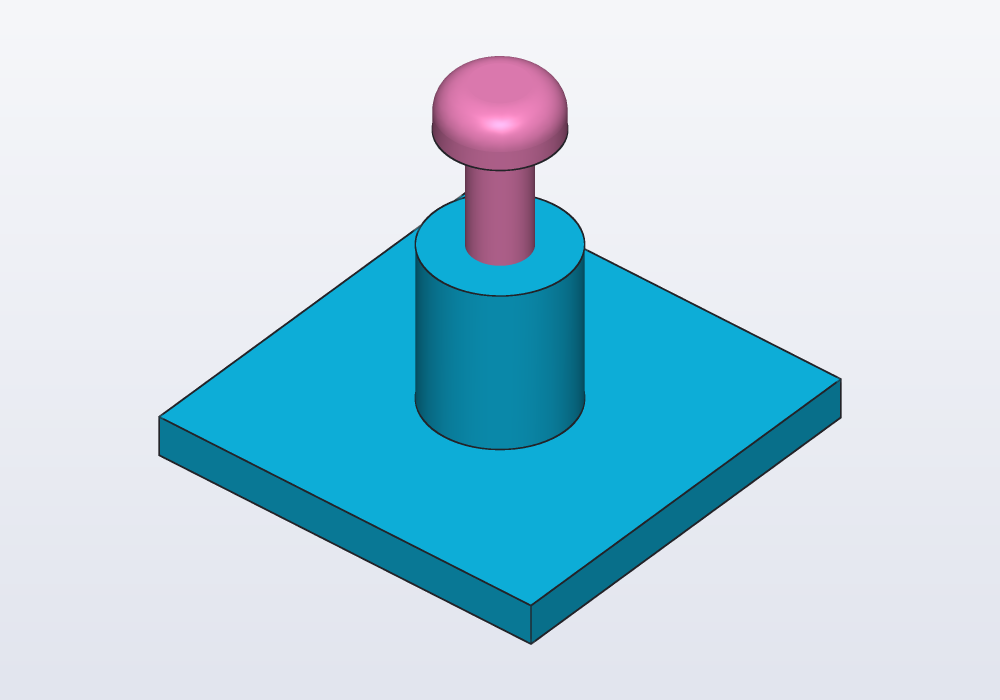
A self-tapping screw cuts its own thread in a plain hole: no nut, no insert. It holds well in printed parts that are opened a few times. ST2_2, ST2_9, ST3_5 and ST4_2 are the ISO 7049 sizes, pan head; their tap is the hole to print, 0.8 of the screw's diameter (a little wider in hard or brittle plastics). Use hole(ST2_9, depth, "tap"), and a boss round it two or three times the screw's diameter across, so the wall does not split.
import std;

// a boss for an ST2.9 self-tapping screw, and the
// screw above it
@part("Sky Pop")
Solid boss() => box(20.mm, 20.mm, 2.mm)
    + cylinder(d: 7.mm, h: 10.mm)
    - hole(ST2_9, 9.mm, "tap").move(z: 10.mm);

@part("Pink Pop")
Solid selfTapper() => screw(ST2_9, 9.5.mm, head: "pan")
    .move(z: 16.mm);
Ribs instead of a thread
A plain tap hole makes the screw cut its thread all the way round: for small screws that takes force, and can split a thin wall. With "ribs" the hole is wide enough for the screw, and three narrow ribs along it, 120° apart, are all the screw has to cut: it forms its thread in them as it goes in, holds well, and goes in easily. For small screws it works better than a printed thread, which comes out too fine.
One rib points to −Y. In a wall, cut with on: a face (whose frame has y going up), that is the rib at the bottom, which prints best when the hole lies sideways; the other two lean over it at 120°. The ribs start 0.6 mm in from the face, so the screw's tip finds the hole before it has to cut. The mouth is chamfered 0.5 mm at 45°, which guides the screw in and takes up the first layers' spread when the hole opens on the bed: chamfer: sets it (chamfer: 0.mm none), and gives any other kind of hole a chamfered mouth too: a counterbore's round the head's recess. A countersink's cone is a chamfer already: one given to it is an error.
// an M3 hole with ribs across a wall, printed lying
// down: one rib at the bottom, two above it

import std;

@part("Sky Pop")
Solid wall()
{
    auto w = box(20.mm, 8.mm, 12.mm, center: true)
        .move(z: 6.mm);
    return w.cut(hole(M3, 8.mm, "ribs"),
        on: faces.farthest(-Y));
}
Aluminium extrusions and T-nuts
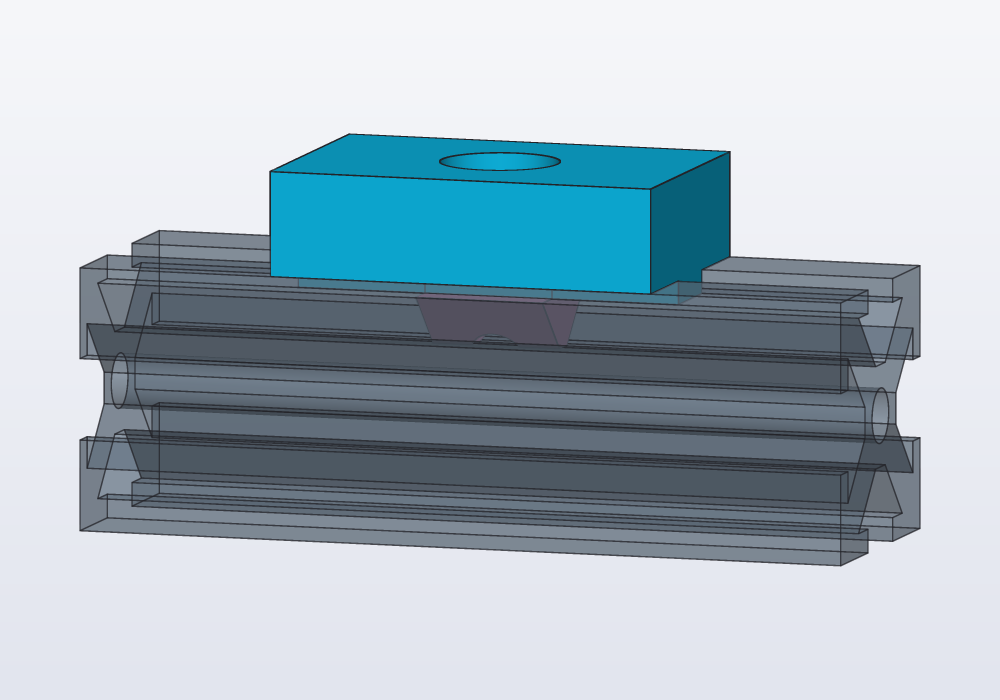
Frames and supports are often built from aluminium extrusions: long square bars with a slot on each side, 20 or 30 mm across (2020, 3030). Parts are screwed to them with T-nuts, which slide into the slot and grip it from behind its lips.
extrusion(series, length)is a length of extrusion (series20 or 30), standing along Z and centred: a reference part to build onto.tNut(series)is a T-nut as it sits in a slot facing up, the extrusion's face on z = 0; its hole is a tap hole for M5 (20 series) or M6 (30 series).slotKey(series, length)is a key to add under a printed part: it drops into the slot and keeps the part square to the bar.extrusionSeries(series)gives the sizes:size,slot(the opening),lip,cavity,depth,bore,screw.
The sizes are the typical ones of the B-type slot; makers differ by a few tenths, so check yours for a tight fit.
import std;

// a printed bracket on a 2020 extrusion: a key in
// the slot, an M5 screw into a T-nut
immutable series = 20;

// the extrusion lying along X, a slot facing up, its
// face on z = 0
@part("slategray", alpha: 0.5, export: false)
Solid rail() => extrusion(series, 60.mm)
    .move(z: -30.mm)
    .rotate(y: -90)
    .move(z: -10.mm);

@part("Sky Pop")
Solid bracket() => box(30.mm, 20.mm, 8.mm)
    + slotKey(series, 30.mm)
    - hole(M5, 8.mm, "counterbore").move(z: 8.mm);

@part("Pink Pop")
Solid nut() => tNut(series);
Teardrops: holes printed sideways
A round hole across a wall that prints standing has a flat-ish roof that sags: the top of the circle leans more than 45° from the vertical, and a printer cannot lay plastic on so little underneath (an overhang). teardrop(d:) is a circle with a 45° point towards +Y, which on a wall is up: it prints without supports. flat: true cuts the point at the circle's top, leaving a short bridge instead; angle: gives another point (3° to 90° from the vertical).
// a wall printed standing: a round hole, a teardrop,
// and a teardrop with its point cut flat

Solid wall() => box(60.mm, 6.mm, 25.mm);

@part("Sky Pop")
Solid holes() => wall()
    .cut(circle(vec(-18.mm, 0.mm), d: 10.mm),
        on: faces.front, through: true)
    .cut(teardrop(d: 10.mm),
        on: faces.front, through: true)
    .cut(teardrop(vec(18.mm, 0.mm), d: 10.mm, flat: true),
        on: faces.front, through: true);
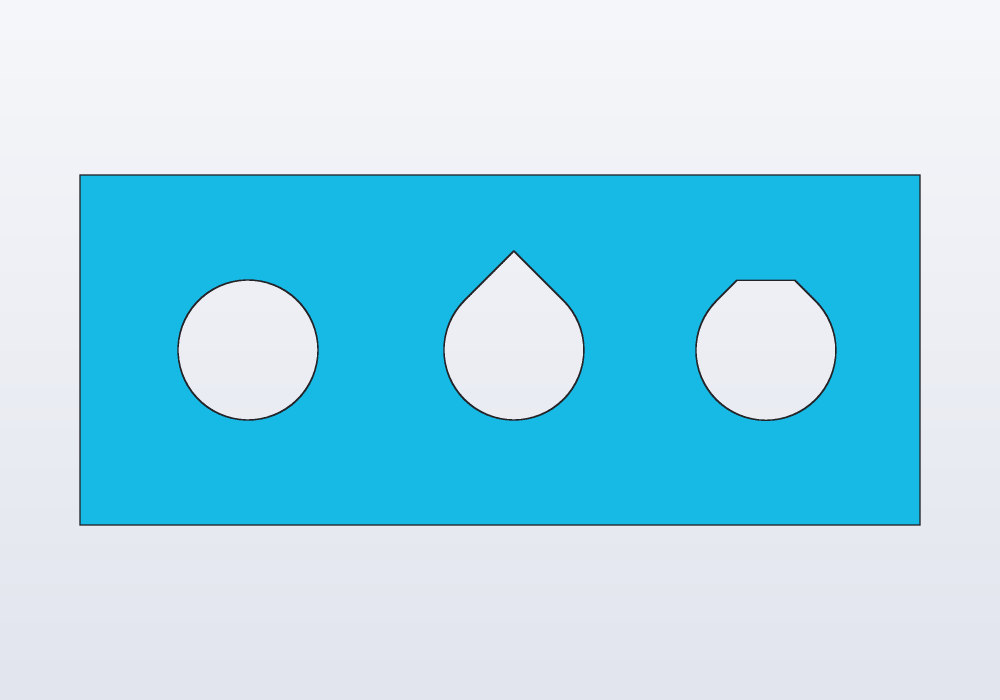
hcad check --printability counts the overhangs: here 72 mm², the round hole's roof and the flat teardrop's short bridge; the plain teardrop adds none. Use a teardrop of M3.clearance for a screw across a wall. hole() itself is always round: for a sideways screw hole, cut teardrop(d: M3.clearance) (or M3.tap) on the face instead. In a sketch the same shape is s.teardrop(c, d: 5.mm).
A worked example: standoffs for a board
A base for a small board with M2.5 holes 58 × 49 mm apart: four posts with heat-set inserts, and two countersunk M3 holes to screw the base down.
// a base for a small board: four standoffs with heat-set
// inserts for its M2.5 screws, and two countersunk M3
// holes to screw the base to a shelf

import std;

@param("Hole spacing along X", min: 20.mm, max: 120.mm)
immutable spanX = 58.mm;

@param("Hole spacing along Y", min: 20.mm, max: 120.mm)
immutable spanY = 49.mm;

immutable base = 3.mm;
immutable post = 6.mm;

@part("Sky Pop")
Solid mount()
{
    auto s = rect(spanX + 30.mm, spanY + 12.mm,
            corner: 4.mm)
        .extrude(base);
    foreach (x; [-spanX / 2, spanX / 2])
        foreach (y; [-spanY / 2, spanY / 2])
        {
            immutable top = base + post;
            s += cylinder(d: 7.mm, h: post)
                .move(x: x, y: y, z: base);

            // the insert, then a pilot hole for the
            // screw's tip
            s -= hole(M2_5, post, "insert")
                .move(x: x, y: y, z: top);
        }

    // flat heads, sunk into the top of the base
    foreach (x; [-spanX / 2 - 9.mm, spanX / 2 + 9.mm])
        s -= hole(M3, base, "countersink")
            .move(x: x, z: base);
    return s;
}

unittest
{
    // the insert sits in the post, not in the base
    assert(M2_5.insertDepth <= post);
}
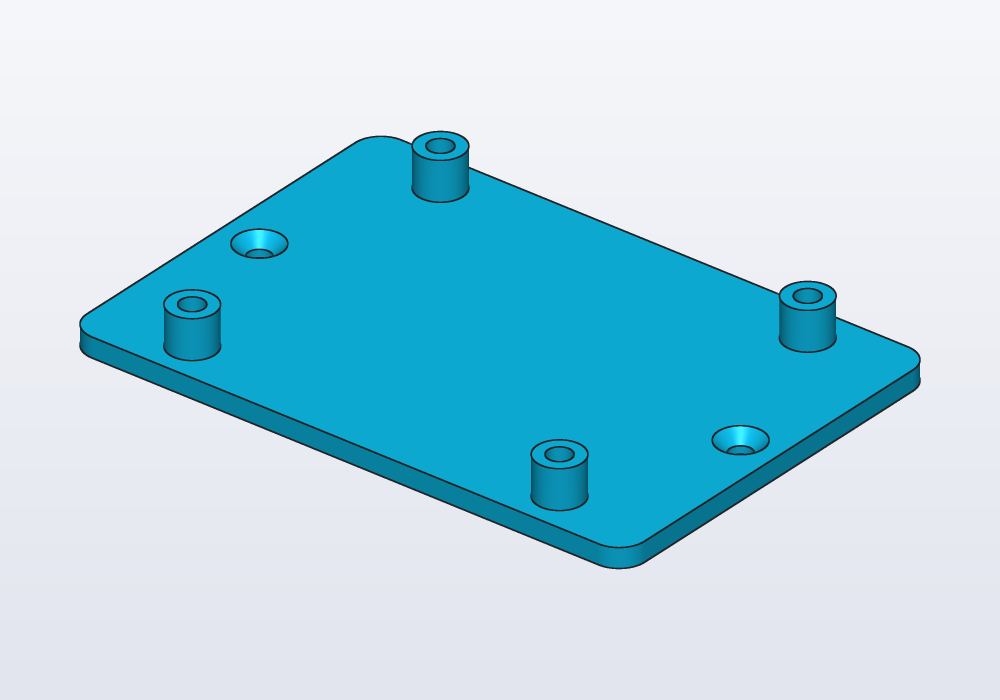
Each post is 7 mm across for a 3.6 mm insert: leave at least 1.5 mm of wall round an insert, or the heat splits the post.
Printing holes
- Printed holes come out a little small, by 0.1 to 0.2 mm on an FDM printer (one that lays down a thread of melted plastic): the clearance sizes (ISO medium, 3.4 mm for M3) leave room for it. For a pin or a shaft, see the guide on fits.
- Self-tapping into a
taphole: three or more perimeters (walls) round the hole, so the thread has plastic to cut. - Heat-set inserts: a straight
inserthole is right for most; push the insert in square, with the iron at the plastic's printing temperature, and stop when it is flush. - Vertical holes print round; horizontal ones want a teardrop; holes in a face that lies on the bed come out clean, those opening downwards in the air need a bridge or supports.
Common errors
| Message or symptom | What to do |
|---|---|
| hole kind must be clearance, tap, insert, counterbore, countersink or ribs, not through | one of those six; for a through hole, a depth equal to the wall |
| hole: the M3 insert is 5.7 mm long, deeper than the hole's 3 mm… | a deeper hole (a taller boss), or a shorter insert's hole of your own: cylinder(d: …); the same for a counterbore's or a countersink's seat |
| module 'hardware' has no public symbol 'M14' | the sizes are M2, M2_5, M3, M4, M5, M6, M8, M10, M12 (and the inch and self-tapping ones); for others write a cylinder |
| ST2.9 is a self-tapping screw: it cuts its own thread in a tap hole, with no nut | nut() and nutTrap() take the metric and inch sizes |
| square nuts (DIN 562) go from M2 to M8, not M10 | a hex nut in a nutTrap for the larger sizes |
| screw: an M3 screw is 1.5 mm long at least… | screw() and setScrew() are at least half their diameter long |
| undefined identifier 'hole' | import std; at the top (or add it to an import std.hardware : … line) |
| the point's angle is from the vertical: between 3° and 90° | a teardrop's angle: out of range |
| the hole is missing, no error | hole() goes down from z = 0: it was not moved up to the face (.move(z: thickness)) |
| the nut trap is on the wrong side | nutTrap goes down from z = 0: flip it with .mirror(Z) to cut from the bottom |
In the application
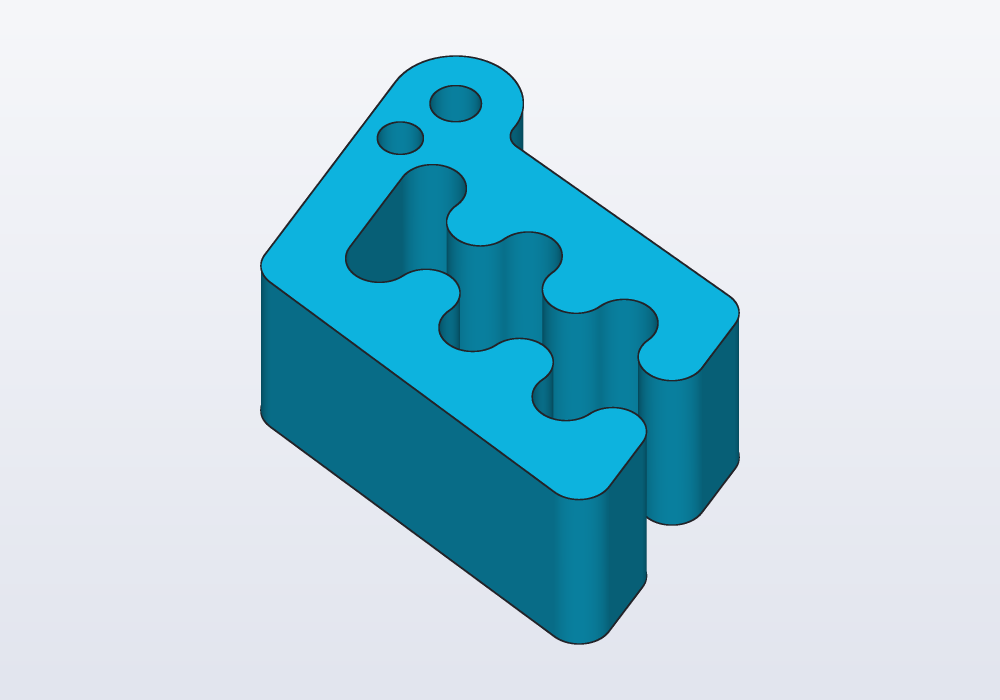
Right-click a face in the 3D view: At this point › Hole opens six groups, Clearance, Tapping, Heat-set insert, Counterbore, Countersink and Ribs, each with the sizes M2 to M12 and the hole's diameter beside them. Clearance and tapping write a plain round hole 5 mm deep at the point clicked, with a comment naming it (any size can be typed over it):
import std;

// what the menu writes on Carlo's top
@part("Sky Pop")
Solid clip() => carlo()

    // M3 clearance hole (through: true goes all the way)
    .cut(circle(d: 3.4.mm), on: faces.top,
        at: vec(-4.mm, 6.mm, 15.mm), depth: 5.mm);
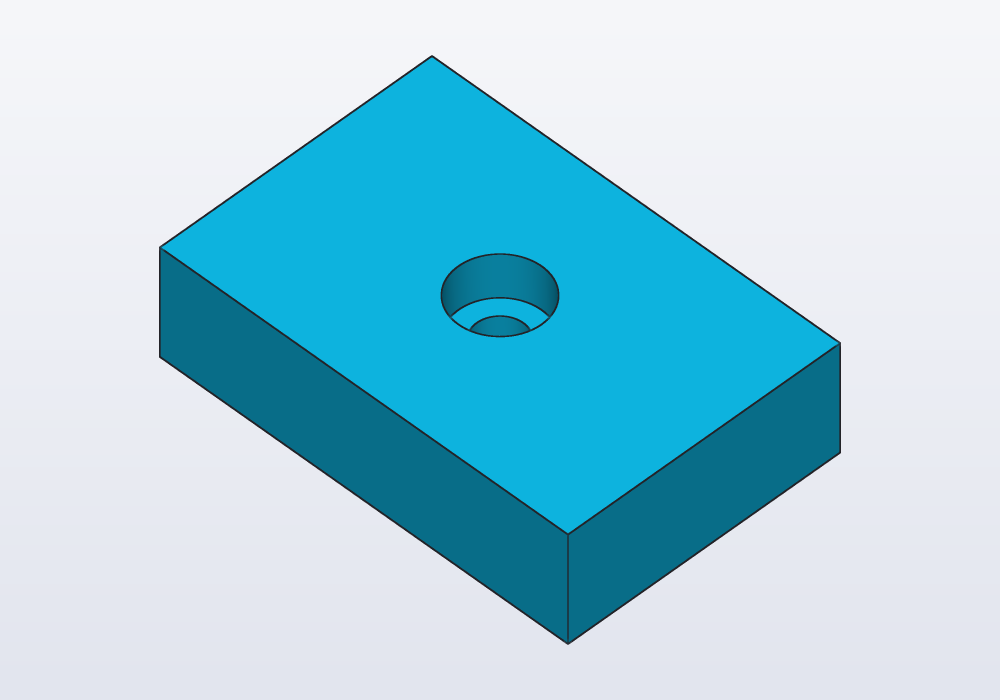
The other four write a hole() of the hardware library, placed on the face, 5 mm deep or as deep as an insert or a head's seat needs (6 mm for an M3 insert), and add import std.hardware : hole, M3; at the top when the model lacks it (nothing with import std;):
import std.hardware : hole, M3;

// a counterbore on a block's top, as the menu writes it
@part("Sky Pop")
Solid block() => box(30.mm, 20.mm, 8.mm)
    .cut(hole(M3, 5.mm, "counterbore"), on: faces.top,
        at: vec(0.mm, 0.mm, 8.mm));
Change the depth there, or write through: true in its place. Pocket… and Boss… beside it cut a rectangle and raise a cylinder the same way. On a cylindrical hole, Surface › Thread (in the hole) lists the threads it is the tap drill of (the guide on threads).
In the sketch view the shape bar has a Teardrop tool: its centre, then a point on its circle. The Printability check box of the display menu marks the overhangs a round hole across a wall leaves.