Sketches in depth
A sketch is a flat outline drawn from points, lines, arcs, circles, ellipses, splines and ready-made shapes, held in place by constraints (rules such as "this line is level" or "these two points are 30 mm apart"), then extruded (pushed up into a solid), revolved (turned round an axis) or cut into a part. This guide is the whole of it and covers sketch(), every constraint, construction geometry, degrees of freedom and their warning, reading the solved sketch back, sketches on the faces of a solid, where a sketch beats shapes added together, and the sketch bar of the application.
New to sketches? Drawing an outline starts gently, on two small parts.
A first sketch
A sketch is an outline told by its sizes and its relations: this side level, that arc touching this line, the hole 5 mm from that edge. hackerscad solves the constraints (it works out where every point must go) and gives the outline as a Profile, a flat outline that extrudes, revolves and cuts like any other. When a @param (a size that can be changed from outside the code) changes, the outline is solved again: arcs that touched a line still touch it, holes stay where they were measured from. For one plain shape, a rectangle with round corners or a circle, a profile in one line is shorter: rect(40.mm, 20.mm, corner: 3.mm) (see the guide on profiles).
An L bracket. Each point is drawn roughly where it goes; the constraints then say what is exact.
// an L bracket: each size of the drawing a dimension

@param("Height", min: 20.mm, max: 80.mm)
immutable height = 40.mm;

Profile outline()
{
    auto s = sketch();

    // one point pinned, or the whole outline floats
    auto o = s.point(0, 0, fixed: true);
    auto a = s.point(60, 0);
    auto b = s.point(60, 6);
    auto c = s.point(6, 6);
    auto d = s.point(6, 40);
    auto e = s.point(0, 40);
    auto l = s.polyline([o, a, b, c, d, e]);
    s.horizontal(l[0]);
    s.vertical(l[1]);
    s.horizontal(l[2]);
    s.vertical(l[3]);
    s.horizontal(l[4]);
    s.vertical(l[5]);
    s.length(l[0], 60.mm);
    s.length(l[5], height);
    s.length(l[1], 6.mm);
    s.length(l[4], 6.mm);

    // the inside corner rounded, against cracking
    s.fillet(c, 4.mm);
    return s.profile;
}

@part
Solid bracket() => outline().extrude(20.mm);
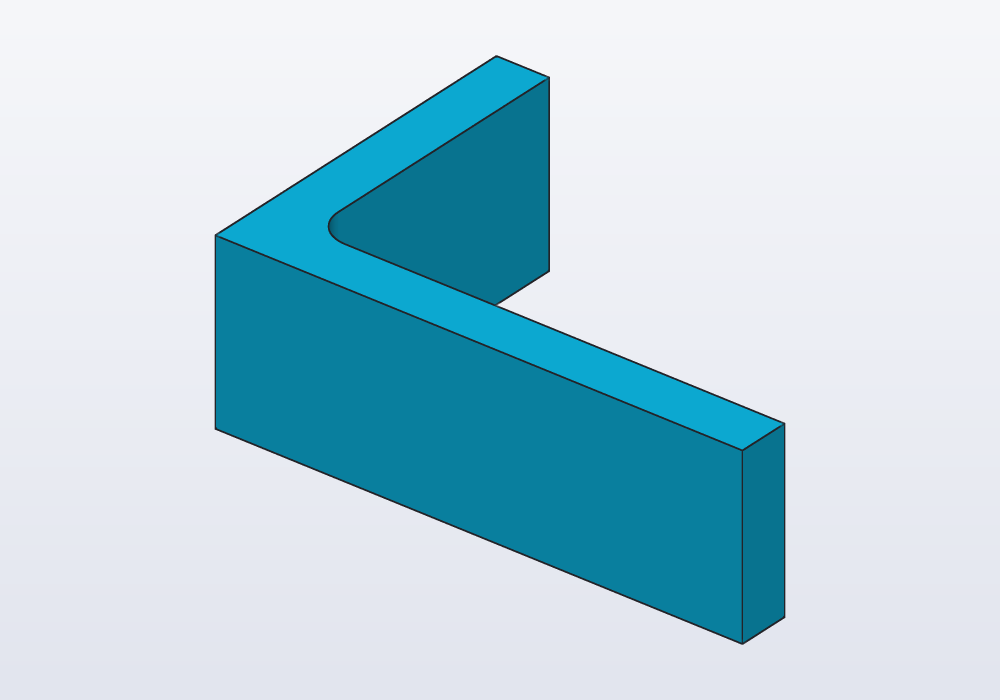
The steps are always the same: sketch(), the geometry, the constraints, s.profile. s.fillet(c, 4.mm) rounds the inside corner at c (a fillet is a rounded corner or edge). s.dof is 0 here: every point is decided. Then the solid takes the 3D features that are not part of the outline: holes, fillets on its edges, a shell (the part hollowed out to walls of one thickness).
The geometry
| Call | Draws | Notes |
|---|---|---|
s.point(x, y) |
a point | where the solver starts from; fixed: true pins it |
s.line(p, q) |
a line between two points | points, or vectors that become new points (to join, pass the previous line's .end) |
s.polyline([p, q, vec(…)], closed: true) |
joined lines, returned as an array | vectors become new points; closes unless closed: false |
s.arc(center, start, end) |
an arc, counter-clockwise | |
s.circle(center, r: \| d:) |
a circle | without r/d the radius is left to the constraints |
s.ellipse(center, rx:, ry:, angle:) |
an ellipse | what is not given is left free, the turn too |
s.spline([p, q, r], closed: false) |
a smooth curve through the points | it bends evenly, like a thin strip; its points move it |
The ready-made shapes have the names and arguments of the profiles. They return their lines (and arcs), with their own constraints already in:
| Shape | Returns | Degrees of freedom left |
|---|---|---|
s.rect(p, q), s.rect(p, w:, h:), s.rect(center: c, w:, h:) |
bottom, right, top, left | 0 with w, h and a fixed corner or centre; w alone, a square |
s.rect(…, angle: 30.deg) / angle: "free" / corner: 3.mm |
turned / turn left to constraints / rounded | |
s.polygon(c, 6, d: 13.mm, fit: "sides") |
its n sides | 1 (the turn) unless angle: or a constraint takes it |
s.polygon([p, q, vec(0, 20)]) |
a closed polyline | |
s.slot(p, q, w:), s.slot(30.mm, 6.mm, center: c) |
line, arc round q, line, arc round p | 0 with p, q fixed and w given |
s.teardrop(c, d:, angle:, flat:) |
arc, line, line (flat: one more) | 0 with c fixed |
Without a centre, s.circle(d: 10.mm), s.rect(40.mm, 20.mm) and the others start from a new point at the origin, free to move. Sizes given to a shape (w, h, r, d, corner…) are dimensions: in the window they show on the sketch and change with a click.
The constraints
| Constraint | What it holds |
|---|---|
s.coincident(p, q) |
two points in one place |
s.fix(p) |
a point pinned where it is (as fixed: true) |
s.horizontal(line), s.horizontal(p, q) |
a level line, or two points at one height (an ellipse: its x axis along X) |
s.vertical(line), s.vertical(p, q) |
an upright line, or one point above the other |
s.length(line, v) |
a line that long |
s.distance(p, q, v) |
two points that far apart; along: X or along: Y only across or up |
s.distance(p, line, v) |
a point that far from a line |
s.on(p, curve) |
a point on a line, circle, arc or ellipse; a shape's lines: every corner on the circle |
s.parallel(a, b), s.perpendicular(a, b) |
two lines |
s.angle(a, b, v), s.angle(line, v) |
between two lines (start → end), or of one from X |
s.equal(a, b) |
lengths or radii; s.equal(e) makes an ellipse round |
s.radius(c, v), s.diameter(c, v) |
a circle or arc that size; s.radius(e, rx:, ry:) an ellipse |
s.tangent(a, b) |
a line touching a circle, arc or ellipse, or two circles; a shape's lines: every side touching |
s.concentric(a, b) |
circles, arcs, ellipses or a point round one centre |
s.midpoint(p, line) |
a point in the middle of a line |
s.symmetric(p, q, line) |
two points mirrored across a line |
s.fillet(p, r) |
not a constraint: the corner where two lines meet at p, rounded |
A distance is never negative: which side a point lies on comes from where it is drawn. Draw the points roughly where they go, and the solver keeps them on that side.
Where a sketch beats unions
A union is shapes added together into one. A lever: two round ends joined by sides tangent to both (touching each round end without crossing it). As unions of circles and boxes, every size of the sides would be worked out by hand, and wrong as soon as the span changes. As a sketch it is its dimensions:
// a lever: two round ends joined by tangent sides

@param("Between the holes", min: 30.mm, max: 120.mm)
immutable span = 60.mm;

Profile lever()
{
    auto s = sketch();
    auto a = s.point(0, 0, fixed: true);
    auto b = s.point(60, 0);

    // each side runs from one end's arc to the other's
    auto p1 = s.point(0, -12);
    auto p2 = s.point(60, -7);
    auto p3 = s.point(60, 7);
    auto p4 = s.point(0, 12);
    auto low = s.line(p1, p2);
    auto right = s.arc(b, p2, p3);
    auto high = s.line(p3, p4);
    auto left = s.arc(a, p4, p1);

    s.horizontal(a, b);
    s.distance(a, b, span);
    s.radius(left, 12.mm);
    s.radius(right, 7.mm);
    s.tangent(low, left);
    s.tangent(low, right);
    s.tangent(high, left);
    s.tangent(high, right);

    // the holes, round the same centres
    s.circle(a, d: 10.mm);
    s.circle(b, d: 5.mm);
    return s.profile;
}

@part
Solid arm() => lever().extrude(5.mm);
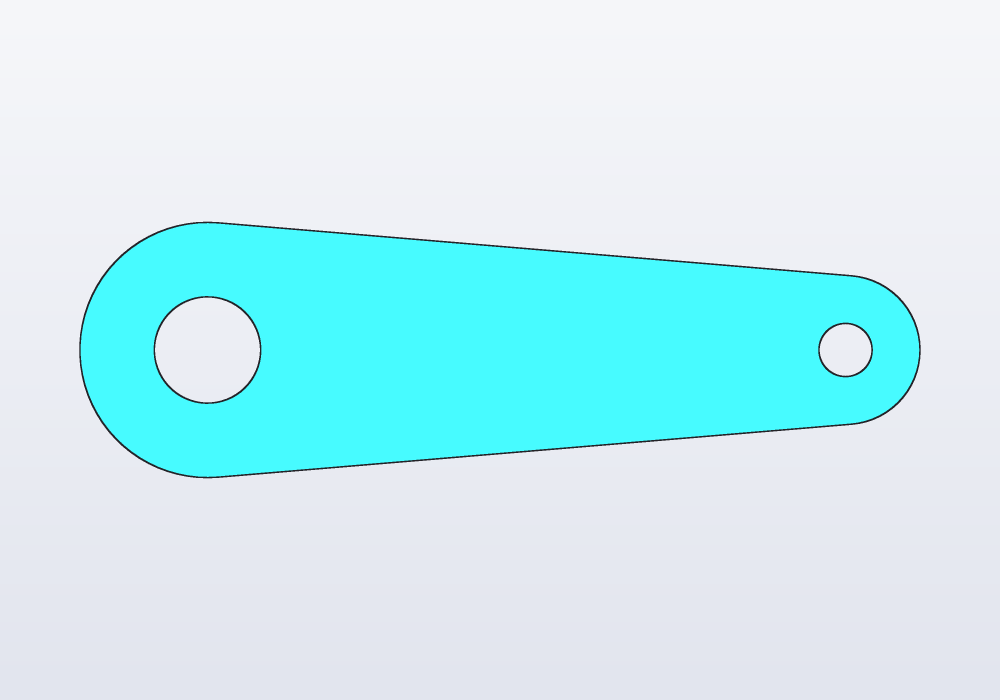
A profile made of more than three shapes, moved by sizes worked out by hand, or rounded with .offset(r).offset(-r), is an outline that wants a sketch: it reads as its dimensions, keeps its tangents when a size changes, and its edges take fillets. The two mix: s.profile - circle(d: 5.mm) is a profile too.
The profile fills what lies inside an odd number of loops: the circles inside the outline are holes. Where more than two lines or arcs meet at a point (a line across a rectangle from side to side, an arc from one corner to another; a line ending on another splits it there), every area they close is full. s.fill(at) makes the area holding a point full whatever the loops say, s.fill(at, full: false) empty.
Construction geometry
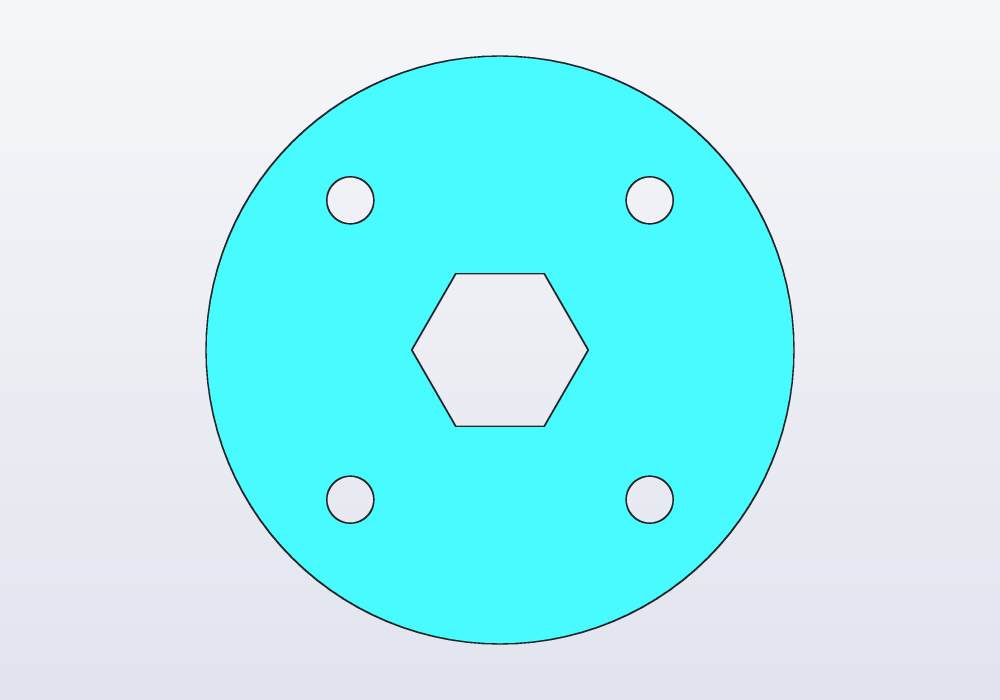
construction: true on any geometry or shape draws a guide: something to constrain to, drawn dashed in the window, never part of the profile. A bolt circle is the classic one: the holes sit on it, and the circle itself is not cut.
// a flange: four holes on a bolt circle, a hexagon
// for a nut

Profile flange()
{
    auto s = sketch();
    auto c = s.point(0, 0, fixed: true);
    s.circle(c, d: 50.mm);

    // the bolt circle is a guide: not cut, not extruded
    auto bolts = s.circle(c, d: 36.mm,
        construction: true);
    auto sq = s.rect(center: c, construction: true);
    s.equal(sq[0], sq[1]);
    s.on(sq, bolts);
    foreach (side; sq)
        s.circle(side.start, d: 4.mm);

    // across the flats, as a spanner measures a nut
    auto nut = s.polygon(c, 6, d: 13.mm, fit: "sides");
    s.horizontal(nut[0]);
    return s.profile;
}

@part
Solid plate() => flange().extrude(4.mm);
Other guides that come up often: a construction diagonal of a rectangle, whose midpoint is its centre; a construction line joining two centres; a construction circle a polygon is inscribed in (s.on(s.polygon(c, 6), circle)) or drawn round (s.tangent(…)).
Offset, trim and extend
s.offset(lines, d) copies lines and arcs end to end d away, their corners joined: a closed outline grows outwards (shrinks inwards with a negative d), and the rounds of its corners come along, d bigger or smaller. Each copied line is held parallel to its own, d from it, so the copy follows when the outline changes: a wall round a shape, a lip inside a lid.
s.trim(line, at: p) takes away the piece of a line between the lines, arcs and circles that cross it, the piece holding p. A piece at an end moves that end to the cut, held on what cuts it (an end joined to another line, as a rectangle's corner, stays with that line, and the trimmed line takes a new end at the cut); a piece in the middle splits the line in two, in line with each other. A line whose length or middle is constrained cannot be trimmed in the code; the sketch bar's ✂ takes those constraints away with the trim, and says so. s.extend(line, to: other) carries a line on, the way it runs, until it meets another line, an arc or a circle. It moves a free end only (joined to nothing else), and keeps it on what it meets.
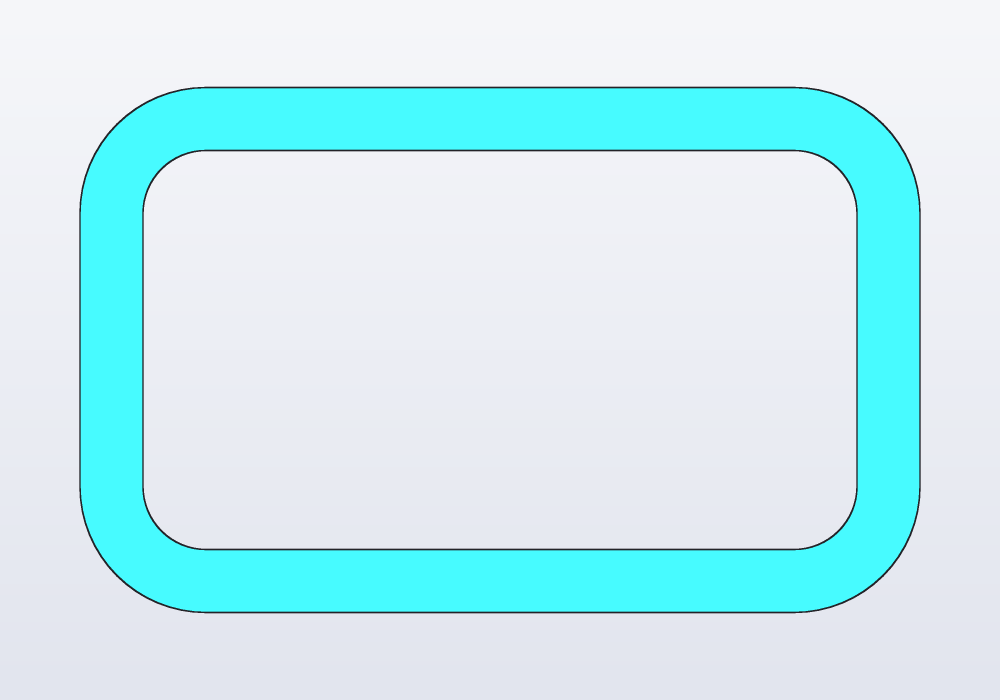
// a frame: a rounded outline and the same 3 mm inside it

Profile frame()
{
    auto s = sketch();
    auto r = s.rect(vec(0.mm, 0.mm), vec(40.mm, 25.mm));
    s.fix(r[0].start);
    s.horizontal(r[0]);
    s.length(r[0], 40.mm);
    s.length(r[1], 25.mm);
    foreach (side; r)
        s.fillet(side.start, 6.mm);
    s.offset(r, -3.mm);
    return s.profile;
}

@part
Solid part() => frame().extrude(2.mm);
Mirrors and patterns
Half an outline is half the constraints: draw one side, then s.mirror(half, axis) copies it across a line of the sketch, usually a construction one. Each new point is held symmetric to its own, so when a dimension of the first half changes, the copy follows; a point on the line is its own image, which joins the two halves. s.pattern(entities, n, step:) repeats geometry in a row, s.circularPattern(entities, n, center:) round a point: holes from one constrained circle, every copy following it.
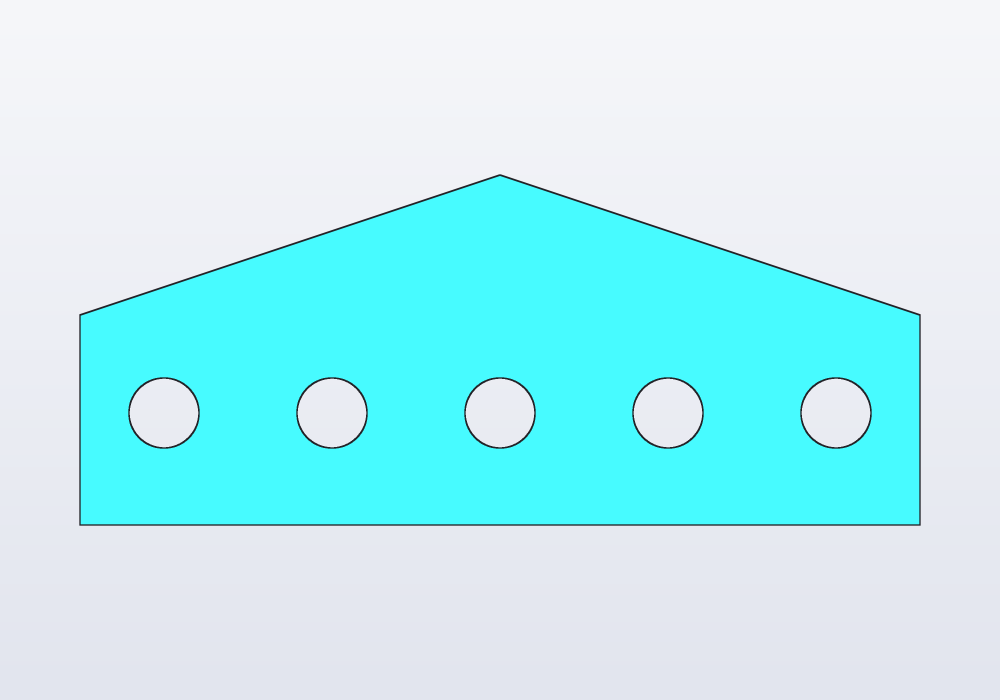
// a plate drawn as half an outline, mirrored, and a row
// of holes from one

Profile plate()
{
    auto s = sketch();
    auto o = s.point(0, 0, fixed: true);
    auto axis = s.line(o, vec(0.mm, 30.mm), construction: true);
    s.vertical(axis);
    s.length(axis, 30.mm);

    // the right half: across, up, and in to the axis
    auto half = s.polyline([o, vec(30.mm, 0.mm),
        vec(30.mm, 15.mm), vec(0.mm, 25.mm)], closed: false);
    s.horizontal(half[0]);
    s.vertical(half[1]);
    s.length(half[0], 30.mm);
    s.length(half[1], 15.mm);
    s.on(half[2].end, axis);
    s.distance(o, half[2].end, 25.mm);
    s.mirror(half, axis);

    // one hole, then four more 12 mm apart
    auto hole = s.circle(vec(-24.mm, 8.mm), d: 5.mm);
    s.distance(o, hole.center, 24.mm, along: X);
    s.distance(o, hole.center, 8.mm, along: Y);
    s.pattern([hole], 5, step: vec(12.mm, 0.mm));
    return s.profile;
}

@part
Solid part() => plate().extrude(3.mm);
Curves: ellipses and splines
s.ellipse(c, rx:, ry:, angle:) has its rx along its own x axis, turned angle from X. s.spline([…]) is a smooth curve through the points, in order; closed: true goes round back to the first, a loop of its own. An open spline's ends join lines and arcs as theirs do. The points move the curve, so constrain them like any other.
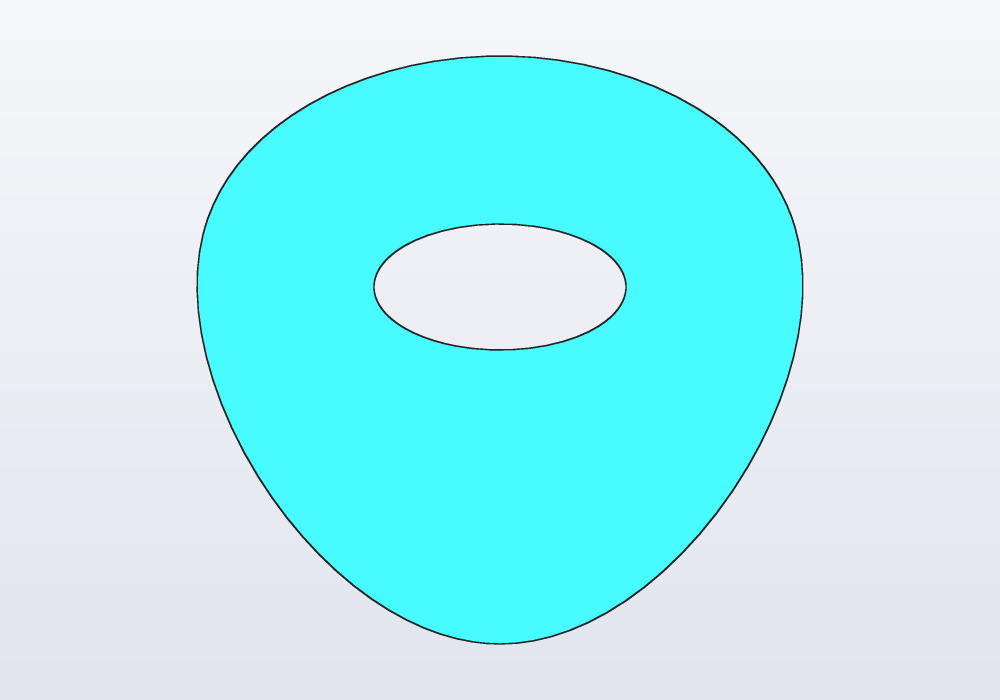
// a guitar pick: a smooth loop through four points,
// with an oval window for the thumb

Profile pick()
{
    auto s = sketch();
    auto tip = s.point(0, 0, fixed: true);
    auto right = s.point(14, 20, fixed: true);
    auto top = s.point(0, 28, fixed: true);
    auto left = s.point(-14, 20, fixed: true);
    s.spline([tip, right, top, left], closed: true);

    auto c = s.point(0, 17, fixed: true);
    s.ellipse(c, rx: 6.mm, ry: 3.mm, angle: 0.deg);
    return s.profile;
}

@part
Solid plectrum() => pick().extrude(1.mm);
Degrees of freedom
Each point has two degrees of freedom (it can move across and up), a circle's radius one, and each constraint takes some away. s.dof is what is left. Aim for 0: an outline with freedom left still works, but the solver chooses where the free points go, and a change of a @param can move them in ways you did not mean. hackerscad says so, with the lines of the free points:
warning[E0420]: the sketch is under-constrained: 1 degree of freedom left (free points at lines 12, 13)
The usual causes: no point pinned (the whole outline can slide: 2 degrees, plus one if it can turn), a size not given, a shape's turn left free (s.polygon without angle:). Constraints that ask for two things that cannot both hold are an error that points at them all:
error[E0420]: the sketch constraints conflict: check the constraints at lines 17, 24, 26
Reading back
Once solved, the sketch can be read: p.x, p.y, p.pos, line.start, line.end, line.length, line.mid, c.center, c.radius, e.center, e.rx, e.ry, e.angle, a spline's .points and .length, and s.dof, s.solved. Use them to place what comes after (a boss on a point the sketch decided), or in a unittest:
assert(s.dof == 0, "every size given");
Beyond s.profile, a sketch gives what it draws as a path to sweep along: s.path (one chain, open or closed), s.paths (several). See the guide on sweeps.
Names on the drawing: tags
A line, circle or arc of the sketch can be given a name, a tag: the face the extrusion makes from it has that name, and faces.tagged("name") finds it later, wherever the part was turned and whatever was cut into it. A point tagged becomes a point of the part, a circle an axis through its centre (Planes, frames and placement shows how to use them).
// a doorstop whose sloping side and base are tagged in the sketch:
// the faces made from them keep the names

@part("Sky Pop")
Solid doorstop()
{
    auto s = sketch();
    auto a = s.point(0, 0, fixed: true);
    auto b = s.point(100, 0);
    auto c = s.point(0, 25);
    auto sides = s.polyline([a, b, c]);
    s.horizontal(sides[0]);
    s.vertical(sides[2]);
    s.length(sides[0], 100.mm);
    s.length(sides[2], 25.mm);

    // the names, on the lines
    sides[0].addTag("base");
    sides[1].addTag("slope");

    // a groove for grip across the slope, and the tip rounded
    return s.profile
        .extrude(40.mm, along: Y)
        .cut(rect(60.mm, 3.mm), on: faces.tagged("slope"), depth: 1.mm)
        .fillet(edges.between(faces.tagged("slope"),
            faces.tagged("base")), r: 1.mm);
}
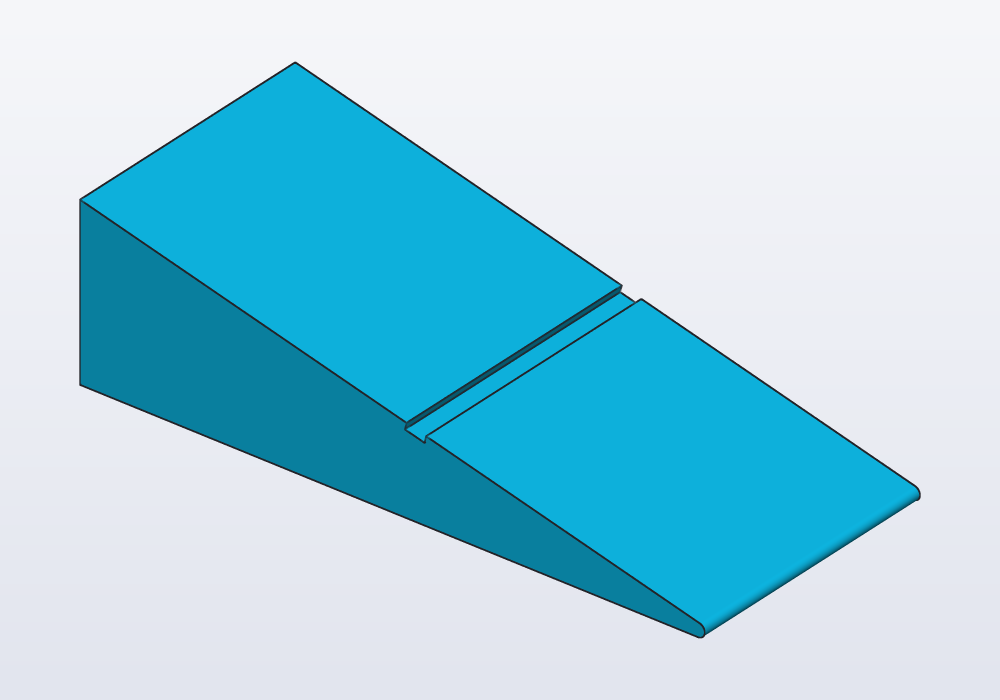
The groove splits the slope in two; both pieces keep the name, and the fillet finds the edge where the slope meets the base. s.addTag("name") tags the whole sketch: its profile, and the solid made from it, have the tag. The names hold when the profile is extruded (also tapered, sheared or twisted) or revolved, and through what is done to the profile first: moved, turned, offset, rounded, joined to another profile or with a hole cut in it. A hull of the profile, a sweep or a loft loses the faces' names, not the points'; looking for such a face then says where its name was lost.
Sketches on faces
body.sketch(face) draws on a flat face of a solid, with the axes of body.frame(face): the origin at the face's centre; on a wall, x to the right and y up seen from outside. The face's edges are in the sketch from the start as references (fixed construction geometry, no degrees of freedom):
s.edgeslists them, each loop from its lowest edge counter-clockwise, like a rectangle's sides (bottom, right, top, left on a rectangular face), the outside loop first;s.originis the origin as a fixed point;s.project(edges.…)flattens other edges of the solid onto the face as references: a hole's rim below it (a circle seen aslant becomes an ellipse).
The profile knows its face: body.cut(s.profile, depth:) and body.extrude(s.profile, depth:) need no on:.
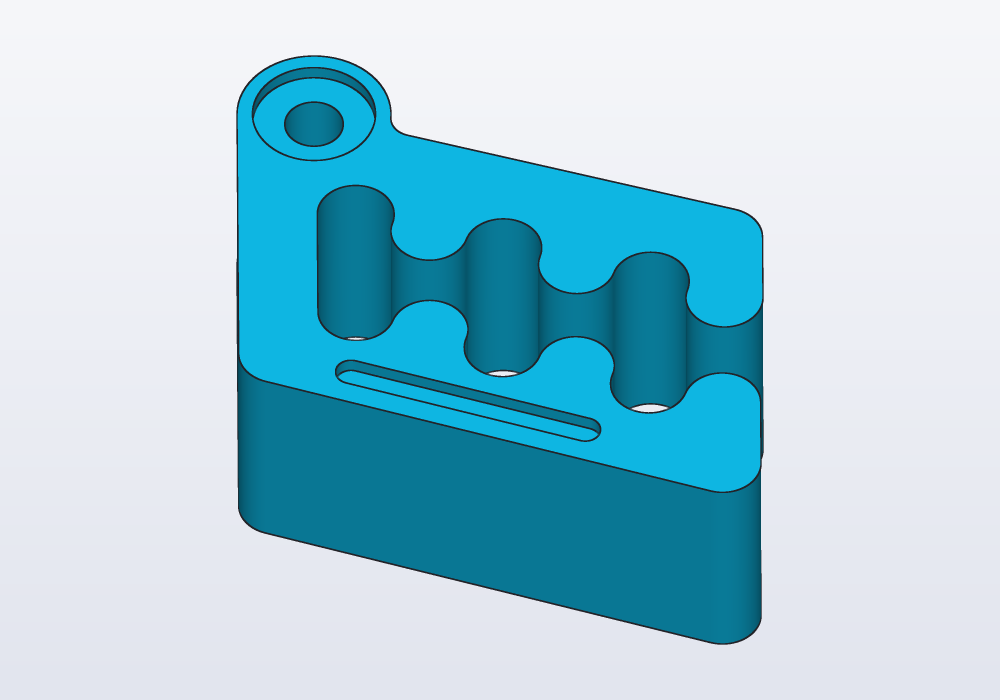
// on Carlo's top face: a groove along its lower edge,
// and a recess round its eye, both placed from the face

import std;

@part
Solid marked()
{
    auto body = carlo();
    auto s = body.sketch(faces.top);

    // the lowest edge first; the eye's rim last
    auto bottom = s.edges[0];
    auto eye = s.edges[$ - 1];

    auto a = s.point(-6, -10);
    auto b = s.point(10, -10);
    auto groove = s.slot(a, b, w: 2.mm);
    s.parallel(groove[0], bottom);
    s.distance(a, bottom, 2.5.mm);
    s.distance(a, b, 16.mm);
    s.distance(a, s.origin, 6.mm, along: X);

    s.circle(eye.center, d: 8.mm);
    return body.cut(s.profile, depth: 1.mm);
}
A rim under the face, made concentric with a boss on top:
@part
Solid block()
{
    auto body = box(30, 20, 10)
        - cylinder(d: 6.mm, h: 5.mm).move(x: 6.mm);
    auto s = body.sketch(faces.top);

    // the blind hole under the top face: its rim
    auto rim = s
        .project(edges.filter(e => e.isCircle))[0];
    auto c = s.circle(vec(6, 0), d: 10.mm);
    s.concentric(c, rim);
    return body.extrude(s.profile, depth: 2.mm);
}
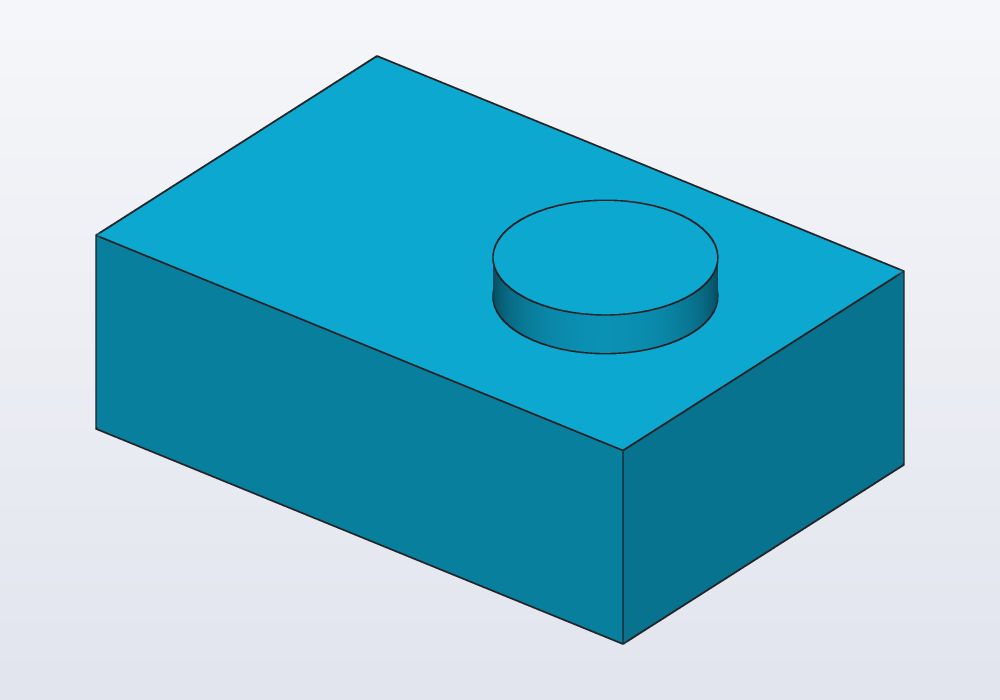
sketch(frame) and sketch(plane) draw on a frame or a plane instead (sketch(XZ): seen from the front), with s.origin and no edges: see the guide on planes. A sketch's profile stays where it was drawn: moved, tiled, hulled or combined with a profile of no place, it stays in its plane; two profiles in different planes do not combine. Turned with revolve, its axis is a world one in that plane: a half outline drawn on sketch(XZ) turns round Z (revolve(axis: Z), or revolve()).
Common errors
| Message | What to do |
|---|---|
| the sketch is under-constrained: N degrees of freedom left (free points at lines …) | add the sizes missing, or pin a point with fixed: true |
| the sketch constraints conflict: check the constraints at lines … | two of them ask the impossible (a line both horizontal and vertical, a size given twice): remove one |
| a distance is not negative: the side comes from where the points are drawn | give the size positive, and draw the point on the side it belongs |
| open: what line N draws has a free end, and stays out of the profile | join its ends to the rest, or make it construction: true if it is a guide |
| expected a sketch point, line, arc, circle or ellipse, not Vec2 | a constraint takes the sketch's points and lines, not vectors: s.distance(a.end, b.start, 10.mm) |
In the application
- The sketch at the cursor. With the cursor in a sketch's code, the view shows that sketch from above, its dimensions on it and what the cursor's line makes in orange; out of it, the model again. The display menu's Show the sketch at the cursor turns this off; the pin in the mode bar keeps the sketch shown when the cursor leaves its code; Esc closes it.
- Dimensions. Each size the code gives is a label on the sketch: click it, type the new value, Enter writes it in the code. Points that can still move are drawn in blue; conflicting dimensions in red.
- Opening a sketch. The view bar's View › Sketches lists the model's sketches (line, dimensions, whether fully constrained); right-click a face made from a sketch: Edit sketch….
- New sketches. Right-click a flat face: Sketch and planes › Sketch on face… keeps the part's solid in a variable and starts an empty sketch on it, its edges as references. View › New sketch… draws on the face or plane picked, or shows the planes and waits for a click on one.
- The sketch bar. While a sketch is shown and its code can be written to (kept in a variable, in the open file, not in a loop), a bar of tools runs down the left of the view. The left column draws: select (↖), point, lines, smooth curve, rectangle (by corners, from its centre, turned), regular polygon, slot, circle, ellipse, teardrop, arc (by centre or through 3 points), fill (◩, an area full or empty), trim (✂, a click on a line takes away its piece there, between what crosses it:
s.trim; a line nothing crosses goes whole; the piece turns red under the pointer first); ⌫ deletes what is selected with what is drawn on it and its constraints; ┄ turns it into construction geometry (with nothing selected, what you draw next). The other column constrains what is selected: coincident, fix, horizontal, vertical, parallel, perpendicular, equal, midpoint, symmetric, tangent, concentric, on, and, asking for a value, length, distance, angle, radius, diameter. Under them it edits the sketch: extend (⇥, a line, then what it is carried on to), offset (⧉, lines and arcs end to end, asking for the distance), mirror (⇆, what to copy, then the line across which), pattern (∷, asking for the count and the step) and circular pattern (✲, what to copy, then the point round which, asking for the count). Each button writes the line into the code; the tooltips say what each needs selected. - Done and Cancel. While a sketch can be edited, the bar at the top of the view has Done, which closes it keeping what was changed, and Cancel, which closes it and puts the code back as it was when the sketch was opened (a new sketch goes away whole); Ctrl+Z brings the changes back. Esc steps back first (what is being drawn, the tool, the selection), then closes the sketch, asking before it throws changes away.