Selectors and features
Rounding, bevelling, hollowing and tapering a solid: fillet, chamfer, shell and draft, and the selectors that say which edges and faces they work on (edges.parallel(Z), faces.top, edges.between(…), faces.from(tool)). How to pick edges so that they stay the right ones when a parameter changes, names (tags) for the faces you come back to, in which order to apply the features, what their errors mean, and how to do the same with the mouse in the 3D view.
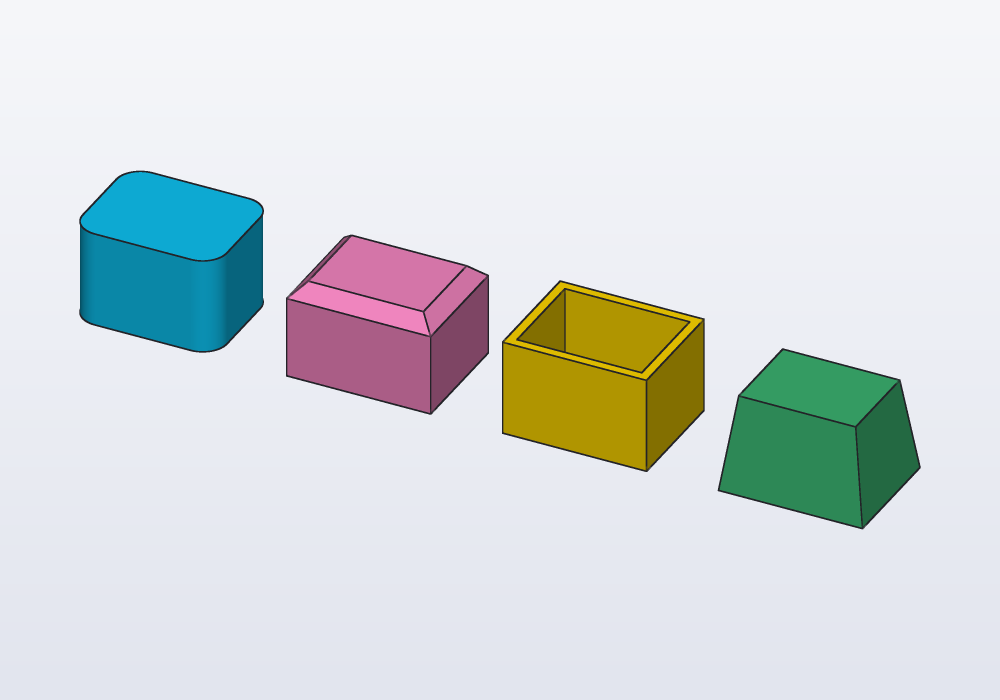
The four features
A feature changes a solid that is already there. A fillet is a rounded edge; a chamfer a bevelled one, cut flat at an angle; a shell hollows the solid out, leaving walls; a draft tilts the sides a little, so that a moulded part slides out of its mould. Each takes a selector, a description of which edges or faces to work on ("the top edges", "the edges along Z"), resolved against that solid at the moment the feature is applied:
| Feature | What it does | Takes |
|---|---|---|
s.fillet(edges, r:) |
rounds edges with an arc of radius r; with r2: from r to r2 along each edge |
edges |
s.removeFaces(faces) |
the solid without those faces, the faces round them closing it again (a hole, a fillet, a boss taken away) | faces |
s.offsetFaces(faces, d:) |
those faces moved out by d (in if negative), the faces round them following; those that carry on from them with no edge between move too |
faces |
s.splitFace(face, by:, tag:) |
one face divided in pieces, the solid unchanged: by an outline drawn on it, a plane or a surface | one face |
s.rib(plane:, from:, to:, thickness:) |
a rib (gusset): the line from → to in the plane is its free edge, filled to the part | a plane, two points |
s.fullRound(faces) |
a flat face between two parallel ones becomes a half round as wide as it | faces |
s.chamfer(edges, d:) |
bevels edges at 45°, d back on each face; uneven with d2: or angle: |
edges |
s.shell(open:, thickness:) |
hollows the solid, the open faces removed, walls thickness thick |
faces |
s.draft(faces, angle:, pull:, neutral:) |
tilts faces so that the part comes out of a mould | faces |
// the same block four ways: fillet, chamfer, shell, draft

Solid block() => box(30.mm, 24.mm, 20.mm);

@part("Sky Pop")
Solid rounded() => block()
    .fillet(edges.parallel(Z), r: 5.mm);

@part("Pink Pop")
Solid bevelled() => block()
    .chamfer(edges.of(faces.top), d: 3.mm)
    .move(x: 45.mm);

@part("gold")
Solid hollow() => block()
    .shell(open: faces.top, thickness: 2.mm)
    .move(x: 90.mm);

@part("mediumseagreen")
Solid tapered() => block()
    .draft(faces.normal(X) + faces.normal(-X)
        + faces.normal(Y) + faces.normal(-Y),
        angle: 8.deg, pull: Z)
    .move(x: 135.mm);
Features work on any shape, not only on boxes. Carlo, the mascot clip, with the rim of its top face rounded, teeth and keyring eye included, and the rim of its bottom face bevelled a little, as is usual for a part printed flat on that face:
import std;

// the top rim rounded, the bottom rim bevelled
@part("Sky Pop")
Solid smooth() => carlo()
    .fillet(edges.loop(faces.top), r: 1.5.mm)
    .chamfer(edges.loop(faces.bottom), d: 0.6.mm);
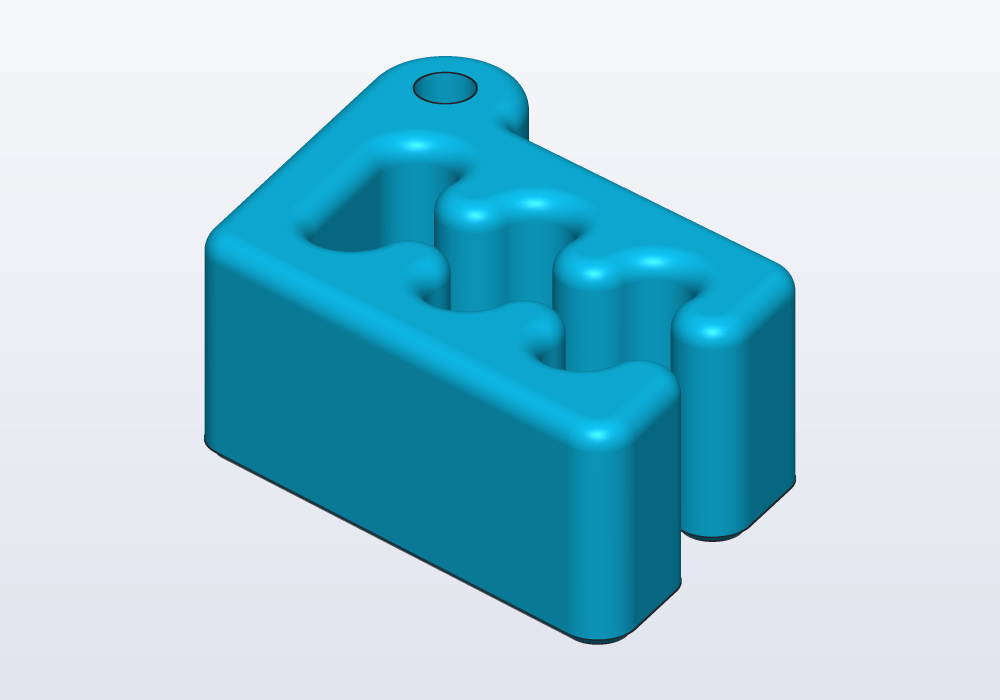
edges.loop(faces.top) is every edge round the outside of the top face: the keyring hole's rim is left sharp.
The parameters
| Parameter | What it does | Default |
|---|---|---|
edges (fillet, chamfer) |
which edges: an edge selector | — |
r: |
the fillet's radius; it must fit on the faces beside the edge | — |
r2: (fillet) |
the radius at each edge's end (e.end), r at its start: a round that grows along the edge |
r |
d: |
how far back the chamfer cuts on each face (with d2: or angle:, on the face on: names) |
— |
d2: (chamfer) |
how far back it cuts on the other face: an uneven chamfer | d |
angle: (chamfer) |
instead of d2:, the bevel's angle from the face on: names (a lead-in at 30°) |
45° |
on: (chamfer) |
with d2: or angle:, the face d is measured on: one face of each edge |
— |
open: (shell) |
the faces taken away: one or several, in one call | — |
thickness: |
the wall left all round, measured inwards | — |
walls:, wallThickness: (shell) |
faces whose walls have a thickness of their own (a thicker floor); lists of both for several, in the same order | — |
outward: (shell) |
true: the walls grow outside the solid, which becomes the hollow inside (a case round a part) |
false |
by: (splitFace) |
a profile drawn on the face, a Plane or a Surface crossing it |
— |
tag: (splitFace) |
names the pieces inside the outline, or on the plane normal's side | none |
faces (draft) |
the faces to tilt | — |
angle: |
how far they lean, between 0 and 90° (moulds use 1–3°) | — |
pull: |
the way the part leaves the mould | Z |
neutral: |
the height, along pull, where the faces keep their place |
0.mm |
Selectors
A solid is bounded by faces (flat or curved patches of its surface) that meet along edges. edges and faces stand alone, without a solid in front: they mean the edges and faces of the solid the feature is applied to. They narrow down by chaining, and combine with + (either), - (the first without the second) and & (both).
| Selector | Picks |
|---|---|
faces.top, .bottom, .left, .right, .front, .back |
the outermost face(s) facing +Z, −Z, −X, +X, −Y, +Y; on a part turned a little, those facing that way the most |
faces.normal(X) |
every face facing +X, outermost or not |
faces.largest |
the largest face (of those selected so far) |
faces.farthest(Z) |
the face whose centre is farthest that way, whichever way it faces: a tilted top |
faces.filter(f => f.area > 100 * 1.mm ^^ 2) |
by a property: center, normal, area |
faces.from(tool) |
the faces a tool or feature made: the walls of holes cut with it |
faces.tagged("lid") |
the faces given that name with addTag (see below) |
edges.parallel(Z), edges.perpendicular(Z) |
straight edges along, or across, an axis (circles lying across it too) |
edges.lines, edges.circles |
straight or circular edges |
edges.of(faces.top) |
every edge round those faces, holes included |
edges.loop(faces.top) |
only the outer rim of each face, not the edges round its holes |
edges.between(a, b) |
the edges where a face of a meets a face of b |
edges.chain(e) |
those edges and every edge running on from them without a corner |
edges.from(tool) |
edges between two faces both made by the tool |
edges.filter(e => e.isCircle && e.radius == 3.mm) |
by a property: start, end, mid, direction, length, isLine, isCircle, isParallel(axis), isPerpendicular(axis); for circles center, axis, radius |
A face selector where edges are expected is an error that says so: fillet(faces.top, …) must be fillet(edges.of(faces.top), …).
Select by provenance, not by position
Provenance is where something came from. Every face remembers the tool or feature that made it. faces.from(tool) picks those faces, and edges.between(faces.from(a), faces.from(b)) the edges where two pieces meet. A selector written this way follows the model when a parameter changes: the post below can be any height, and the fillet stays where the post meets the plate.
// a post on a plate, rounded where they meet

@param("Height of the post", min: 10.mm, max: 60.mm)
immutable height = 30.mm;

@part
Solid post()
{
    auto plate = box(60.mm, 40.mm, 5.mm);
    auto upright = box(12.mm, 20.mm, height)
        .move(x: -10.mm, z: 5.mm);
    auto holes = cylinder(d: 5.mm, h: 20.mm, center: true)
        .linearPattern(2, step: vec(0.mm, 24.mm, 0.mm))
        .move(x: 18.mm, y: -12.mm);

    // the edges where the two meet, by where they came from
    auto body = (plate + upright)
        .fillet(edges.between(faces.from(upright),
            faces.from(plate)), r: 3.mm);

    // holes after the fillets; then their rims on top
    return (body - holes)
        .chamfer(edges.between(faces.from(holes),
            faces.normal(Z)), d: 0.8.mm);
}
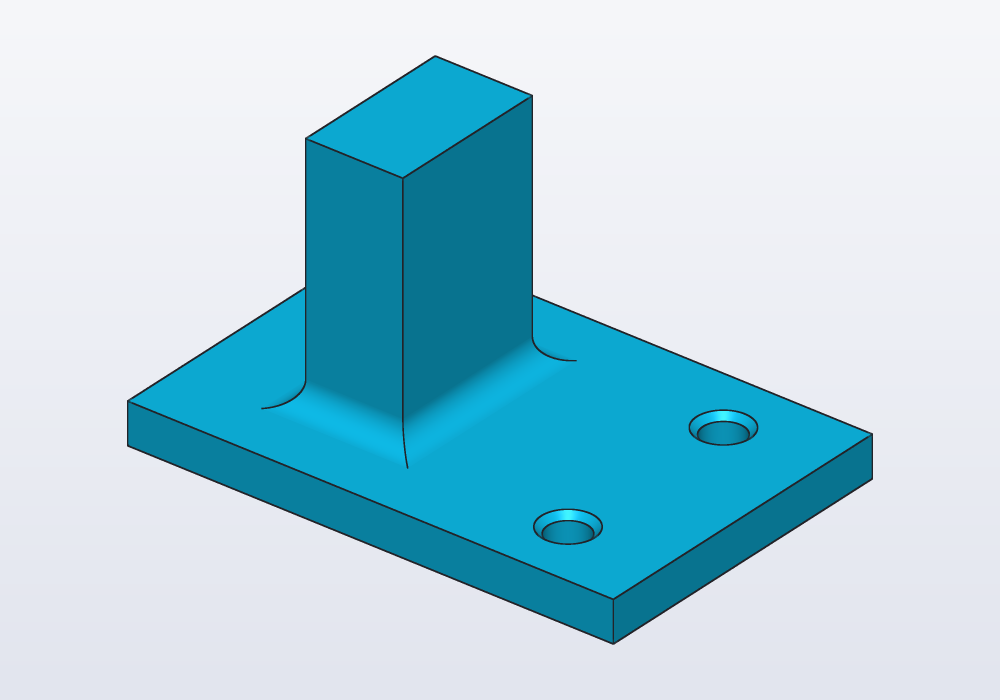
Position-based selectors break in quiet ways:
edges.filter(e => e.mid.z == 5.mm)would also catch the plate's outer top edges and the holes' rims, which lie at the same height; and it stops matching when the plate's thickness changes.faces.topis the highest face. Here it is the top of the post, not of the plate:edges.between(faces.from(holes), faces.top)matches nothing.faces.normal(Z)takes every face facing up; a curved face facing up on the whole (a dome) counts too, a cylinder's whole side faces no way.
Keep the tool in a variable. Provenance belongs to one value: auto holes = …; body - holes; faces.from(holes) reads best, and so does a module-level immutable holes = …. A function called twice, body - holes() then faces.from(holes()), makes a second tool; it still finds the faces, by the lines of code that made them, but the variable says plainly which tool it is.
Names for faces: tags
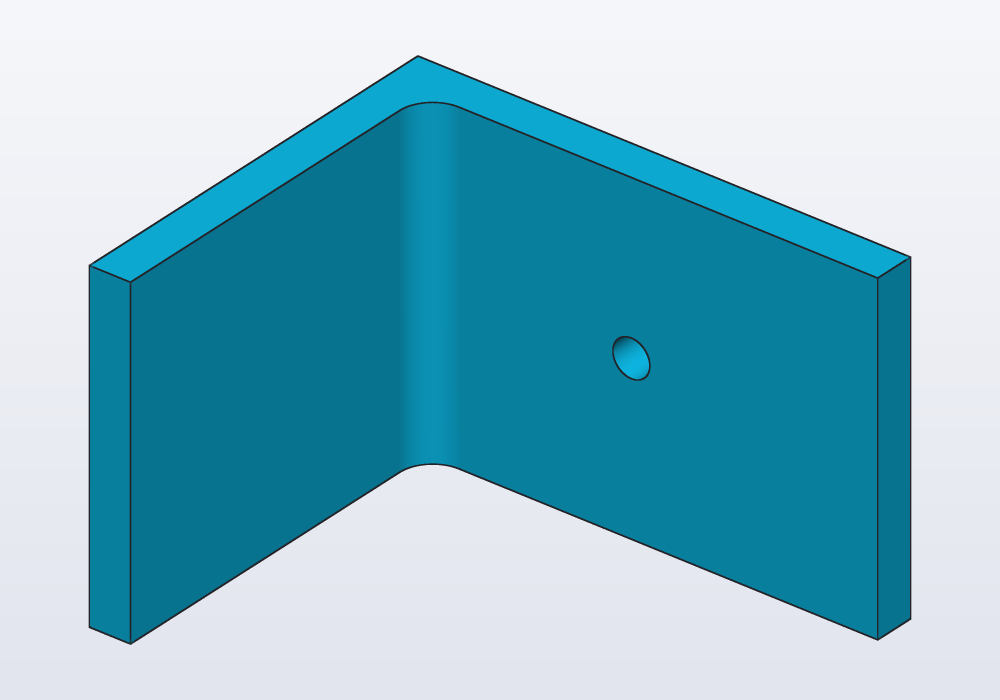
A face you will come back to can be given a name, a tag, where it is made: upright.faces.back.addTag("wall"). faces.tagged("wall") finds it later, wherever the part was turned or moved since, and whatever was done to it: cut, rounded, joined to another part. Where faces.back would now pick another face, the tag still picks this one.
// a shelf bracket, built standing, laid on its side to print;
// the faces that matter found by name wherever they end up

@part("Sky Pop")
Solid bracket()
{
    // the upright and the arm, the faces that matter tagged as they are made
    auto upright = box(40.mm, 5.mm, 60.mm);
    upright.faces.back.addTag("wall");
    upright.faces.front.addTag("inside");
    auto arm = box(40.mm, 45.mm, 5.mm)
        .move(y: -25.mm);
    arm.faces.top.addTag("shelf");

    // on its side to print: top, front and back are other faces now
    auto b = (upright + arm)
        .rotate(y: 90);

    // the corner rounded and a screw hole in the wall face, by name
    return b
        .fillet(edges.between(faces.tagged("inside"),
            faces.tagged("shelf")), r: 4.mm)
        .cut(circle(d: 4.5.mm), on: faces.tagged("wall"),
            through: true);
}
b.facesare the faces ofb, to select some of:b.faces.top.addTag("lid").addTagchangesb(asb = …would) and gives the solid back, so it fits in a chain too:auto b = box(…).faces.top.addTag("lid");.- A face keeps its tags through what changes it: split in two, both pieces have them; two faces joined into one (two blocks side by side), it has the tags of both. Faces made new (a fillet's round, a hole's wall) have none.
- Tag a tool whole with
recursive: trueand the faces it leaves in the part have its tag:body - drill.addTag("bore", recursive: true), thenfaces.tagged("bore")is the hole's wall. - A face can have several tags (
addTag(["lid", "seat"]));removeTag("seat")andclearTags()take them off;b.faces.top.tagslists them. - Name a face for what it does (
wall,shelf,seat,grip), not for where it is:topwould be wrong as soon as the part lies on its side.
Several tags at once: faces.tagged("lid").tagged("left") is the faces that have both, faces.tagged(["lid", "seat"]) those with either.
The libraries' tags
The libraries tag what you are likely to come back to. Their tags start with the library's name and a dot, hardware.bore: a tag with a dot can only be given in the module of that name, so a library's tags and yours never mix (in a module of your own, module hook;, yours can be hook.end).
| Library | Faces | Points and axes |
|---|---|---|
hardware |
hardware.bore every face of a hole(), which stays on the hole's wall in the part; hardware.seat a counterbore's or countersink's, where the head sits |
hardware.axis the axis of a hole, screw, nut or washer |
gears |
gears.bore the bore's wall |
gears.axis; a rack's pitch line gears.pitch |
hinges |
hinges.pin the holes for a pinHinge's pin |
hinges.axis on both leaves, the axis they turn round |
enclosures |
enclosures.rim where the lid rests, enclosures.floor the inside bottom, enclosures.lip the lid's lip |
|
joints |
joints.cut the faces left in the cut's plane, on each piece |
joints.plane the plane of the cut |
molds |
molds.cavity the hollow, molds.parting the faces on the parting plane, molds.sprue the pour hole |
// the rims of the holes on the top, chamfered, the counterbores left as they are
plate = plate.chamfer(edges.between(faces.tagged("hardware.bore")
    - faces.tagged("hardware.seat"), faces.top), d: 0.4.mm);
Two parts from the same library have the same tags. Tag each whole with a name of yours before joining them, and look for both: auto left = pinHinge().fixed.addTag("left", recursive: true);, then faces.tagged("left").tagged("hinges.pin"). With two holes or two gears in one part, body.axis("hardware.axis") finds two and says so: take it from the hole before you cut it, hole(M3, 5.mm).move(…).axis("hardware.axis").
Points, axes and planes can be tagged too, and follow the part the same way: see Planes, frames and placement. In a sketch, a line or circle tagged gives its tag to the face made from it: see Sketches in depth.
The order of operations
Build in the order a machine would, and the features stay simple:
- the main shape (a sketch extruded, primitives united);
- fillets and chamfers on its outside edges;
shell, so that the walls follow the rounded outside;- holes, pockets and slots;
- the small chamfers on what the cuts left, picked by provenance.
Fillets before shell give walls of even thickness: the inside follows the outside at a smaller radius. Rounded after the shell, the inside corners get the same radius as the outside ones and the walls thicken there:
// rounded then hollowed; hollowed then rounded

Solid block() => box(40.mm, 30.mm, 20.mm);

@part("Sky Pop")
Solid filletFirst() => block()
    .fillet(edges.parallel(Z), r: 6.mm)
    .shell(open: faces.top, thickness: 2.mm);

@part("Pink Pop")
Solid shellFirst() => block()
    .shell(open: faces.top, thickness: 2.mm)
    .fillet(edges.parallel(Z), r: 6.mm)
    .move(x: 55.mm);
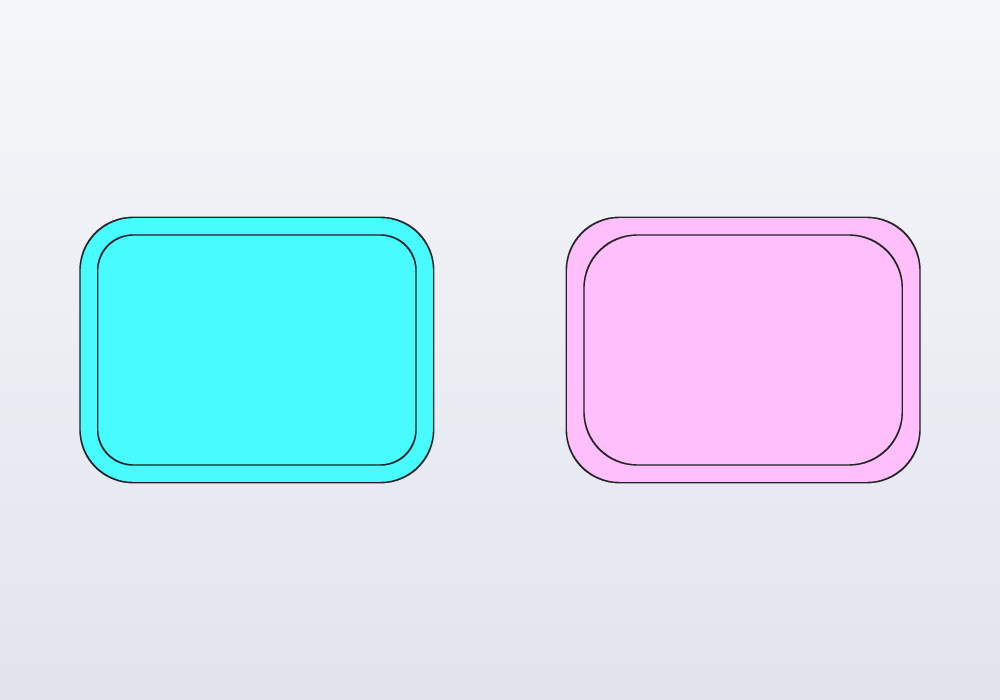
Fillets before holes, because a hole near an edge narrows the faces a fillet needs room on, and because edges.of(faces.top) taken after the holes also takes their rims.
Changing a solid you did not build
A mesh or STEP loaded with load, or a part from a library, has no code to edit: its features are changed on its faces. removeFaces takes faces away and heals the solid, the faces round them grown or cut back until they close it again: a hole's wall, a fillet's face, a boss and its top. offsetFaces moves faces along their normals and the faces round them follow: a step higher, a wall thicker, a hole wider (its wall moved out of the hole: a negative d).
import std;

// a block with a hole through it, and the same block healed
immutable hole = cylinder(d: 8.mm, h: 30.mm, center: true).move(z: 10.mm);
immutable drilled = box(20.mm, 20.mm, 20.mm) - hole;

@part
Solid whole() => drilled.removeFaces(faces.from(hole));

// the hole 4 mm wider
@part
Solid wider() => drilled
    .offsetFaces(faces.from(hole), d: -2.mm)
    .move(x: 30.mm);
A Solid is always closed: when the faces round a gap can never meet (a box's walls without its lid), removeFaces is an error, not an open solid. open: true leaves the gap on purpose and gives a Surface, to close with fill and sew or to make a solid with thicken.
Dividing a face
A feature works on whole faces. To work on part of one (raise a label on a plate, round only the front of a top, colour a band round a can), divide it first: splitFace cuts one face into pieces without changing the solid. Draw the zone on the face with a sketch, or cut it with a plane or a surface; tag: names the pieces inside the outline, or on the side the plane's normal points to, and the features that follow take them by that name:
// a label on a plate: the zone drawn on the top,
// divided off, then raised alone

immutable plate = box(60.mm, 40.mm, 5.mm);

Solid marked()
{
    auto s = plate.sketch(faces.top);
    auto r = s.rect(vec(-15.mm, -8.mm), vec(15.mm, 8.mm),
        corner: 3.mm);
    s.fix(r[0].start);
    s.fix(r[2].start);
    return plate.splitFace(faces.top, by: s.profile,
        tag: "label");
}

@part("Sky Pop")
Solid raised() => marked()
    .extrude(faces.tagged("label"), depth: 1.mm);
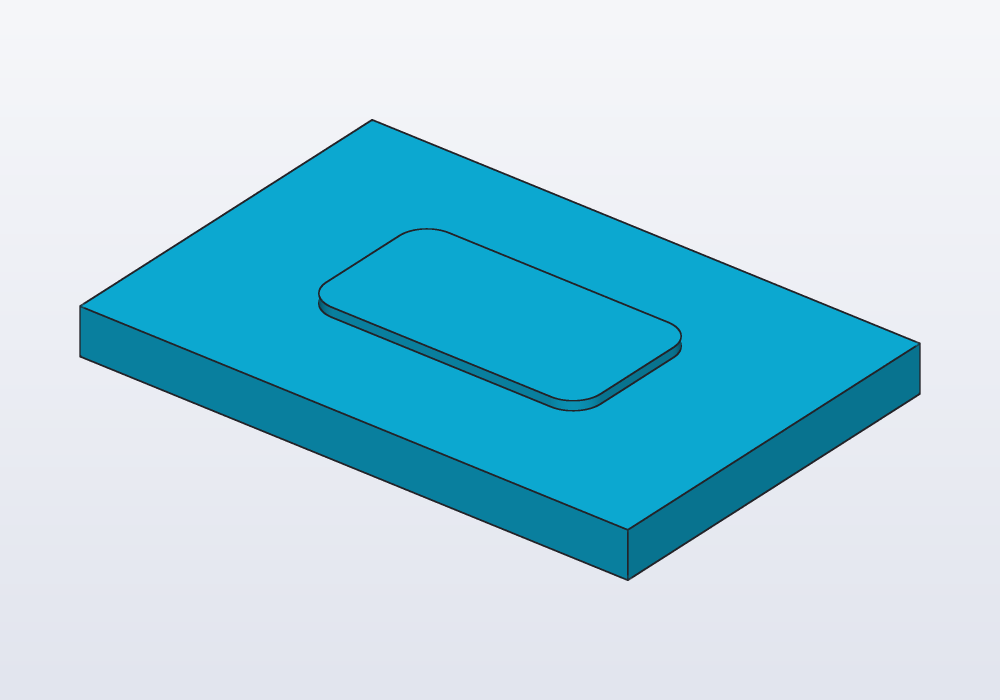
The outline must lie on the face (draw it with body.sketch(face)), and a plane or a surface must cross the face from one edge to another. A curved face that closes round on itself, a cylinder's side, has a seam where it joins: dividing it, the piece across the seam comes in two faces, both tagged.
A piece of a flat face takes every feature a flat face does: raise or sink it (extrude, cut), round or bevel its new edges. A piece of a curved face (a band round a can) can be raised or sunk along its normal (extrude(faces.tagged("band"), depth: 1.mm): a ring; cut(…): a groove), and takes the features that work on a curved face as it is: knurl (a grip on the band only), cut(profile, wrap: …) (a label laid on it) and thread. Its new edges, where it carries on smoothly into the rest of the face, cannot be rounded.
In the view, the lines where a face was divided are drawn fainter than the edges, as are those where a fillet meets the faces beside it: the pieces show without being taken for corners.
Common errors
| Message | What it means, what to do |
|---|---|
| the selector matched no edges on this solid | nothing fits: a face that is not where you think (faces.top is the highest face), a tool that never cut this solid, a filter on a position that moved |
| no face of this solid is tagged 'shelff'; did you mean 'shelf'? | a tag misspelt, or given to another solid: the message lists the tags there are |
| addTag: the tag would be lost, as 'base' cannot change | the solid is immutable (or in no variable): tag it where it is made, immutable base = box(…).addTag("name") |
| fillet failed on the straight edge at (0, -15, 3)… a face beside them is only 3 mm wide there, and a fillet of r 5 needs that much room on it | the radius is larger than a face next to the edge: a smaller r, or fillet before the cut that narrowed the face |
| fillet failed: each of the 4 edges takes it on its own, not all together | each edge alone works, but where they meet the rounds do not close: fillet them in groups, or a smaller r |
| 'edges' must be a edge selector (e.g. edges.parallel(Z)), not FaceSelector | a face selector where edges are wanted: edges.of(faces.top) |
| a wall of 20 mm leaves nothing inside a part 10 mm thin | the shell's thickness is too large for the part |
| every face is open: nothing would be left to make the walls of | open: takes some faces, not all |
| the draft angle goes from 0 to 90° (either way), both excluded | a draft of 0° or 90° |
| the kernel could not draft these faces | a smaller angle, or fewer faces at a time |
| splitFace: the outline does not lie on the face | the profile is elsewhere: draw it with body.sketch(face), on that face |
| splitFace: it does not cross the face | the plane or surface misses it, or stops inside it: it must run from edge to edge |
In the application
What a click picks is set by the four buttons in the view's bar: parts (Alt+1), faces (Alt+2), edges (Alt+3), vertices (Alt+4). Every click adds to the selection, a second click on the same item takes it away; a left drag selects by a box (from right to left, what it touches too). Clicking a face also shows, in the editor, the line of the feature that made it.
Right-click the selection:
- Fillet edge…, Chamfer edge… on edges (Fillet 3 edges… with several), and Select the chain, which grows the selection along edges running on without a corner (
edges.chain). - Fillet edge, growing… writes a fillet whose radius goes from
rat one end of the edge tor2:at the other; Chamfer, uneven › Two distances… or Distance and angle… (on an edge clicked on a face) writes a chamfer measured from that face, withd2:orangle:. - On faces the entries come in groups. Edges: Fillet face edges…, Chamfer face edges…, Full round (a face between two parallel faces made a half cylinder) and Select its outer edges (
edges.loop). Push and pull: Extrude face…, Cut face… (a curved face along its normal), Offset face… (moved by a distance, the faces round it following), Draft face… and Remove face (heal) (taken away, the solid closed round the gap: a hole or a boss disappears; a face the solid cannot close without gives an error). Hollow: Shell, opening this face… and Shell outwards… (the walls grow outside the part, which keeps its inside). Surface: Knurl (diamond, straight or diagonal: the grip on that face alone), Thread on a cylinder (the sizes that fit it), and Split face › Across X, Y or Z, which divides the face under the click by a plane through the point clicked (splitFace): its pieces can then be picked one by one. At this point: a Hole for a screw, a Pocket…, a Boss… or a Text (engraved or raised; laid round a curved face) where you clicked. Sketch and planes: Sketch on face…, Plane on face…. On a flat face, Lay on the bed, this face down turns and moves the part so that face rests on z = 0, ready to print (placeOn(XY, from: face)). - With items of several parts selected, the same entries act on each part in turn (Fillet edges on 2 parts…).
- Tag face… writes
.faces.….addTag("name")with the name selected to type over; from then on, clicking that face shows its tags, and every entry above picks it by its tag. - Copy as code › Face selector or Edge selector puts a selector for what is selected on the clipboard.
Each entry writes the feature into the part's code with a value to change (1 mm for a fillet, growing to 3 mm, 1 mm and 0.5 mm or 30° for an uneven chamfer, 2 mm for a shell, 3° for a draft, 1 mm for an offset). The selector it writes picks the clicked items by name or position (faces.top, edges.of(faces.top).parallel(X), or a filter on a point when nothing shorter fits): it is right for the model as it is now. Where the part's sizes are parameters, rewrite it by provenance before relying on it, or tag the face where it is made: a tagged face is always written by its tag.