Patterns, textures and noise
Many copies of one thing: a row, a ring, a grid, a mirror image; layouts the plain patterns cannot make, written as loops; surfaces with a texture, ribbed or bumpy, from noise, loopNoise and loft through rings of points; tilings, honeycombs, Voronoi cells or a tile of your own, for grilles, pockets and reliefs; how to keep them quick to evaluate, and when a pattern belongs in a library.
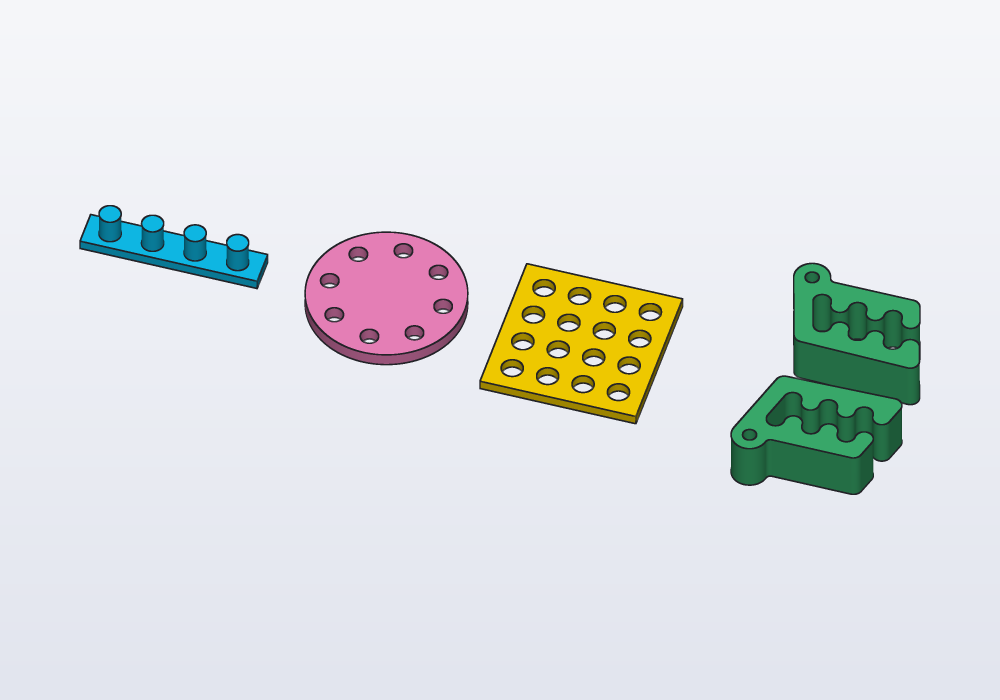
A pattern is one shape repeated: linearPattern copies it along a straight line at an even step (with n2: and step2:, in a grid), circularPattern round an axis at even angles, pathPattern along any path, turning as it turns, mirror reflects it across a plane. Copies that change from one to the next, or skip some places, are a loop (below).
A pattern gives one solid with all the copies. Add it to a part to put pegs on it; subtract it to cut all the holes at once.
// a row, a ring, a grid and a mirror

import std;

@part("Sky Pop")
Solid row() => box(50.mm, 10.mm, 3.mm)
    + cylinder(d: 6.mm, h: 8.mm)
        .linearPattern(4, step: vec(12.mm, 0.mm, 0.mm))
        .move(x: -18.mm, z: 3.mm);

@part("Pink Pop")
Solid ring() => (cylinder(d: 44.mm, h: 4.mm)
        - cylinder(d: 5.mm, h: 10.mm, center: true)
            .move(x: 16.mm)
            .circularPattern(8))
    .move(x: 60.mm);

@part("gold")
Solid grid() => (box(44.mm, 44.mm, 3.mm)
        - cylinder(d: 6.mm, h: 10.mm, center: true)
            .linearPattern(4, step: vec(10.mm, 0.mm, 0.mm),
                n2: 4, step2: vec(0.mm, 10.mm, 0.mm))
            .move(x: -15.mm, y: -15.mm))
    .move(x: 115.mm);

// Carlo and its mirror image across the plane y = 0
@part("mediumseagreen")
Solid pair() => (carlo().move(y: 18.mm)
        + carlo().move(y: 18.mm).mirror(Y))
    .move(x: 175.mm);
Mind the brackets: a chained call belongs to what stands right before it. In plate - holes.circularPattern(8).move(x: 60.mm) the last move moves the holes away from the plate, not the plate; bracket the subtraction first, as above.
The parameters
| Call | Parameter | What it does | Default |
|---|---|---|---|
linearPattern |
n |
how many copies, the first where the solid is | — |
step: |
from one copy to the next: a vector with units | — | |
n2:, step2: |
a second direction: a grid of n × n2 copies |
one row | |
pathPattern |
path |
the path (path, spline, helix, a sketch's path); the solid is built where it starts |
— |
n: |
how many copies, evenly along it: both ends included, or all round a closed path | — | |
rotate: |
each copy turned as the path turns from its start; false only moves them |
true |
|
circularPattern |
n |
how many copies | — |
axis: |
a direction through the origin (Z), or an Axis anywhere: axis(origin: vec(…), direction: Z), body.axis(edges…) |
Z |
|
angle: |
a full turn spaces the copies evenly; less than a turn puts the first and the last at its two ends | 360.deg |
|
mirror |
a direction | across the plane through the origin with that normal (the direction the plane faces) | — |
| a plane | across any plane: plane(origin: vec(20.mm, 0.mm, 0.mm), normal: X) |
— |
Profiles take the same calls (circle(d: 4.mm).linearPattern(5, step: vec(6.mm, 0.mm))), and mirror keeps only the image: s + s.mirror(X) keeps both.
Loops: patterns with rules
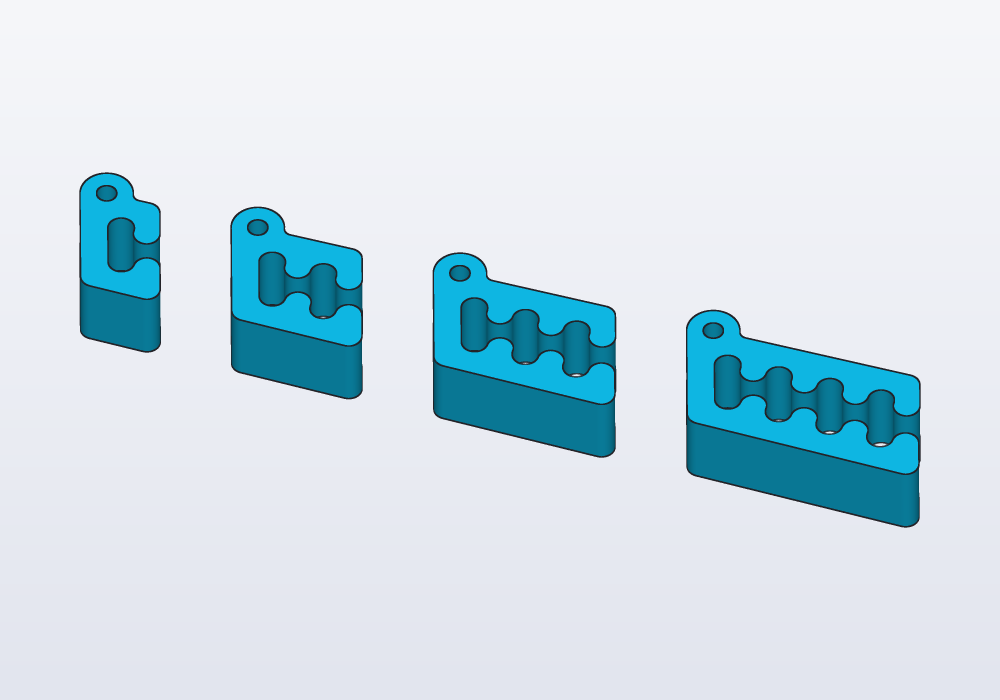
When the copies change from one to the next, or only some places get one, write a loop. Collect the copies in a list and join them once at the end with .sum (or fuse(list)). Here each Carlo has one tooth more than the one before, so it is longer: its bounding box (the smallest box round it, bbox) says how long, and the next one starts 8 mm after it:
// Carlos in a row, one more tooth each time, each
// placed 8 mm after the one before

import std;

@part("Sky Pop")
Solid row()
{
    Solid[] clips;
    auto x = 0.mm;
    foreach (i; 0 .. 4)
    {
        auto c = carlo(teeth: i + 1);
        clips ~= c.move(x: x - c.bbox.min.x);
        x += c.bbox.size.x + 8.mm;
    }
    return clips.sum;
}
A loop also makes layouts no pattern gives. A round vent: hexagons in staggered rows, kept only where they fall wholly inside the circle:
// a round vent: hexagons in staggered rows, only
// those wholly inside the circle

import std;

@param("Hexagon across the flats", min: 3.mm, max: 10.mm)
immutable cell = 5.mm;

@param("Bar between two cells", min: 0.8.mm, max: 3.mm)
immutable bar = 1.2.mm;

immutable radius = 30.mm;

@part
Solid vent()
{
    immutable pitch = cell + bar;
    immutable n = ceil(radius / pitch).to!int;
    Profile[] cells;
    foreach (j; -n .. n + 1)
        foreach (i; -n .. n + 1)
        {
            // every other row moves half a cell aside
            auto c = vec(pitch * (i + (j % 2) * 0.5),
                pitch * j * sqrt(3.0) / 2);

            // only the cells 3 mm or more from the rim
            if (c.length + cell / 2 < radius - 3.mm)
                cells ~= polygon(c, 6, d: cell,
                    fit: "sides", angle: 30.deg);
        }
    return (circle(r: radius) - cells.sum).extrude(2.mm);
}
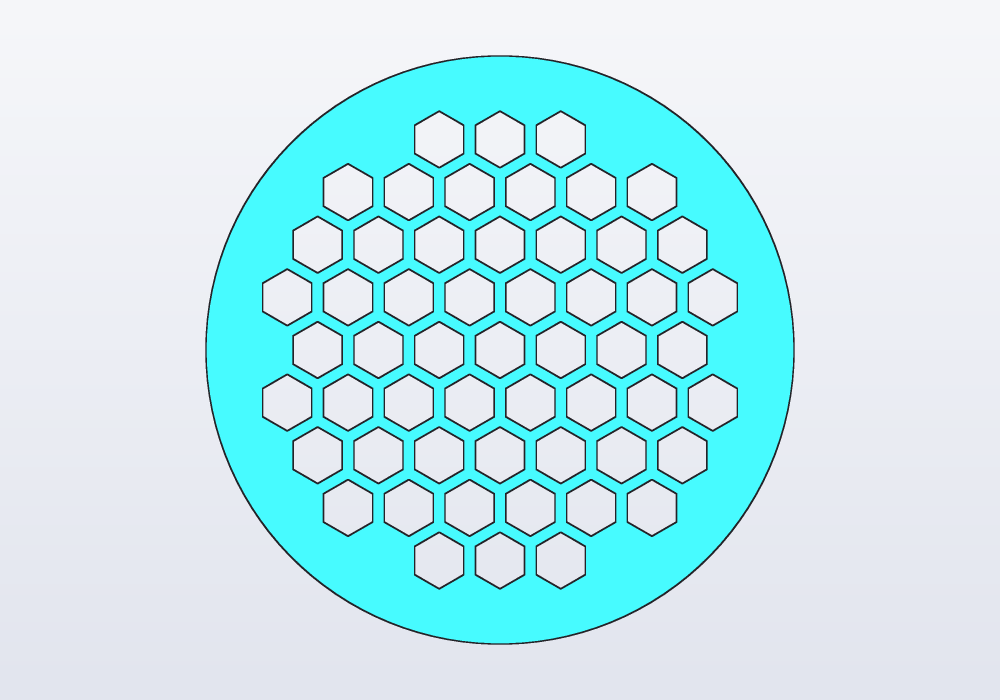
The loop works on profiles (flat outlines) and extrudes once (pushes the outline up into a solid, 2 mm here): flat cuts through a plate are quickest that way (below). Other rules a loop makes easy: sizes that grow along the row (d: 3.mm + 0.5.mm * i), a place left empty (if (i == 2) continue;), heights from random(4.mm, 10.mm, seed: 2) (the same numbers at every run; another seed, others).
Textures and noise
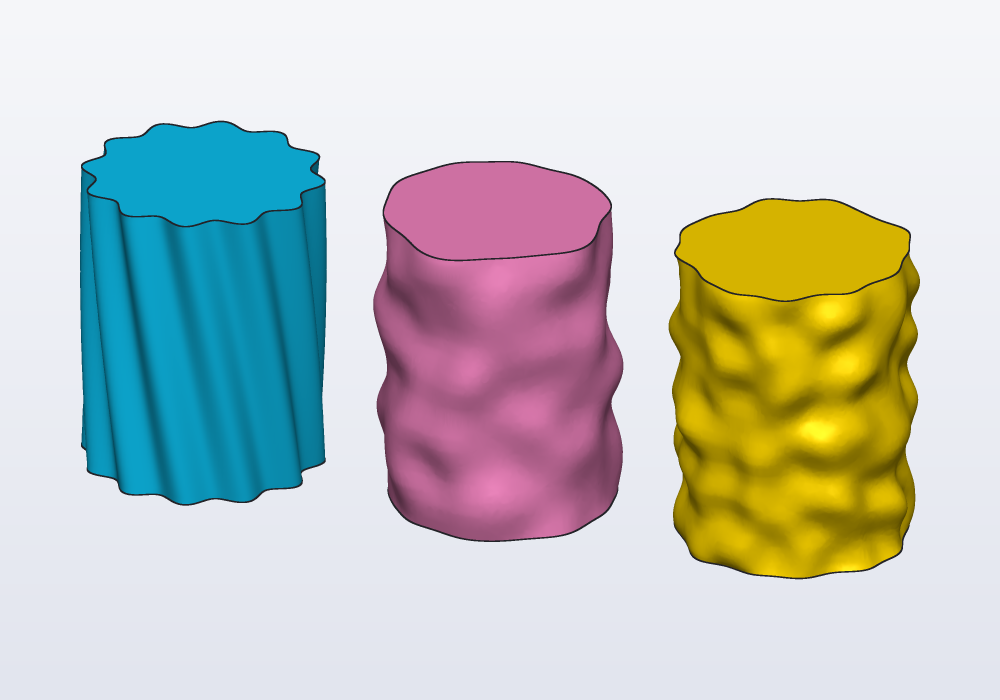
A textured surface is a stack of rings of points, one above the other. Each point is pushed out along the outline's normal (the direction straight out of the outline at that point) by a function of where it is. Then one smooth surface is lofted through them all: stretched from ring to ring, like a skin over hoops.
The calls:
profile.outline(n)givesnpoints evenly round a profile, each with.at(where it is),.normal(outwards) and.around(0 to 1 round the outline);loft(rings)takes the rings (Vec3[][], the same number of points in each) and closes the ends flat;loft(rings, inside: innerRings)makes it hollow, with a floor;- the push is any function: a sine for ribs,
loopNoise(around, along, bumps:)for bumps round a loop with no seam where it closes,noise(x, y, z)for bumps that depend on the place in space (seamless on any shape).
// three skins on the same pot: twisted ribs,
// loopNoise and noise

immutable height = 40.mm;

// how far a point of the outline moves out: `around`
// 0…1 round it, `up` 0…1 up the pot, `p` where it is
Length push(int kind, double around, double up, Vec2 p)
{
    if (kind == 0)
        return 1.mm * sin((around * 12 + up) * 360.deg);
    if (kind == 1)
        return 1.5.mm * loopNoise(around, up * 3, bumps: 7);
    return 1.5.mm * noise(p.x / 10, p.y / 10,
        height * up / 10);
}

Solid pot(int kind)
{
    Vec3[][] rings;
    foreach (k; 0 .. 21)
    {
        immutable up = k / 20.0;
        Vec3[] pts;
        foreach (q; circle(r: 15.mm).outline(96))
        {
            auto p = q.at
                + q.normal * push(kind, q.around, up, q.at);
            pts ~= vec(p.x, p.y, height * up);
        }
        rings ~= [pts];
    }
    return loft(rings);
}

@part("Sky Pop")
Solid ribs() => pot(0);

@part("Pink Pop")
Solid looped() => pot(1).move(x: 40.mm);

@part("gold")
Solid spatial() => pot(2).move(x: 80.mm);
| Function | Gives | Notes |
|---|---|---|
noise(x, y, z, seed:) |
smooth noise, about −1 to 1 | features about one unit across; lengths count in millimetres, so noise(p.x / 10, …) has bumps about 10 mm apart |
loopNoise(around, along, bumps:, seed:) |
noise round a loop, about −1 to 1 | around 0 to 1 once round, no seam; bumps about how many round (4 unless given) |
kind: "cells" (both) |
0 to 1 | cells: 0 at the point each grows from, about 1 farthest from it |
kind: "edges" (both) |
0 to 1 | 0 on the borders between the cells: a Voronoi relief on any surface |
kind: "ridged" (both) |
0 to 1 | 1 on sharp ridges, like veins or crumpled paper |
octaves: 3 (both) |
the same range | finer and weaker layers on top, up to 8: rougher, more natural |
random(lo, hi, seed:) |
a number between lo and hi |
the next of that seed's stream, the same at every run |
A hollow pot with a floor, its wall following the bumps on both sides:
// a pen pot with a bumpy skin

@param("Seed: another one, another skin", min: 0,
    max: 999)
immutable seed = 7;

@param("Depth of the bumps", min: 0.mm, max: 3.mm)
immutable depth = 1.5.mm;

immutable height = 60.mm;

// a ring at height `up` (0 at the foot, 1 at the top),
// `inset` inside the outer skin
Vec3[] ring(double up, Length inset)
{
    Vec3[] pts;
    foreach (q; circle(r: 25.mm - inset).outline(120))
    {
        immutable bump = depth * loopNoise(q.around,
            up * 4, bumps: 9, seed: seed);
        auto p = q.at + q.normal * bump;
        pts ~= vec(p.x, p.y, height * up);
    }
    return pts;
}

@part
Solid pot()
{
    Vec3[][] outside, inside;
    foreach (k; 0 .. 25)
    {
        immutable up = k / 24.0;
        outside ~= [ring(up, 0.mm)];

        // the inside starts 3 mm up, over the floor
        if (height * up >= 3.mm)
            inside ~= [ring(up, 2.5.mm)];
    }
    return loft(outside, inside: inside);
}
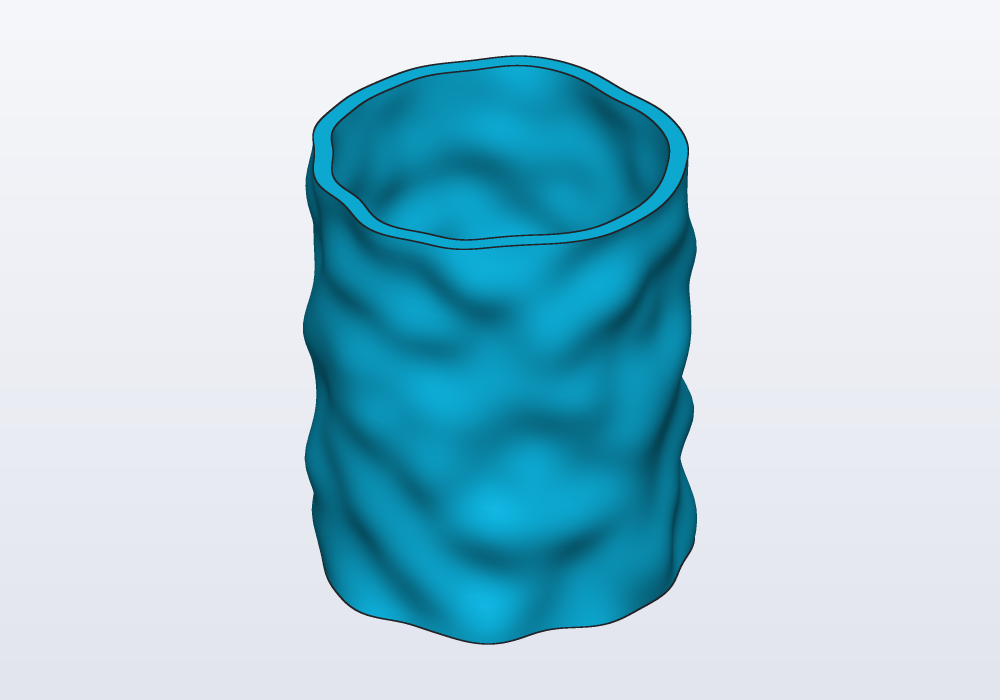
Along a curved spine, path.frames(n) gives n frames along it (each a point with directions to build on) to place the rings on: see examples/03_randomvase.hcad, a vase on a random spine with its lid.
Cells, edges and ridges
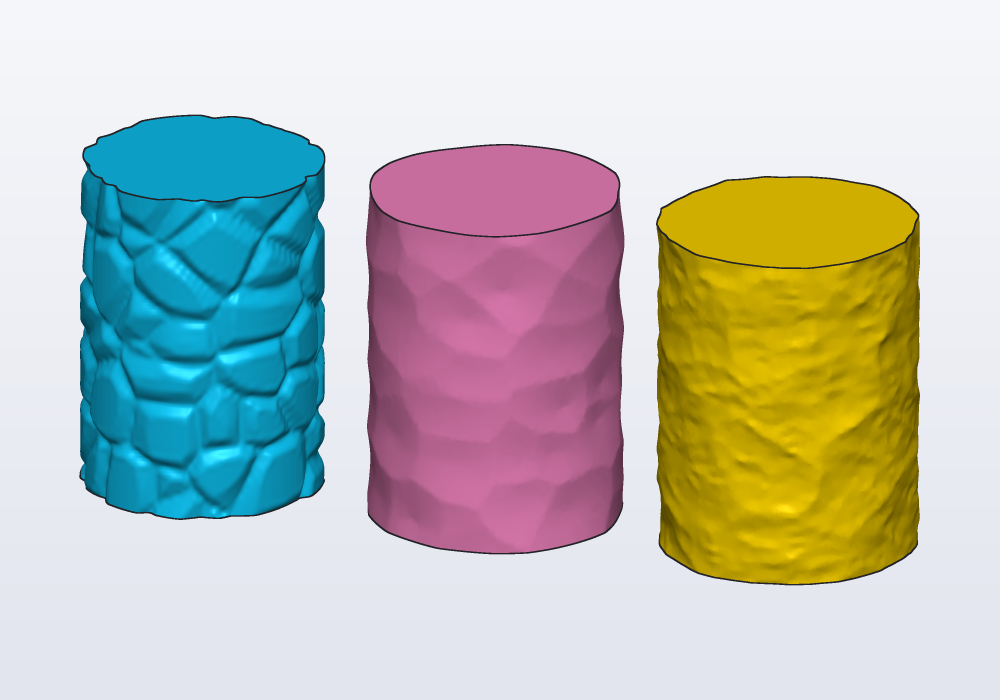
The kind: of noise and loopNoise changes what the bumps look like. "edges" is 0 along the borders of cells about one unit across, and rises inside them: push the points in where it is near 0 and the surface gets the grooves of a Voronoi pattern, on any shape, curved or not.
// three kinds of noise on the same pot: the edges of
// cells as grooves, the cells as dents, and ridges

immutable height = 50.mm;

Length push(int kind, double around, double up)
{
    // grooves 1.2 mm deep where the edges are near 0
    if (kind == 0)
    {
        immutable e = loopNoise(around, up * 5, bumps: 10,
            kind: "edges");
        return -1.2.mm * clamp(1 - e * 4, 0, 1);
    }
    if (kind == 1)
        return 1.5.mm * loopNoise(around, up * 5,
            bumps: 10, kind: "cells");
    return 1.5.mm * loopNoise(around, up * 3, bumps: 5,
        kind: "ridged", octaves: 3);
}

Solid pot(int kind)
{
    Vec3[][] rings;
    foreach (k; 0 .. 61)
    {
        immutable up = k / 60.0;
        Vec3[] pts;
        foreach (q; circle(r: 18.mm).outline(160))
        {
            auto p = q.at
                + q.normal * push(kind, q.around, up);
            pts ~= vec(p.x, p.y, height * up);
        }
        rings ~= [pts];
    }
    return loft(rings);
}

@part("Sky Pop")
Solid edges() => pot(0);

@part("Pink Pop")
Solid cells() => pot(1).move(x: 45.mm);

@part("gold")
Solid ridged() => pot(2).move(x: 90.mm);
Tilings
A tiling covers an area with cells that fit together, like the tiles of a floor, with a wall (gap) between them. region.tiles(…) gives the cells inside a profile, as one profile. What to do with them is up to you:
- subtract them from the region for a grille:
(outline - cells).extrude(3.mm); - dig them into a face for pockets:
body.cut(cells, on: faces.top, depth: 1.mm); - grow them from a face for reliefs:
body.extrude(cells, on: faces.top, depth: 1.mm), withtaper:for slanted sides that print without supports.
// three tilings: a honeycomb through a flat Carlo,
// Voronoi pockets in a coaster, studs with slanted
// sides on a tile

import std;

@part("Sky Pop")
Solid honeycomb()
{
    auto outline = carlo().projection;
    auto cells = outline.offset(-1.5.mm)
        .tiles(kind: "hex", size: 4.mm, gap: 1.mm);
    return (outline - cells).extrude(3.mm);
}

@part("Pink Pop")
Solid coaster()
{
    auto disc = cylinder(d: 50.mm, h: 4.mm);
    auto cells = circle(d: 44.mm)
        .tiles(kind: "voronoi", size: 6.mm, gap: 1.2.mm,
            round: 0.5.mm, relax: 2);
    return disc.cut(cells, on: faces.top, depth: 1.5.mm)
        .move(x: 60.mm);
}

@part("gold")
Solid studs()
{
    auto tile = box(44.mm, 44.mm, 3.mm, center: true);
    auto squares = rect(40.mm, 40.mm)
        .tiles(kind: "square", size: 6.mm, gap: 1.5.mm,
            angle: 45.deg, whole: true);
    return tile
        .extrude(squares, on: faces.top, depth: 1.5.mm,
            taper: 25.deg)
        .move(x: 120.mm);
}
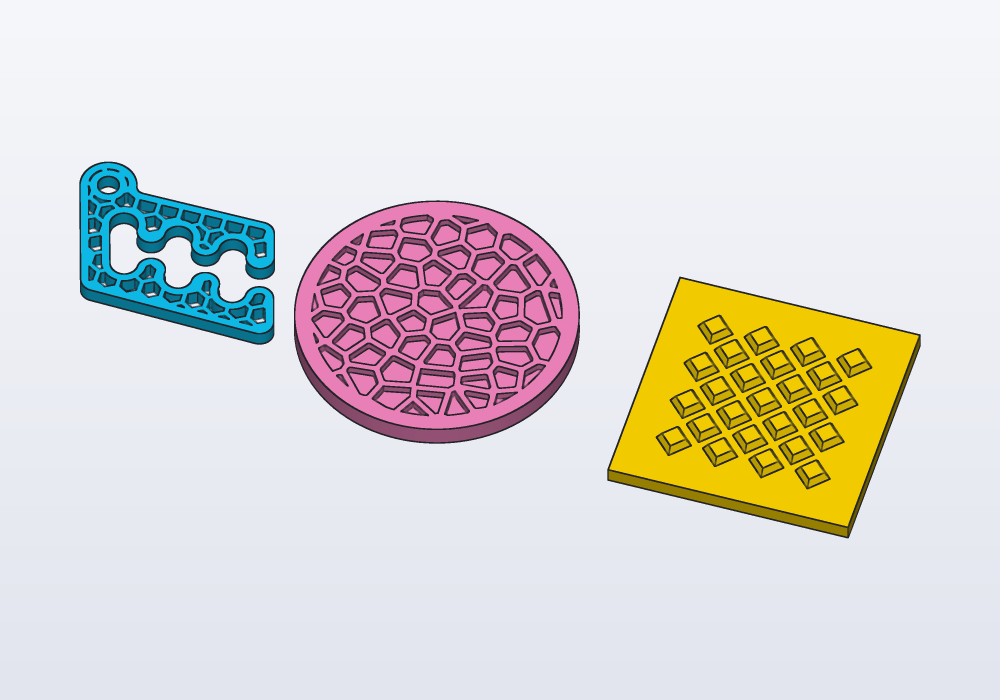
The kinds: "square", "hex", "triangle", "brick", "octagon" (octagons with small squares between them) and "diamond", where size is the distance from one cell's centre to the next; and "voronoi", cells grown round points scattered about size apart, each cell the part of the area nearer its point than any other.
| Argument | What it does |
|---|---|
gap: |
the wall between two cells (each is shrunk by half of it) |
round: |
rounds the corners of every cell |
angle: |
turns the whole tiling |
origin: |
where one cell sits; the region's centre unless given |
whole: true |
keeps only the cells wholly inside; otherwise those on the border are cut along it |
jitter: |
Voronoi only: 0 puts the points on a grid of hexagons, 1 (the default) scatters them fully |
relax: |
Voronoi only: passes that move each point to the middle of its cell, for evener cells (2 or 3 are plenty) |
seed: |
Voronoi only: another seed, other cells |
points: |
Voronoi round points of your own |
scale: |
a number, or a function of the cell's centre giving one: each cell scaled about its centre |
keep: |
a function of the cell's centre: true to keep the cell |
A tile of your own
Any profile can be a tile: give it as tile: and say how it repeats with step: [a, b], the two moves from one copy to its neighbours. Several profiles repeat together when given as a list, and a profile drawn in a sketch works as well as one built from shapes.
There is one requirement: the copies must not overlap, once shrunk by the gap. They need not cover everything (round holes on a grid are a tiling too), but if two copies overlap, the error says which two: the one next to it along a, along b or along both.
scale: and keep: work on any tiling. Here the holes grow towards the middle of the plate, a function of where each one is:
// plus signs, which fit together without gaps, and
// round holes larger towards the middle

immutable s = 6.mm;

// five squares in a cross: one step two across and
// one up, the other one back and two up
Profile plus() => rect(3 * s, s) + rect(s, 3 * s);

@part("Sky Pop")
Solid crosses()
{
    auto cells = rect(90.mm, 50.mm)
        .tiles(tile: plus(), step: [vec(2 * s, s),
                vec(-s, 2 * s)],
            gap: 1.mm, round: 0.4.mm);
    return (rect(100.mm, 60.mm) - cells).extrude(2.mm);
}

@part("Pink Pop")
Solid graded()
{
    auto holes = rect(94.mm, 54.mm)
        .tiles(tile: circle(d: 6.mm), step: [vec(7.mm, 0.mm),
                vec(3.5.mm, 6.06.mm)],
            scale: (Vec2 c) => 1.2 - c.length / 60.mm,
            whole: true);
    return (rect(100.mm, 60.mm) - holes)
        .extrude(2.mm)
        .move(y: 70.mm);
}
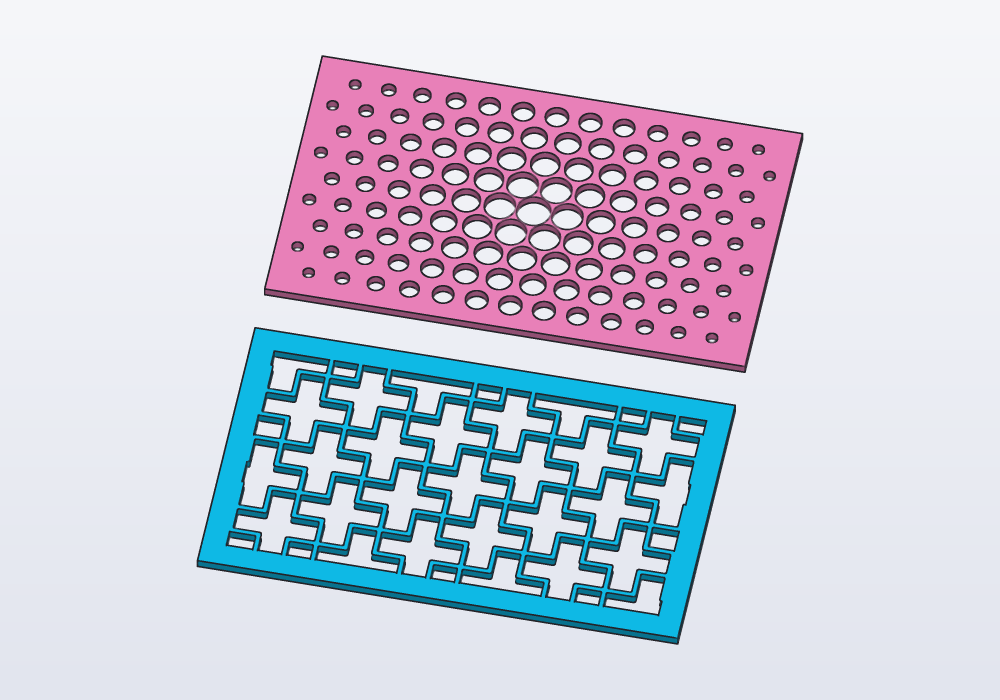
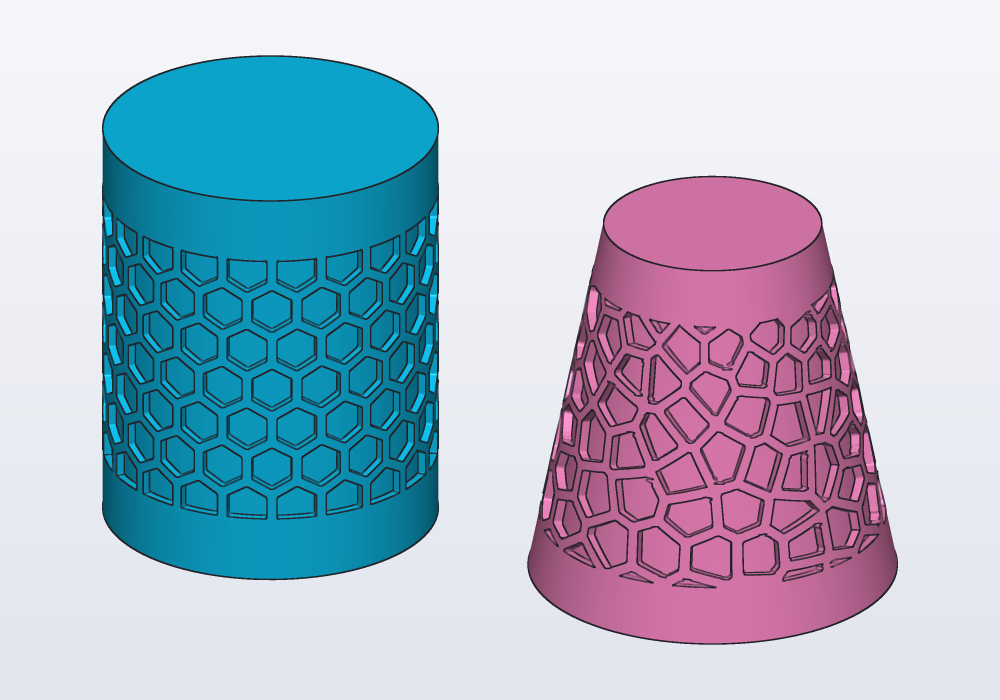
On a curved face, roll the tiling onto it with wrap: instead of on: (see From profile to solid): the cells keep their size round a cylinder or a cone.
// a honeycomb rolled round a cup, Voronoi cells round
// a cone

@part("Sky Pop")
Solid cup()
{
    auto body = cylinder(d: 40.mm, h: 50.mm);
    auto cells = rect(125.mm, 34.mm)
        .tiles(kind: "hex", size: 6.mm, gap: 1.2.mm,
            round: 0.4.mm);
    return body.cut(cells, wrap: faces.largest,
        depth: 1.mm);
}

@part("Pink Pop")
Solid cone()
{
    auto body = loft([circle(d: 44.mm),
        circle(d: 26.mm).move(z: 45.mm)]);
    auto cells = rect(80.mm, 32.mm)
        .tiles(kind: "voronoi", size: 6.mm, gap: 1.2.mm,
            round: 0.4.mm, relax: 2);
    return body.cut(cells, wrap: faces.largest,
            depth: 1.2.mm)
        .move(x: 55.mm);
}
A region that is a ring of noise instead, on any surface: the grooves of kind: "edges" (above).
Knurling
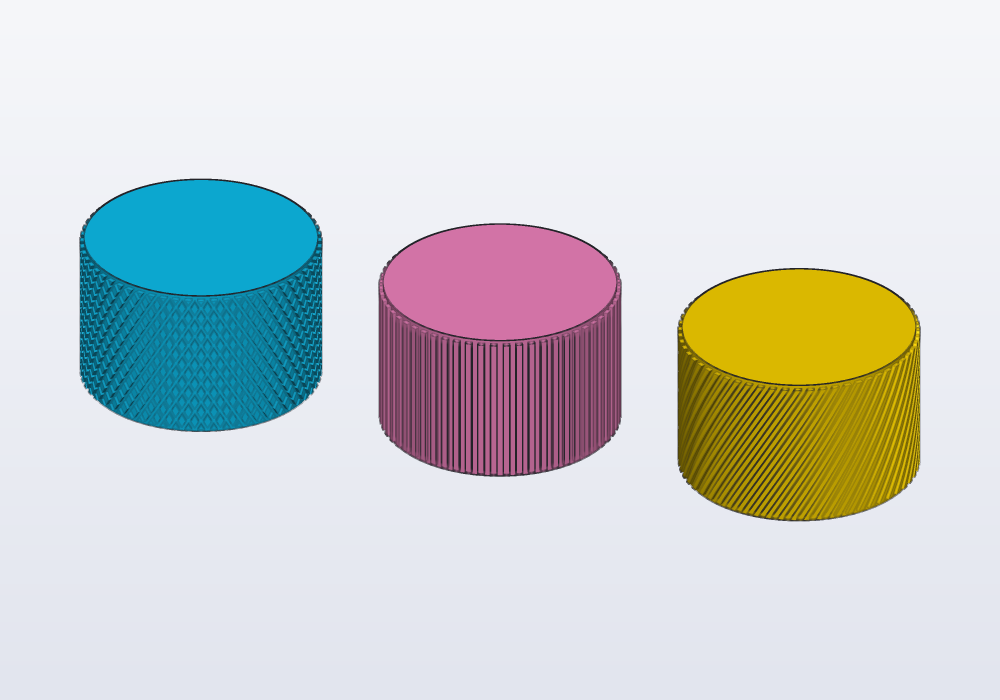
A knob or a handle grips better with a pattern raised on its side. body.knurl(face) raises one on a face: diamonds (the default), straight ridges along it, or ridges leaning across. Round a face that closes on itself, a cylinder or the side of a shape lofted through rings, the pitch is adjusted a little so that a whole number go round and the pattern closes on itself.
// three knobs: diamond, straight and diagonal knurling

@part("Sky Pop")
Solid diamond() => cylinder(d: 30.mm, h: 20.mm)
    .knurl(faces.largest);

@part("Pink Pop")
Solid straight() => cylinder(d: 30.mm, h: 20.mm)
    .knurl(faces.largest, kind: "straight")
    .move(x: 40.mm);

@part("gold")
Solid diagonal() => cylinder(d: 30.mm, h: 20.mm)
    .knurl(faces.largest, kind: "diagonal")
    .move(x: 80.mm);
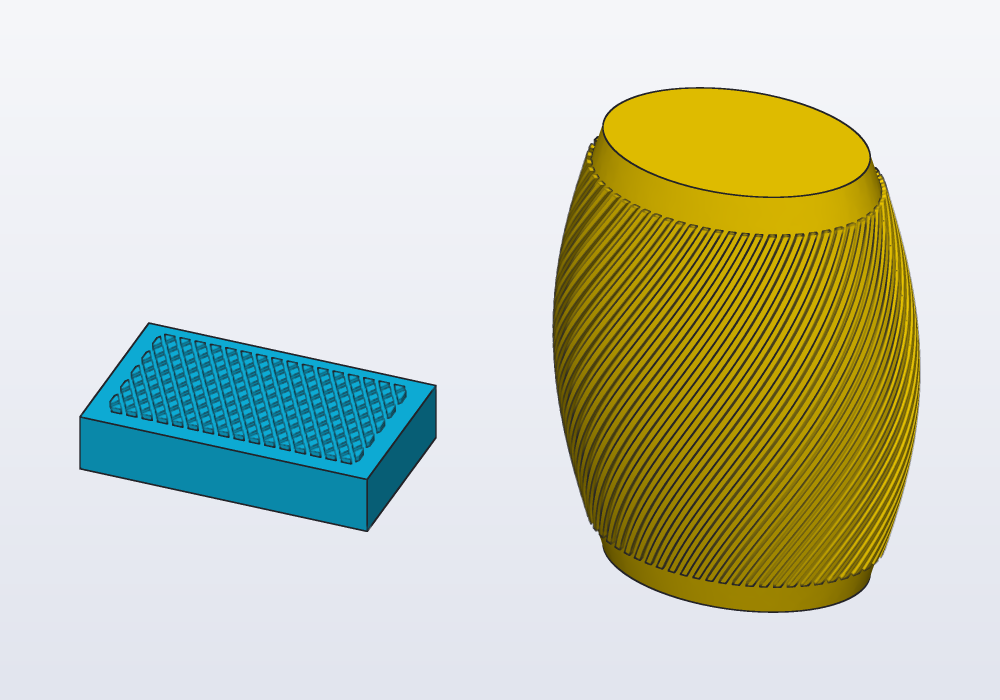
Any other face takes it too: a flat one inside its outline, a curved one as wrap: lays a profile on it. A grip pad on a slider, and the oval side of a handle lofted through rings:
// a slider's flat pad, and an oval handle swelling in the middle

@part("Sky Pop")
Solid slider() => box(30.mm, 18.mm, 6.mm)
    .knurl(faces.top, margin: 2.mm);

/// The handle: oval rings, widest halfway up.
Solid oval()
{
    Vec3[][] rings;
    foreach (i; 0 .. 9)
    {
        immutable r = 9.mm + 3.mm * sin(i * 22.5.deg);
        Vec3[] ring;
        foreach (j; 0 .. 72)
            ring ~= vec(1.5 * r * cos(j * 5.deg), r * sin(j * 5.deg),
                i * 6.mm);
        rings ~= [ring];
    }
    return loft(rings);
}

@part("gold")
Solid handle() => oval()
    .knurl(faces.largest, kind: "diagonal", margin: 4.mm)
    .move(x: 50.mm);
| Argument | What it does |
|---|---|
kind: |
"diamond", "straight" or "diagonal" |
pitch: |
from one ridge to the next round the face, 1.6 mm unless given (adjusted to a whole number round) |
depth: |
how far the pattern stands out, 0.5 mm unless given |
angle: |
how far a diagonal ridge leans from the axis, and the diamonds' slant: 30° unless given |
margin: |
the plain band left along the face's edges (at each end round a cylinder), 0.5 mm unless given |
The pattern stands out of the face: the knob grows by depth all round. Printed standing, the ridges and diamonds come out crisp; a pitch under 1.2 mm blurs on a 0.4 mm nozzle.
In the model or in a library
- A pattern used once, in this part: in the model, next to what it cuts.
- The same pattern in several models (a vent, a grille, a hole pattern of a fan or a board): a function in a module of your own,
parts/vents.hcadbeside the model,import parts.vents;, or in the personal library folder to use it everywhere. Give itLengthparameters and return the tool to subtract, ashole()does. - Before writing one, look in the built-in libraries: teeth (
gears), knuckles (hinges), screw posts (enclosures), threads (threads, andthread()on a face) are patterns already made.
Keeping it quick
Measured on a 200 × 200 mm plate with 400 holes:
| How | Time |
|---|---|
p -= hole… inside the loop, one hole at a time |
16.6 s |
holes += hole… inside the loop, then one subtraction |
12.2 s |
the holes collected in a list, fuse(holes) or holes.sum, then one subtraction |
1.5 s |
the holes collected in a list and taken away all at once, p - holes |
0.7 s |
two linearPatterns, then one subtraction |
1.3 s |
the same with profiles (rect - circle….linearPattern…), extruded once |
0.4 s |
- Never add or subtract inside a loop: collect, then join once. A solid less a list,
p - holes, takes them all away in one go, the quickest. A pattern or.sumjoins the copies in pairs, then pairs of pairs; a growing body joined one at a time gets slower with every copy. - Through-cuts in a flat plate: draw them as profiles and extrude once.
- Textures: the time grows with rings × points. Make the bumps at least three or four rings and points apart (smaller ones are lost between the points anyway), and lower both while designing.
loftthrough rings of points takes milliseconds where a loft through as many smooth profiles takes seconds.- A pattern stops at 10 000 copies, a tiling at 20 000 cells.
- A tiling cuts only the cells on the region's border; those inside are kept as they are, so thousands of cells take about a second.
Common errors
| Message | What to do |
|---|---|
| 'n' must be a whole number between 1 and 10000 | n counts copies: round(x).to!int when it is computed |
| a step of zero puts every copy in the same place | give step: a length |
| an angle of 0 puts every copy in the same place | angle: other than 0, or leave it out for a full turn |
| cannot combine a Solid and a Profile: extrude the profile first | a list mixing profiles and solids |
| 4.83871 is not an integer (use floor/round first) | x.to!int of a fraction: ceil(x).to!int, floor(…) or round(…) |
| the holes are not there, the part is | a chained .move moved the tool, not the part: brackets |
| the tiles overlap (by … mm² between one and the one 1·a + 0·b from it) | your own tile is too large for its steps: a longer step, a smaller tile or a wider gap |
| a gap of … leaves nothing of … cells | the gap is wider than the cells: a larger size or a smaller gap |
| round: … is too much for the tile | a smaller round:: at most half the narrowest part of a cell, once shrunk by the gap |
| the cells on the border are slivers | whole: true, or a region shrunk with .offset(-…) so a wall runs round them |
In the application
Right-click a part › Grid of copies… writes a linearPattern of 2 × 2 copies, a step apart of the part's size plus 5 mm each way, the count selected to type over; Ring of copies… a circularPattern of 6 round Z. Any other pattern is a line of code: write it in the editor and the view follows as you type; the copies are one solid, picked together. A count or a step made a @param gets a field in the Parameters panel, to try other counts with the mouse.